Maintenance software for Airbnb hosts: complete 2026 guide
Choose property management software for Airbnb hosts by maintenance needs, not feature lists. Compare options, organize records, and plan repair work.

Airbnb host property management software is a system for organizing rental operations with the aim of keeping stays and property upkeep under control. For a self-managing host, choosing property management software for Airbnb hosts starts with separating reservation work from maintenance work: a booking calendar does not tell you what the plumber repaired last time.
- Choose property management software for Airbnb hosts around the work you need: reservations, maintenance tracking, or both.
- Propertymasterhq fits self-managing landlords who need uploaded property documents connected to maintenance decisions.
- Start with an inspection report, then add repair invoices, equipment details, and maintenance history over time.
- Keep turnover checks separate from preventive maintenance; a clean rental still needs documented equipment care.
Why maintenance software matters for Airbnb hosts
An Airbnb host has two different questions to answer: Is the rental ready for the next guest, and what needs attention beyond the next stay? Treating those as the same task leaves gaps. A cleaner can report a dripping faucet without knowing whether that faucet has already been repaired.
For landlords managing 1–20 rental units, the practical goal is less searching and better repair decisions. You need enough history to explain a problem to a contractor, compare a quote with earlier work, and decide what comes next.
A rental property maintenance log gives those decisions a starting point. Record the symptom, the work completed, and the supporting document rather than relying on a message thread.
In 2026, choose around these jobs, not around the longest feature list. Reservation management and maintenance records serve different purposes; assess each on its own terms.
How to choose and set up your maintenance system
Start with one property's records
Before comparing software, gather the documents you already have for 1 property. An inspection report is a useful starting point because it records observed conditions at a particular time. It is not proof that every system still has the same condition today.
Use a folder and a simple spreadsheet first. This manual version shows you which records exist, which details are missing, and where searching takes effort. Do not delay the whole setup while you hunt for an old appliance receipt.
Build a 2026 baseline from the evidence available now. Keep the original document alongside your summary so you can check the wording later. If an invoice says a component was replaced, do not record the entire system as new.
Start with documents that answer an immediate maintenance question. The rest can follow as you find them.
- Gather the inspection report and recent repair invoices.
- Separate quotes from records of completed work.
- File each document under the correct property and unit.
- Mark missing details as not added, rather than guessing.
Separate turnover checks from ongoing maintenance
Write two lists before buying anything. The first covers readiness for an arriving guest. The second covers repairs, equipment care, and work that needs a separate appointment.
You can keep both lists in a spreadsheet or shared document. The important distinction is what happens after someone notices a problem. A turnover check can identify a loose handle; a maintenance record tracks the repair and its outcome.
For each issue, identify who reports it, who approves the work, and who confirms completion. In a self-managed rental, you might fill more than one role. Recording the handoff still matters when a cleaner or contractor is involved.
Do not turn this into a complicated approval system. The aim is to make an unresolved issue visible without rereading every guest conversation. Keep private guest information out of contractor notes unless it is needed for the job.
- Keep cleaning completion separate from repair completion.
- Give each reported problem a clear location.
- Assign someone to decide the next action.
- Record access arrangements separately from the repair description.
Connect documents to the equipment they describe
A folder can hold every invoice and still leave you searching. Add a simple equipment list that connects each repair to the relevant furnace, water heater, dishwasher, or other asset. Only enter equipment that actually belongs to your rental.
The manual approach is a spreadsheet with document references. The faster path is software that organizes uploaded records around the property, unit, and equipment they describe.
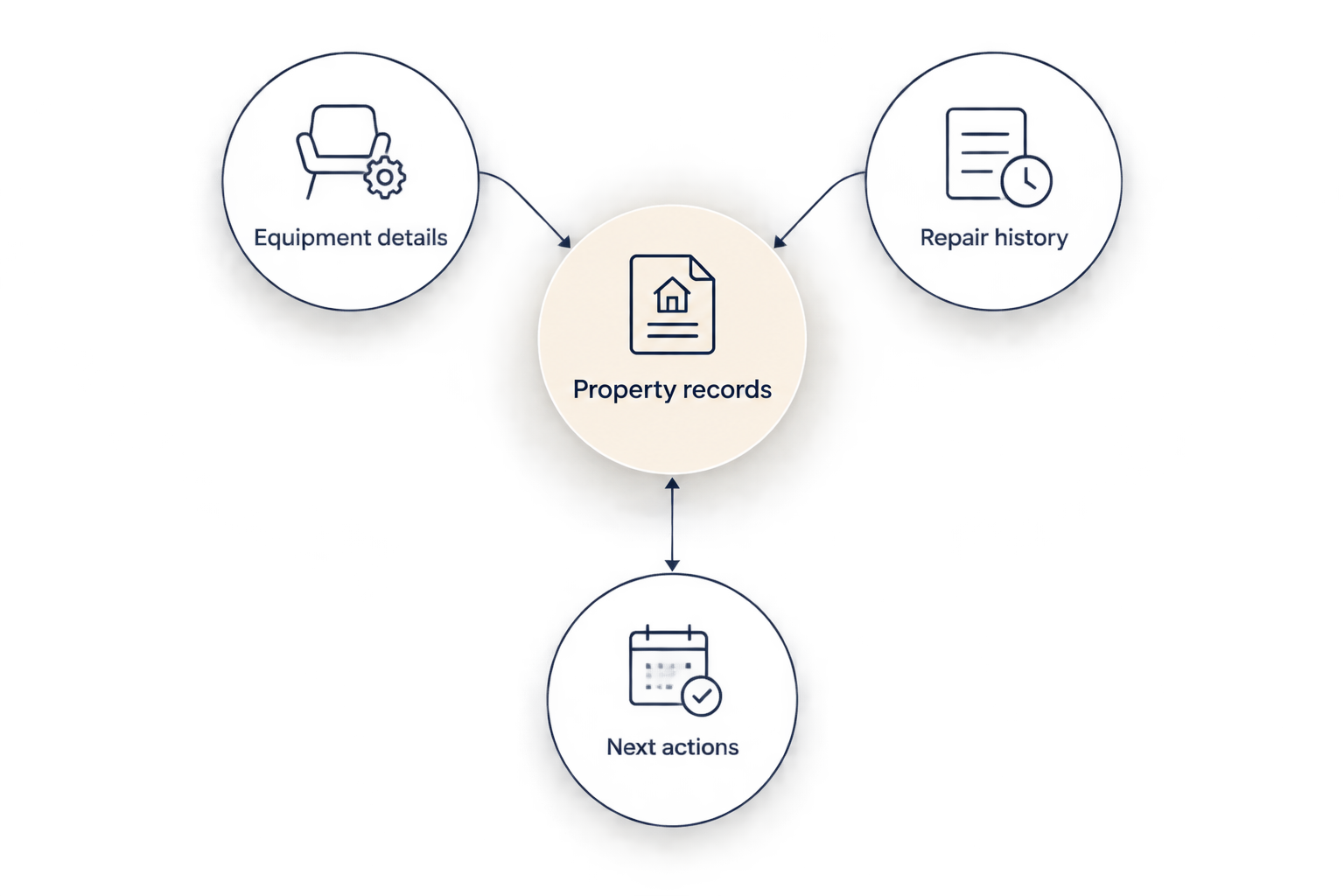
Propertymasterhq organizes uploaded inspection reports, invoices, quotes, and other documents under the relevant property, unit, and asset. Its maintenance insights and preventive maintenance tracking build on those records. Missing information remains marked as not added; uploading one report does not create an undocumented property history.
Propertymasterhq maintenance software is best for self-managing landlords who want uploaded records to support repair decisions. Evaluate it for that job, rather than assuming it replaces every part of a hosting system.
- Property records: keep the inspection baseline together.
- Equipment details: connect documented asset information.
- Repair history: attach invoices to the work they describe.
- Next actions: track maintenance and upcoming replacements.
Turn reported problems into usable repair history
Start with a basic repair log, even if you manage requests by text. Copy the relevant facts out of the conversation and put them beside the property record. A message saying the dishwasher is broken is a report, not a diagnosis.
Separate what someone observed from what a contractor found. Then record the work actually completed. This distinction keeps an initial guess from becoming accepted property history.
Use 3 status labels if you need a simple starting point: reported, scheduled, and completed. These are suggested labels for your own process, not a claim about a particular software interface. Add detail only when it helps you make a decision.
When reviewing a repeat problem in 2026, read the previous invoice before approving another visit. Check whether it describes the same symptom, the same component, or a different issue entirely. Do not treat a repeated complaint as proof of a failed repair without checking.
- Record the reported symptom and its location.
- Add the contractor's findings separately.
- Save the approved scope and completed-work invoice.
- Note unresolved work before marking the job complete.
Plan work around guest stays without losing maintenance tasks
A calendar entry is the manual starting point for arranging access. Keep the job description and supporting records outside the calendar, where you can find them after the appointment has passed. Scheduling and recordkeeping need to work together.
Before confirming a contractor visit, establish whether the work requires an empty property, interrupts a service, or needs another appointment afterward. Ask the contractor rather than estimating the duration yourself. Do not assume a gap between bookings is long enough for an unfamiliar repair.
The same distinction matters when managing same-day Airbnb turnovers: cleaning completion and maintenance completion are separate checks. A rental can be ready for housekeeping while a repair still needs a contractor's attention.
Keep preventive tasks visible even when no guest has complained. Base schedules on the equipment's instructions, documented service advice, and applicable requirements—not a generic interval copied into every asset record.
- Confirm access before committing to the appointment.
- Ask what services the work will interrupt.
- Keep unfinished maintenance on a separate open-work list.
- Save completion notes after the contractor leaves.
Test the workflow before moving every record
Use one real repair to test your proposed setup. Find the original report, identify the equipment, locate the previous invoice, and record the next action. This reveals more than browsing a dashboard without a specific task.
You can perform the test with folders and a spreadsheet first. Then compare the same work in your shortlisted software. Judge whether the software reduces repeated filing and searching without obscuring the source documents.
For a 2026 software decision, check the boundaries as carefully as the features. Propertymasterhq connects uploaded property knowledge with maintenance tracking, but the quality of that starting record depends on what you provide. Finding scattered existing documents remains part of the setup.
Confirm any booking, messaging, calendar, or contractor-access requirement separately before committing. Do not infer an integration from the phrase property management software. Choose a system you can maintain after an ordinary repair, not just during the initial setup.
- Find the supporting invoice without searching your inbox.
- Check how missing information appears.
- Confirm how you add a newly completed repair.
- Verify any required access or integration directly.
Compare your options for 2026
There is no reason to replace a working reservation process just to organize maintenance. Compare options against the missing job. A manual system is a valid choice when you can keep it current; dedicated software earns its place when it makes the record easier to use.
| Option | Best for | Main advantage | Key limitation |
|---|---|---|---|
| Folders and a spreadsheet | Hosts building their first maintenance baseline | You control the fields and filing structure | You must connect documents, update records, and manage reminders yourself |
| A shared task list and calendar | Hosts coordinating access and open jobs | Makes responsibilities and appointments explicit | You still need somewhere to keep equipment history and supporting documents |
| Propertymasterhq maintenance software | Self-managing landlords connecting documents with upkeep | Organizes uploaded property knowledge and tracks preventive maintenance | Missing or unuploaded history remains incomplete |
| A reservation-focused system | Hosts whose main problem is booking administration | Matches the reservation side of the workflow | Assess maintenance records separately; do not assume the category covers them |
Before choosing, write down the work you expect the system to handle. Distinguish required functions from conveniences. If reservation management already works, test whether a separate maintenance record solves the actual problem before changing everything.
Common mistakes Airbnb hosts make
Treating a turnover checklist as a maintenance history
A checked box tells you that someone completed a check. It does not explain what a contractor repaired or which part was replaced. Keep the turnover observation, then connect any resulting work to a repair record and invoice.
Recording an estimate as completed work
A quote describes proposed work. It does not establish that the work happened. Preserve the quote for the decision trail, but update the history from the completed work and supporting invoice. Mark anything still unresolved clearly.
Guessing equipment age to fill an empty field
An uncertain installation date can distort a replacement decision. Keep documented dates separate from assumptions, and leave unknown details as not added. Check existing records or ask the servicing contractor what can actually be established.
Buying booking features to solve a records problem
If the recurring frustration is finding the last plumbing invoice, start there. More reservation features do not answer that question by themselves. Test document retrieval and repair history before judging software by the size of its feature list.
Waiting for a complete archive before starting
Start with the inspection report and current work. Add older records as they turn up. A clearly incomplete baseline is more useful than an imaginary complete history, and it gives new repairs somewhere consistent to land.
FAQ
What's the best property management software for Airbnb hosts who need maintenance help?
The best fit addresses maintenance records, equipment information, and follow-up work, not just reservations. Propertymasterhq fits self-managing landlords who want uploaded documents connected to maintenance decisions; confirm separate hosting requirements before choosing.
Can I track Airbnb maintenance with a spreadsheet?
Yes, a spreadsheet can track equipment, reported problems, repair dates, and next actions. Keep supporting documents in clearly organized folders and maintain the connections yourself.
Does maintenance software replace Airbnb booking software?
Do not assume maintenance software replaces booking software. Verify reservation handling, guest messaging, calendar requirements, and any integrations separately from document and maintenance features.
What documents should I upload first?
Start with an inspection report and records for current maintenance questions. Add invoices, quotes, and other documents over time, keeping proposed work separate from completed repairs.
Will uploading an inspection report create my property's full history?
No, an inspection report provides a baseline, not a complete property history. Undocumented repairs and missing equipment details remain unknown until you add supporting information.
How should I schedule maintenance between Airbnb guests?
Confirm the work scope, access requirements, and service interruptions with the contractor before scheduling. Keep the appointment separate from the permanent repair record, then save completion details afterward.
What should I check before choosing software in 2026?
Test one real maintenance task from the original report through the completed repair. Confirm that you can locate evidence, distinguish missing information, record the outcome, and handle any required hosting functions separately.
One last thing
Before your next contractor call, find the invoice from the previous visit. Read what was actually repaired, not just the description you remember.
That is a practical test of your 2026 maintenance system: can it put the right evidence in front of you before you approve the next job? Start there. Organizing everything else becomes easier when each new repair has a clear place to go.