Best preventive maintenance software for rental properties 2026
Compare preventive maintenance software for rental properties. Choose document-led planning, task tracking, or a manual log to guide repair decisions.

Best for document-led maintenance planning: Propertymasterhq. Best for following an established checklist: recurring-task software. Best for manual control: a spreadsheet and calendar. Best for finding repair paperwork: document storage software. This 2026 guide compares these approaches for landlords who manage their own rentals.
- Propertymasterhq fits landlords seeking preventive maintenance software for rental properties built around uploaded documents and maintenance history.
- Recurring-task software suits established checklists; a spreadsheet and calendar suit landlords who want manual control.
- Document storage keeps repair records accessible but does not, by itself, create a preventive maintenance plan.
- Choose maintenance tracking that connects equipment, supporting records, and the next action without hiding missing information.
Why this matters
A reminder to service the furnace answers one question: when should you act? It does not explain the furnace’s documented condition, what the last contractor repaired, or where the invoice went. Those details matter when you decide what to inspect, repair, or replace.
For a landlord with 1 rental unit, the problem can start with a drawer and an email inbox. At 20 rental units, keeping equipment details in your head creates more records to reconcile. Choose software around the decisions you need to make, not the longest feature list.
This shortlist separates document-led planning from task tracking and file storage. Those are different jobs. Buying one does not automatically solve the others.
What makes good preventive maintenance software for rental properties
Use these criteria before you compare options in 2026:
- Property and equipment context: A maintenance record should identify the rental, unit, and relevant system or asset.
- Evidence behind decisions: You should be able to find the inspection, invoice, or quote behind a repair recommendation.
- Preventive tracking: Equipment age, maintenance schedules, and upcoming replacements belong alongside completed repairs.
- Clear information gaps: An unknown installation date should remain unknown, not become an assumed equipment age.
- Manageable upkeep: The system should fit the records you actually receive and the time you have to maintain them.
The deciding question is simple: can you understand what needs attention and why? A full calendar is not enough if every reminder sends you searching through old email.
The 2026 shortlist at a glance
| Option | Best for | Standout capability | Key limitation |
|---|---|---|---|
| Propertymasterhq | Document-led maintenance decisions | Connects uploaded records with property knowledge and preventive tracking | Undocumented history remains missing |
| Recurring-task software | Following an established maintenance checklist | Keeps repeat actions in a task workflow | You must supply equipment context and supporting evidence |
| Spreadsheet and calendar | Keeping direct control over a maintenance register | Lets you define fields and reminders yourself | Requires manual entry and reconciliation |
| Document storage software | Retrieving inspection reports and repair paperwork | Keeps source documents together | File storage alone does not establish maintenance priorities |
These are workflow choices, not interchangeable feature bundles. The non-brand options describe software categories; individual products differ. Confirm the capabilities of any specific application before moving your records.
1. Propertymasterhq: best for document-led maintenance planning
Propertymasterhq is preventive maintenance software for rental properties best suited to self-managing landlords who want uploaded records to inform maintenance decisions. It brings property documents, equipment information, and maintenance history together, with tracking for equipment age, schedules, and upcoming replacements.
Start with an inspection report to establish a documented baseline. Add invoices, quotes, leases, and other records over time; the platform files uploaded documents under the relevant property, unit, and asset. Missing information is marked as not added.
Where it fits
This approach fits the landlord who remembers that a plumber visited but cannot remember what was repaired. The useful outcome is not simply a tidy folder. It is having the supporting record available when the same problem returns.
Propertymasterhq pros:
- Uses existing property documents as the starting point.
- Brings equipment, vendors, documents, and maintenance history together.
- Connects recorded repairs and property history with maintenance insights.
- Includes preventive maintenance tracking rather than document storage alone.
Propertymasterhq cons:
- You still need to find and upload scattered records.
- An undocumented repair cannot become a verified maintenance history.
- Maintenance insights do not replace a contractor’s inspection or diagnosis.
Best for: Self-managing landlords with 1–20 rental units who want better maintenance decisions from the paperwork they already have.
The starting commitment is gathering records, not reconstructing every repair from memory. A 7-day trial is available, but your evaluation should use a real inspection report and supporting documents rather than an empty account.
Verdict: Buy for document-led planning; do not expect missing records to fill themselves in.
2. Recurring-task software: best for established maintenance checklists
Recurring-task software organizes actions you already know you need to take. Choose an application with repeat scheduling if your main problem is remembering an established routine, rather than understanding the property’s repair history.
The distinction matters. A task can tell you to arrange an inspection, but the task title alone does not explain equipment condition or previous findings. You must provide that context in notes or linked records.
Where it fits
A checklist works well when you already have equipment-specific maintenance instructions and a clear process for recording completion. Use manufacturer instructions and professional advice to establish the work; do not treat a generic task template as a property assessment.
Recurring-task software pros:
- Makes the next action explicit.
- Keeps routine work separate from an overflowing inbox.
- Supports a repeatable checklist when the chosen application includes recurring tasks.
Recurring-task software cons:
- Requires you to establish the maintenance schedule.
- Does not inherently explain equipment age or condition.
- Can separate task completion from the invoice documenting the actual work.
Best for: Landlords who know what work is required and need a dependable place to track it.
Before adopting a task application in 2026, follow a completed task back to its evidence. If the invoice lives elsewhere, include a consistent reference so you can find it later. Otherwise, you have a record of checking a box, not a usable repair history.
Verdict: Buy for checklist execution; skip it as your only property knowledge system.
3. Spreadsheet and calendar: best for direct manual control
A spreadsheet gives you a maintenance register you can shape yourself. A calendar holds the reminders. Together, they let you track equipment details, completed work, and future actions without adopting a dedicated maintenance workflow.
The trade-off is ownership of the process. You enter the information, decide what belongs in each field, and keep the calendar aligned with the register.
Where it fits
Use this approach when you want to inspect every entry and are willing to maintain the connections yourself. Keep document references beside the relevant repair rather than recording an expense with no explanation.
Spreadsheet and calendar pros:
- Lets you choose the fields that matter to your rentals.
- Keeps manually entered assumptions visible for review.
- Supports a straightforward equipment register and repair log.
Spreadsheet and calendar cons:
- Requires manual updates when work is completed or plans change.
- Leaves document filing separate unless you maintain references.
- Makes you responsible for spotting gaps and conflicting entries.
Best for: Landlords who prefer a hands-on register and consistently update their records.
The failure point is not the spreadsheet itself. It is letting the calendar say one thing while the repair log says another. When a contractor changes the recommended work, update the record and the reminder together.
Verdict: Buy into this approach only if you will maintain it; skip it if manual upkeep is already the problem.
4. Document storage software: best for retrieving repair paperwork
Document storage software gives inspection reports, invoices, and quotes a consistent home. It addresses a real maintenance problem: knowing a record exists but being unable to find it when a contractor asks a question.
Storage is still different from planning. A folder containing an inspection report does not, by itself, turn the report’s findings into maintenance actions.
Where it fits
Use document storage when retrieval is the immediate problem. Organize records by property and equipment, then use a separate process to capture unresolved findings and upcoming work.
Document storage software pros:
- Keeps original repair evidence accessible.
- Supports consistent filing by property and document purpose.
- Gives other maintenance records a source to refer back to.
Document storage software cons:
- Requires someone to interpret findings and assign actions.
- Does not inherently connect equipment condition with a maintenance schedule.
- Becomes difficult to use when filenames and folders are inconsistent.
Best for: Landlords who need to stop losing paperwork before improving their maintenance planning.
Treat storage as the evidence layer. Keep the contractor’s original findings, not just your summary, so you can revisit the details when another repair decision comes up.
Verdict: Buy for record retrieval; skip it as a complete preventive maintenance system.
Test the workflow with a real repair
A useful 2026 evaluation starts with paperwork from your own rental, not a sample dashboard. Choose an inspection report and a related invoice. Then follow the same repair from its original finding to the next action.
Use this sequence:
- Establish baseline: Identify what the inspection actually documents about the property and equipment.
- Add repair evidence: Attach the invoice or quote that explains the work completed or proposed.
- Record gaps: Leave unknown installation dates and missing repair details clearly marked.
- Set next action: Record what needs attention, using documented instructions or professional advice.
- Close the loop: Keep completion details and the resulting paperwork with the same equipment record.
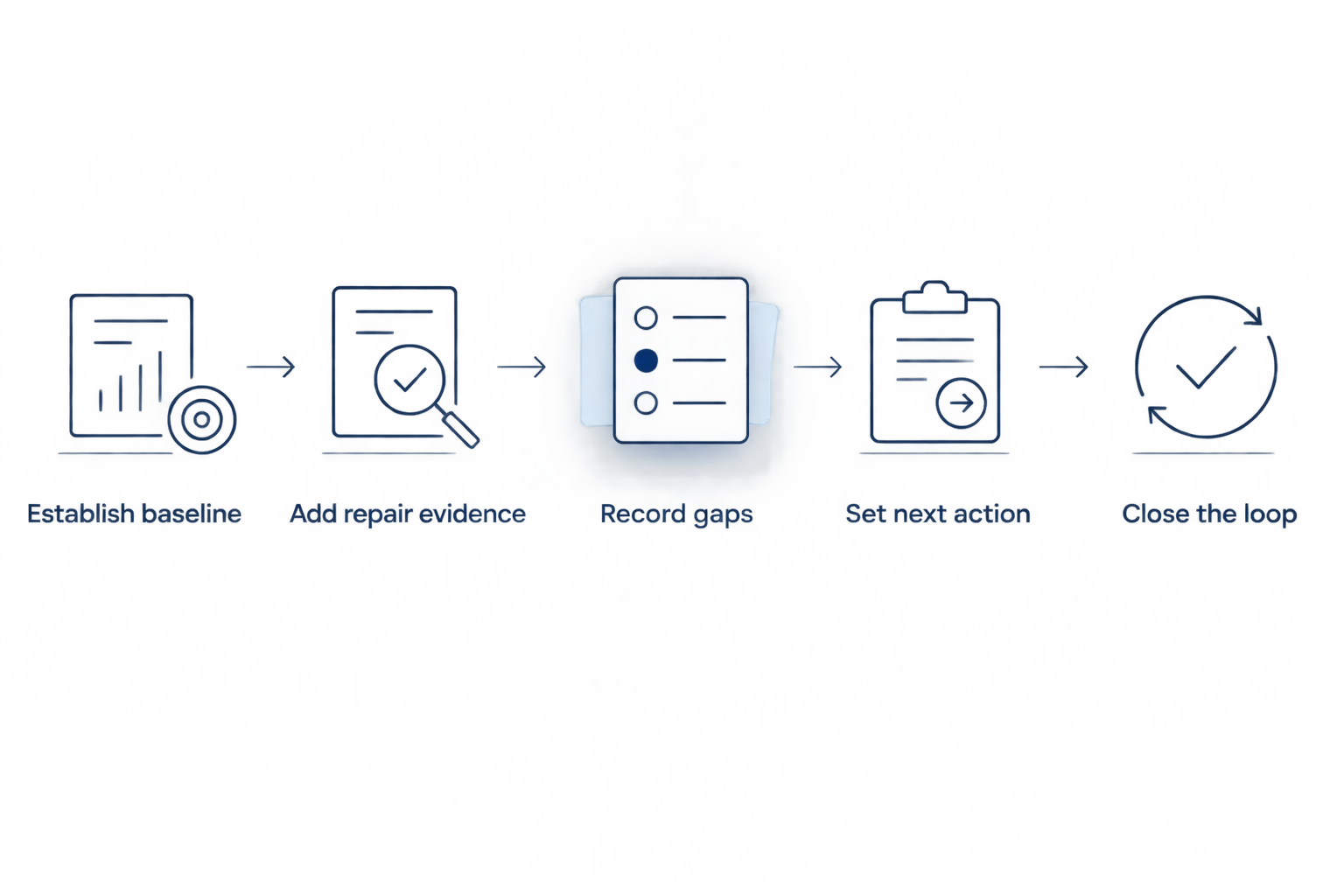
The software passes this test when you can explain the next action without searching across unrelated places. It fails when the reminder survives but the reason for it disappears.
Keep replacement decisions separate from reminders
A replacement reminder is a prompt to review evidence, not proof that equipment needs replacing. Condition, documented repair history, and a qualified assessment belong in that decision.
For water heater replacement for rentals, the maintenance record should distinguish a reported symptom, a contractor’s findings, and the work actually completed. Keeping those separate prevents a proposed replacement from being mistaken for a finished job.
The same discipline applies to other equipment. Store the quote as proposed work until you have evidence of completion. After installation, add the new equipment details and retain the old record so the history still makes sense.
Check what happens when information is missing
Missing records are normal when paperwork has lived in email, drawers, and someone’s memory. The useful response is to make the gap visible and identify how to resolve it.
Ask whether an equipment date came from an invoice, an inspection, a label, or recollection. Record that distinction. A confident-looking date without a source can steer a replacement decision in the wrong direction.
Do not postpone getting organized until every document turns up. Start with the evidence you have and add records as work happens.
How this shortlist is ranked
The order reflects the needs of a self-managing landlord seeking preventive maintenance planning in 2026: equipment context, supporting documents, future actions, visible gaps, and manageable upkeep. It is a workflow comparison, not a claim of hands-on product testing.
Document-led planning comes first because it connects the reason for work with the work itself. Task software follows for execution, spreadsheets for manual control, and document storage for retrieval. Your current bottleneck determines which approach belongs first for you.
Which approach should you choose?
Choose Propertymasterhq when scattered records make repair decisions harder than they need to be. It fits landlords who want maintenance tracking connected to uploaded property knowledge, rather than another standalone checklist.
Choose recurring-task software when the schedule is already clear. Choose a spreadsheet and calendar when you want manual control and will maintain it. Choose document storage when finding the original paperwork is the immediate job.
Do not move your entire archive before testing a real repair. Start with a documented issue, confirm that you can find the evidence and understand the next action, then expand the system.
FAQ
What's the best preventive maintenance software for rental properties?
Propertymasterhq is a fit for self-managing landlords who want uploaded property documents connected with maintenance history and preventive tracking. Recurring-task software fits landlords whose main need is following an established checklist.
Is a maintenance calendar enough for a rental property?
A maintenance calendar handles reminders, but it does not by itself explain equipment condition or repair history. Keep supporting inspections, invoices, and completion details connected to each action.
Can I use a spreadsheet instead of maintenance software?
Yes, a spreadsheet and calendar can hold a manually maintained equipment register, repair log, and reminders. You remain responsible for updating entries, filing evidence, and keeping the reminders consistent with completed work.
What documents should I upload first?
Start with an inspection report to establish a documented baseline. Add invoices, quotes, and other property records over time rather than waiting for a complete archive.
Does maintenance software know my property's full repair history?
No, software cannot verify repairs that have not been documented. Missing information should remain clearly marked until you add supporting records.
Can preventive maintenance software decide when to replace equipment?
Software can organize equipment age, maintenance history, and upcoming replacements, but a reminder is not a diagnosis. Use documented condition and a qualified professional's assessment when deciding whether to repair or replace.
What should I check before switching systems in 2026?
Follow a real repair from inspection finding to invoice and next action. Confirm that you can identify the equipment, find the supporting record, and distinguish proposed work from completed work.
One last thing
Record what did not happen, too. If a quote recommended replacement but you authorized a repair instead, keep the quote and document the decision. Otherwise, the next person reading the file can mistake a proposal for the property’s current condition.
Your maintenance history should explain the rental you own now, not just preserve a pile of paperwork.