Best software for scheduling rental property repairs 2026
Compare software for scheduling rental property repairs. Choose document-led maintenance planning, a repair board, a calendar, or a simple repair log.

Best for document-led maintenance planning: Propertymasterhq. Best for tracking repair stages: Trello. Best for confirmed appointments: Google Calendar. Best for a manual maintenance register: Microsoft Excel. This 2026 guide compares software for scheduling rental property repairs by the job you need done, from deciding what needs attention to recording the finished work.
- Propertymasterhq is the best fit here for landlords who want uploaded records to support preventive maintenance planning.
- Choose software for scheduling rental property repairs around your main task: planning, tracking, appointments, or maintenance history.
- Trello suits repair-stage tracking; Google Calendar suits confirmed appointments; Microsoft Excel suits a manually maintained repair register.
- Maintenance reminders do not confirm contractor availability, tenant access, or a booked appointment.
Why this matters
A repair has several moving parts. You need to identify the problem, decide what to do, arrange access, agree on a visit, and keep the paperwork afterward. Putting a date on a calendar handles only part of that work.
For landlords managing 1–20 rental units, the useful starting point is the task that keeps slipping. Missing equipment history calls for a different tool than forgotten appointments. Your 2026 software choice should address that gap without creating another record you struggle to maintain.
What makes the best repair scheduling software
Judge each option against these criteria before comparing features:
- Property context: You can connect the task to the right rental, unit, equipment, and supporting documents.
- Clear next action: You can distinguish a reported problem from a repair awaiting a quote or a confirmed visit.
- Useful timing: You can separate preventive maintenance due dates from appointments agreed with a contractor.
- Repair history: You can find the previous work, invoice, and equipment details before making another decision.
- Manageable upkeep: The system fits the amount of manual entry you will actually do.
No single field called “due date” answers every scheduling question. Before choosing, decide whether that date means inspect, request a quote, follow up, or attend an appointment.
Repair scheduling options at a glance
| Option | Best for | Standout feature or approach | Key limitation |
|---|---|---|---|
| Propertymasterhq | Maintenance planning informed by property documents | Uploaded records support centralized property knowledge and preventive maintenance tracking | Planning depends on the records you add; do not assume contractor booking is included |
| Trello | Following repairs through stages | Cards move between lists representing the repair process | You must create and maintain the property context and workflow |
| Google Calendar | Keeping confirmed repair appointments visible | Scheduled events hold the agreed time and visit details | A calendar is not a structured equipment or repair-history register |
| Microsoft Excel | Keeping a custom maintenance register | Rows and columns let you define the information you record | Updating the register and following up remain manual responsibilities |
These are different approaches, not interchangeable property management systems. The ranking puts maintenance context first, then repair progress, appointment timing, and a manual register. Choose a later option when its narrower job matches your problem.
1. Propertymasterhq: best for document-led maintenance planning
Propertymasterhq is the best fit here for self-managing landlords who want property records to guide maintenance decisions. It organizes uploaded documents, brings property knowledge together, and supports preventive maintenance tracking.
Start with an inspection report as a baseline. Add invoices, quotes, and other records over time so maintenance decisions have more context than a date and a short task name.
Where it fits
Choose this approach when you keep asking what was repaired, which equipment is getting older, or what needs attention next. The aim is to make the next maintenance decision with the available history in front of you.
That is different from booking a contractor. If your 2026 requirement is appointment coordination, check the exact workflow before choosing any maintenance platform. Do not treat preventive tracking as proof of dispatch or booking functions.
Propertymasterhq pros:
- Connects uploaded records with the relevant property, unit, and asset.
- Brings documents, equipment, vendors, and maintenance history into one place.
- Supports tracking equipment age, maintenance schedules, and upcoming replacements.
- Lets you build on an inspection report rather than collect every historical record first.
Propertymasterhq cons:
- Finding scattered documents is still an initial task for you.
- Undocumented history remains unknown; missing information is marked “not added.”
- Contractor booking should not be assumed from maintenance tracking features.
Best for: Landlords whose main scheduling problem begins with incomplete property knowledge.
Verdict: Buy for document-led maintenance planning, not on an assumption that it books repair visits.
2. Trello: best for tracking repairs through stages
Trello organizes work into cards and lists. For rental repairs, you can use a card for each job and move it between stages such as reported, awaiting quote, scheduled, and completed.
This approach puts stalled work in view. A job waiting for a contractor response stays separate from a job with an agreed appointment.
Where it fits
Choose a repair board when you already know what needs doing but lose track of what happens next. Put the rental identifier and the problem in each card name. Keep the next action in the card rather than relying on a vague stage label.
For example, “awaiting quote” is more useful when the card also says who you contacted and what response you need. The board supplies the structure; you supply the discipline.
Trello pros:
- Makes repair stages visible on a board.
- Lets you use a separate card for each repair.
- Supports due dates for follow-up tasks.
- Allows lists to reflect the way you handle work.
Trello cons:
- You must design the repair workflow and keep cards current.
- A card does not create an equipment history from missing records.
- Moving a card to scheduled does not confirm tenant access or contractor attendance.
Best for: Landlords who need to see which repairs are waiting, moving, or finished.
Verdict: Buy into the board approach when repair progress is the main problem. Skip it as your only equipment-history system.
3. Google Calendar: best for confirmed repair appointments
Google Calendar works well when the task is to keep an agreed visit visible. Create an event with the appointment time, property address, access arrangements, and a short description of the work.
The important word is agreed. A maintenance deadline and a contractor appointment are not the same thing, even when both appear on a calendar.
Where it fits
Choose a calendar when you already have a workable repair log but miss visits or confuse appointment details. Use event descriptions for practical instructions, not as the only home for invoices and equipment records.
Keep appointment titles clear enough to recognize without opening them. Avoid putting sensitive tenant information in titles or shared event details when it is not needed for the visit.
Google Calendar pros:
- Shows repair appointments alongside your other commitments.
- Supports event notifications.
- Lets you invite participants to an event.
- Provides space for the address and visit instructions.
Google Calendar cons:
- Events do not provide a structured maintenance register.
- An invitation is not proof that a contractor accepted the work.
- Completed appointments still need a separate repair record and supporting documents.
Best for: Landlords whose main difficulty is remembering and coordinating confirmed visits.
Verdict: Buy into a calendar-based appointment routine. Skip it as the sole record of property maintenance.
4. Microsoft Excel: best for a manual maintenance register
Microsoft Excel gives you a flexible table for recording repair tasks and their status. You decide which columns matter and enter the information yourself.
A useful register connects the property, problem, next action, responsible person, and relevant dates. Keep supporting files organized separately and record where to find them.
Where it fits
Choose a spreadsheet when you want direct control over the register and will update it consistently. For a landlord with 2 rental units, a carefully maintained sheet is a valid starting structure; unit count alone does not decide whether it will suit you.
Avoid storing several unrelated facts in one cell. Separate the follow-up date from the appointment date so sorting the sheet does not blur different obligations.
Microsoft Excel pros:
- Lets you define your own columns and categories.
- Supports sorting and filtering repair records.
- Keeps open and completed work in a tabular format.
Microsoft Excel cons:
- Information stays current only when someone updates it.
- Appointment coordination requires a separate routine.
- Equipment history becomes difficult to follow if names and entries are inconsistent.
Best for: Landlords comfortable maintaining a custom repair register themselves.
Verdict: Buy into the spreadsheet approach if regular manual upkeep is realistic. Skip it if updating the sheet is already the task you avoid.
How the options are ranked
The ranking follows the maintenance job each option supports. Document-led planning comes first because it connects the next decision to available property history. A repair board follows for tracking progress, a calendar for agreed appointments, and a spreadsheet for a custom register.
This is a workflow comparison, not a claim that every option includes contractor dispatch, tenant requests, or automatic document organization. For a 2026 purchase, confirm those requirements directly rather than inferring them from the word “maintenance.”
Set up a repair workflow before adding more software
Use the same basic handoffs whatever you choose. The aim is to make the next action clear without copying the entire repair record into several places.
Capture
Record the rental, unit, reported problem, and supporting information. Separate what someone observed from a diagnosis. A report of water under a sink does not establish which part needs replacing.
Decide
Check the available inspection notes, previous work, equipment details, and quotes. Record the next action. If information is missing, leave the gap visible rather than filling it with a guess.
Schedule
Agree on the work, contractor availability, and access arrangements. Record the confirmed appointment separately from any earlier follow-up deadline. Treat urgent safety concerns according to their urgency, not their position in a task list.
Close
Record what was done and add the invoice or other supporting document. Update any relevant future maintenance task. A finished visit is not a complete record until you can find the outcome later.
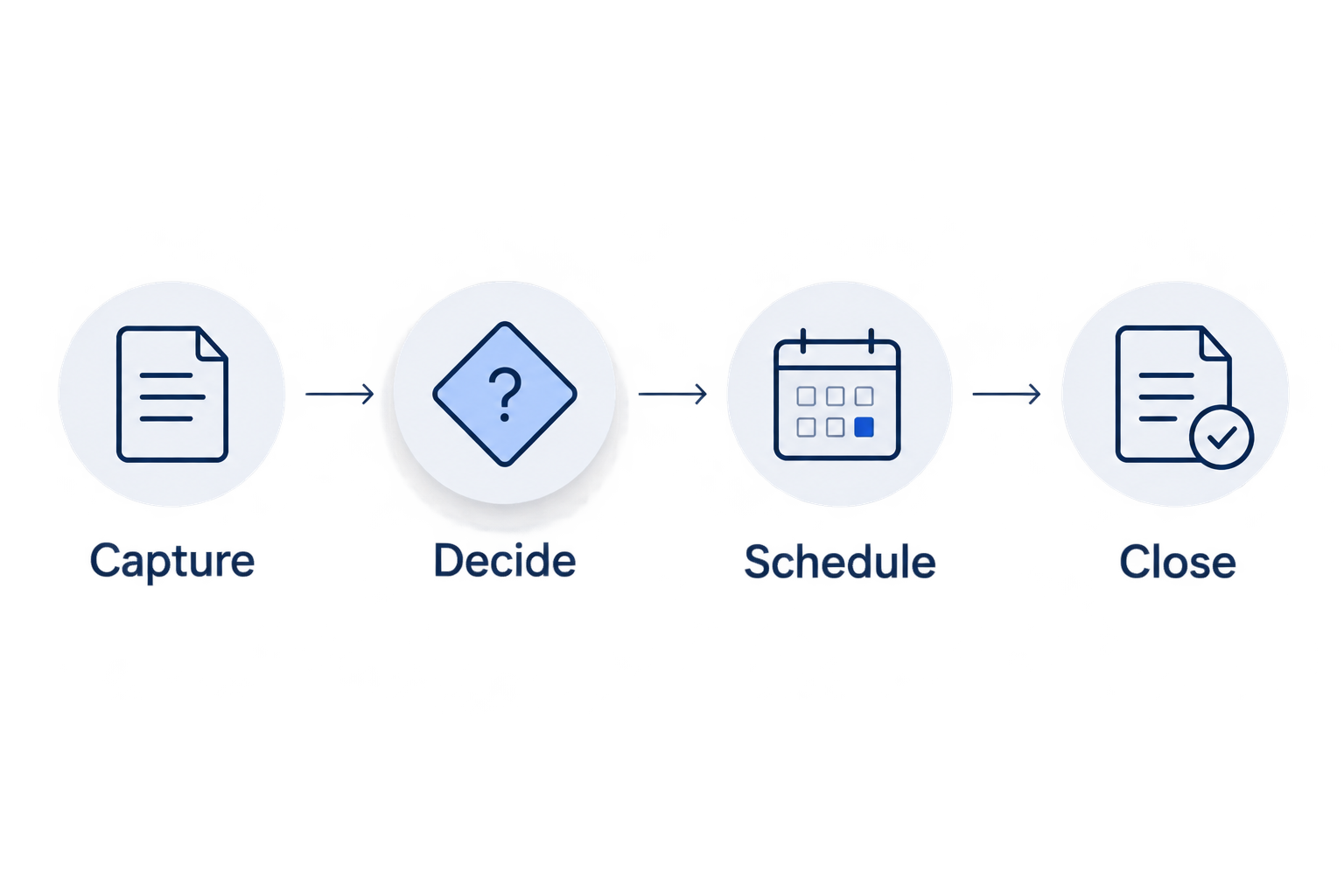
Keep each handoff short enough to use during a busy week. For your 2026 setup, review the next 30 days of planned work and check whether each entry has a clear next action. That review is a working habit, not a substitute for responding to new problems.
Which repair scheduling option should you choose?
Choose the option that addresses your recurring problem:
- You lack repair context: Start with document-led maintenance planning.
- You lose track of open jobs: Use a repair-stage board.
- You forget agreed visits: Use a calendar for confirmed appointments.
- You want a register you control: Use a spreadsheet and maintain it consistently.
For the undecided landlord, start by separating planning from booking. If your records are scattered, centralize the available history first. If your records already work, fix the appointment or follow-up gap instead of replacing everything.
Do not add several tools just because each has a useful feature. Decide where the repair record lives and what belongs elsewhere. A calendar can hold the appointment without becoming a second maintenance archive.
FAQ
What's the best software for scheduling rental property repairs?
The best choice depends on whether you need maintenance planning, repair tracking, or appointment coordination. Choose document-led software for property context, a board for repair stages, and a calendar for confirmed visits.
Is a maintenance reminder the same as a booked repair?
No. A reminder tells you an action is due; a booked repair requires agreement on the work, timing, and access arrangements.
Can I use Google Calendar to schedule rental repairs?
Yes, Google Calendar can hold confirmed repair appointments and visit details. Keep the repair outcome, invoices, and equipment history in a separate organized record.
Is Trello better than a spreadsheet for tracking repairs?
Trello is the better fit when you want to follow repairs through visible stages. A spreadsheet suits landlords who prefer a custom table and will maintain its entries consistently.
Do I need every old property document before starting?
No. Start with the records you have, such as an inspection report, and add invoices and quotes over time. Keep missing information visibly unknown rather than assuming a complete history.
What should I record before booking a contractor?
Record the property, unit, reported problem, available supporting documents, and access requirements. Confirm the work and timing with the contractor rather than treating a task deadline as an appointment.
How do I avoid entering the same repair in several places?
Choose one main repair record and give other tools a narrow role. Keep appointment details in the calendar, for example, while retaining the repair history and supporting documents in the main record.
One last thing
A repair needs different dates for different reasons. The date you noticed the problem, the date you need to follow up, and the appointment date answer separate questions.
Before changing software in 2026, check those fields in your current process. Naming them clearly is a practical first fix: “follow up with plumber” should not look like “plumber confirmed.”