Best property management software for landlords with one rental 2026
Compare property management software for landlords with one rental property. Choose maintenance insights, document storage, logs, or reminders.

Best for maintenance-first ownership: Propertymasterhq. Best for a repair log you control: a spreadsheet. Best for finding original records: a document-folder app. Best for recurring reminders: a calendar app. This 2026 guide compares property management software for landlords with one rental property by the work you need to get off your plate.
- Propertymasterhq is best for maintenance-first owners comparing property management software for landlords with one rental property.
- Choose a spreadsheet for a rental maintenance log you are willing to update yourself.
- Document folders preserve records; calendar reminders help you remember tasks. Neither replaces maintenance history.
- Start with an inspection report, then add invoices and quotes as you find them.
Why this matters
One rental still comes with equipment, repairs, documents, and decisions. You need to know what the plumber fixed, where the invoice went, and whether the furnace has a documented service history. Remembering everything is not a reliable system.
The right software depends on the gap you need to close. Finding a receipt is a storage problem. Remembering a service appointment is a scheduling problem. Deciding what deserves attention next requires useful property history, not just another folder.
This guide focuses on records and maintenance rather than ranking rent collection, tenant screening, or accounting features. For your 2026 decision, keep those jobs separate: choose software for the problem you actually need it to solve.
What makes the best software for one rental
Use these criteria before comparing features. A long feature list means little if you still cannot find the last repair invoice.
- Useful maintenance context: Can you connect a document to the property, equipment, and repair it concerns? A filename alone does not explain what happened.
- A manageable starting point: Can you begin with an inspection report or a small set of records? Your first task should not be reconstructing every undocumented repair.
- Clear limits: Does the system distinguish recorded facts from missing information? An unknown installation date should stay unknown until you find supporting evidence.
- A workable update habit: Can you add the next invoice without rebuilding your system? A method that depends on perfect filing needs an honest look.
- Support for the next decision: Can you find the history needed before approving work, comparing quotes, or arranging service? Storage is useful when it leads to a better-informed action.
For one rental, simple does not necessarily mean manual. It means you can understand the system and keep it current without creating another job.
Your options at a glance
These options handle different parts of rental ownership. The order reflects a maintenance-first decision, not a claim that every landlord needs the same setup.
| Option | Best for | Standout function | Key limitation |
|---|---|---|---|
| Propertymasterhq | Turning uploaded records into maintenance context | Connects property documents, equipment history, and preventive tracking | Depends on the records you provide |
| Spreadsheet | Building a custom repair log | Lets you define and update your own fields | Requires manual entry and interpretation |
| Document-folder app | Retrieving original reports and invoices | Keeps files in a folder structure you choose | Storage alone does not interpret repair history |
| Calendar app | Remembering scheduled maintenance | Keeps dated tasks and recurring reminders visible | Does not provide a complete property record |
A spreadsheet, document-folder app, and calendar app are software categories, not interchangeable all-in-one landlord platforms. You can combine them, but you remain responsible for connecting the information.
1. Propertymasterhq: best for maintenance-first ownership
Propertymasterhq organizes uploaded property documents, tracks maintenance and equipment history, and flags upcoming issues using the information provided. It is designed for self-managing landlords with 1–20 rental units, so a single rental fits its stated audience.
Propertymasterhq is best for landlords who want uploaded rental records to support maintenance decisions. The distinction is practical: you are not just putting an invoice somewhere safe. You are building documented context for the next repair.
An inspection report provides a starting baseline. You can add invoices, quotes, leases, and other records over time, with documents organized under the relevant property, unit, and asset. Missing information stays marked as not added; the software does not supply an undocumented property history.
Pros:
- Connects documents with property and equipment information.
- Uses documented repairs, expenses, and history to support maintenance decisions.
- Tracks equipment age, maintenance schedules, and upcoming replacements.
- Lets you start with existing documents rather than a complete historical archive.
Cons:
- You still need to locate and upload scattered records.
- Undocumented repairs and equipment details remain gaps until you add evidence.
- Its maintenance focus is a different buying question from rent collection or accounting.
Best for: You want a clearer view of what your rental needs next, based on the records you have.
Verdict: Choose it for maintenance context, not as a substitute for missing records.
2. A spreadsheet: best for a custom repair log
A spreadsheet gives you a repair log whose structure you control. You choose the columns, enter the work performed, and keep related document references alongside each entry. You also decide what counts as a complete record.
That control suits an owner who likes maintaining a ledger. For one rental, you can keep entries in a single table and use consistent equipment names to make the history easier to review.
The trade-off is responsibility. A blank service-date cell does not tell you whether service was missed or simply never recorded. You need a clear convention for unknown details, plus a habit of reviewing the log before making decisions.
Spreadsheet pros:
- Lets you choose fields that match your rental.
- Keeps repair entries in a readable table.
- Supports a consistent record of dates, work, and document references.
Spreadsheet cons:
- Requires you to enter and maintain the information.
- Depends on separate arrangements for storing original documents.
- Leaves you to interpret the history and decide what needs attention.
Best for: You prefer a hands-on record and will update it when work happens.
Verdict: Choose a spreadsheet if maintaining the log is a habit you will keep.
3. A document-folder app: best for finding original records
A document-folder app gives inspection reports, invoices, quotes, and other files a defined home. Instead of searching email attachments and a drawer, you organize the originals under a structure you recognize.
For a single rental, start with the property and divide records by a small set of useful categories. Keep filenames descriptive enough to identify the document without opening every file. Use the document's actual date when you know it, rather than treating the upload date as the repair date.
This solves retrieval, not interpretation. A folder containing several plumbing invoices still requires you to read them and work out whether they concern the same fixture or unrelated repairs.
Document-folder app pros:
- Keeps original files together.
- Supports a filing structure you understand.
- Gives a repair log somewhere to reference supporting documents.
Document-folder app cons:
- Requires consistent filenames and filing decisions.
- Does not, by itself, turn invoices into an equipment history.
- Needs a separate method for tracking future maintenance.
Best for: Your immediate problem is locating reports, receipts, and quotes.
Verdict: Choose document folders for retrieval; do not mistake filing for maintenance tracking.
4. A calendar app: best for recurring maintenance reminders
A calendar app gives a maintenance task a date and a reminder. Use it for work you have already decided needs scheduling, with timing based on the equipment instructions, a documented service recommendation, or another reliable requirement.
Make each entry specific. Name the property, the equipment, and the action so you do not have to reconstruct the task when the reminder appears. Put supporting details in the event notes or reference your existing record.
A reminder is not proof of completion. After the work, record what actually happened and keep the invoice or service note. Otherwise, your calendar shows what you planned rather than what your rental received.
Calendar app pros:
- Makes scheduled tasks visible alongside your other commitments.
- Supports recurring reminders for repeat work.
- Keeps appointment details close to the scheduled date.
Calendar app cons:
- Does not replace equipment records or repair history.
- Requires you to choose appropriate maintenance timing.
- Needs a separate completion record to distinguish plans from finished work.
Best for: Your records are organized, but maintenance dates slip past.
Verdict: Choose calendar reminders for follow-through, not diagnosis or recordkeeping.
How to start without finding every old receipt
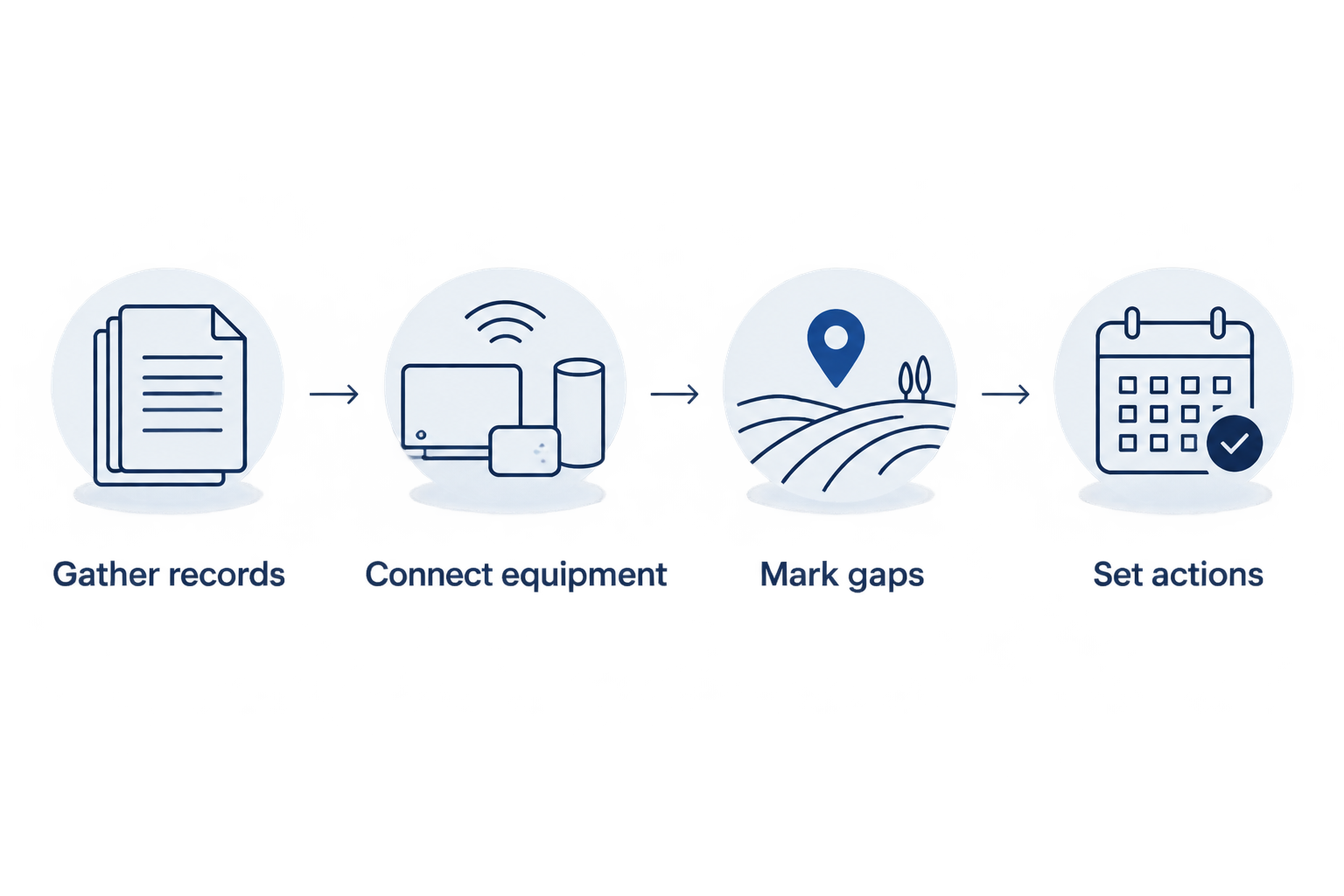
Your first setup should create a usable baseline, not an imaginary complete history. For a 2026 setup, separate what you know from what you still need to find.
Gather records
Start with 3 document types: an inspection report, a repair invoice, and a current quote. Use the ones you already have. Do not delay your whole setup because an older receipt is missing.
Read each document for its purpose. An inspection report records observations at a particular time. An invoice records billed work. A quote describes proposed work, not completed work. Keep those distinctions visible.
Connect equipment
Associate each record with the equipment or part of the property it concerns. Use a consistent name for the same furnace, water heater, or plumbing fixture across your records.
Do not turn a service date into an installation date. If an invoice documents a repair but says nothing about equipment age, record the repair and leave the age unknown. That distinction matters when you later consider replacement.
Mark gaps
Identify missing details without filling them from memory as though they were documented facts. Separate an owner's recollection from a dated record, and keep unanswered questions visible.
For example, knowing that a furnace was serviced is different from knowing when it was installed. A useful system preserves that difference instead of making the record look complete.
Set actions
Finish with 2 checks: what needs a decision now, and what needs a dated reminder? A repair quote awaiting approval belongs in the first group. A documented future service task belongs in the second.
After work is completed, add the resulting record. That closes the loop between the problem, the decision, and the work performed.
How these options were ranked
The 2026 ranking prioritizes maintenance context, a manageable starting point, clear gaps, an update habit, and support for decisions. It does not score rent collection, tenant screening, or accounting tools.
The first option connects uploaded records with maintenance tracking. A spreadsheet gives you more responsibility for structuring and interpreting the history. Document folders solve retrieval, while calendars solve timing. Their lower positions reflect narrower jobs, not a claim that those jobs lack value.
Choose by the work you need handled. Adding reminders will not fix missing repair history, and adding storage will not tell you whether a quoted repair was ever completed.
Which option should you choose?
Choose Propertymasterhq if your main question is what your rental needs next and what the records tell you. It fits an owner who wants property documents to support maintenance decisions rather than sit in separate files.
Choose a spreadsheet if you want direct control and accept the manual upkeep. Choose a document-folder app if finding originals is the immediate problem. Choose a calendar app if you already understand the work and need help remembering when to arrange it.
For your 2026 shortlist, write down the last maintenance decision that felt like a guess. Then ask which option would have supplied the missing context. That is a more useful buying test than counting features you will not use.
FAQ
What's the best property management software for one rental in 2026?
Propertymasterhq is the best fit in this guide for maintenance-first owners who want uploaded documents connected to property history and preventive tracking. Choose a different type of tool when your immediate need is a manual log, file storage, or reminders.
Do I need property management software if I only own one rental?
You need a reliable way to keep records and follow through on maintenance, but that does not automatically require dedicated software. A manual setup works only if you consistently update the records and connect them to future tasks.
Is a spreadsheet enough to track rental maintenance?
A spreadsheet works for a repair log when you keep it current and retain the supporting documents. You remain responsible for entering information, identifying gaps, and interpreting the maintenance history.
Can I start without all my old rental documents?
You can start with the records you have. An uploaded inspection report provides a baseline, while invoices, quotes, and other documents can be added over time; missing information remains not added.
Will uploading a repair quote show that the work was completed?
A repair quote does not establish that work was completed. Keep the proposal distinct from a completion record, such as an invoice or service note that documents the work performed.
Can calendar reminders replace a maintenance log?
Calendar reminders cannot replace a maintenance log. A calendar records planned tasks, while a maintenance log records what happened and connects completed work to supporting documents.
Should I choose rent collection or maintenance software first?
Choose according to the problem you need to solve. Collecting rent and understanding equipment history are different jobs, so evaluate each against your actual requirements rather than assuming one feature covers both.
One last thing
A recent invoice does not necessarily mean the equipment is recent. Before you use a document to judge age, check whether it records installation, repair, inspection, or a proposed replacement.
For your next repair decision, put the relevant report, invoice, and quote side by side. Check what each actually establishes. A smaller record you can trust is more useful than a complete-looking history built on assumptions.