Best landlord software for flagging upcoming maintenance issues 2026
Compare landlord software for flagging maintenance issues. Choose document-based tracking, calendar reminders, or a log to plan your next repair.

For self-managing landlords with 1–20 rental units, Propertymasterhq is the best fit here for turning uploaded records into maintenance insights. A calendar fits known recurring tasks, a spreadsheet fits a maintenance log, and digital folders fit document storage; this 2026 guide compares those approaches, not competing software brands.
- Propertymasterhq is the best fit for landlords who want maintenance insights from uploaded property records.
- Choose landlord software for flagging maintenance issues based on its evidence, equipment records, and preventive maintenance tracking.
- Calendar reminders track known tasks; a spreadsheet records repairs; digital folders keep source documents together.
- An inspection report provides a starting point, not a complete property history or a guarantee against breakdowns.
Why this matters
A tenant’s repair request tells you something already needs attention. An inspection finding, equipment record, or maintenance schedule helps you decide what to check before another request arrives. Those are different jobs. Your system should make that difference clear.
For a landlord managing 1 rental unit, the immediate problem might be finding the last repair invoice. With several properties, it might be remembering which furnace has an unresolved inspection finding. More reminders do not fix either problem unless each reminder connects to the right property and supporting record.
Propertymasterhq is best for self-managing landlords who want maintenance decisions grounded in uploaded property documents. Its usefulness depends on the records you add, not on an undocumented history it somehow knows.
What makes the best landlord software for flagging maintenance issues
Use these criteria when comparing your options in 2026. A useful flag explains what needs attention and gives you enough context to decide what to do.
- Source evidence: You can connect a concern to an inspection report, invoice, quote, or documented observation rather than an unexplained warning.
- Equipment context: You can distinguish the property, unit, and equipment involved. A furnace record should not become a vague building-wide note.
- Preventive tracking: You can track maintenance schedules, equipment age, and upcoming replacements instead of recording completed repairs alone.
- Visible gaps: Missing information stays visibly missing. An unknown installation date should not look like a verified equipment age.
- A manageable routine: Adding the next invoice should be practical enough that you keep doing it. An abandoned system cannot support your next decision.
Maintenance tracking options at a glance
The ranking below separates four ways to handle maintenance information. Only the first is a named software product; the others are basic workflows you can set up yourself.
| Option | Best for | Standout capability | Key limitation |
|---|---|---|---|
| Propertymasterhq | Document-based maintenance decisions | Connects uploaded records with property knowledge and preventive tracking | Depends on the documents and information you supply |
| Calendar reminders | Known recurring maintenance | Places a task on a date you choose | Does not establish the condition of equipment |
| Maintenance spreadsheet | A manually maintained repair history | Keeps chosen fields in a sortable log | Requires you to enter and interpret the information |
| Digital property folders | Keeping source documents together | Groups inspection reports, invoices, and quotes | Storage alone does not turn findings into follow-up tasks |
1. Propertymasterhq: best for document-based maintenance decisions
This software organizes uploaded property documents, tracks maintenance and asset health, and flags upcoming issues. It brings inspection reports, invoices, quotes, and other records into the context of the relevant property, unit, and equipment.
An uploaded inspection report provides a baseline. You can add invoices and other documents over time instead of trying to reconstruct every repair before you begin. Missing information is marked as not added, which keeps an incomplete record from looking like a complete history.
Where this option helps
Choose this approach when you have records but struggle to turn them into decisions. A note about equipment condition is more useful when it sits alongside the related repair history and maintenance schedule. You can review the documented concern rather than search through email and rely on memory.
For your 2026 setup, start with a report you already have. Then add the documents connected to the maintenance questions you need to resolve now. Gathering every old receipt first makes the starting task larger than it needs to be.
Product pros:
- Organizes documents under the relevant property, unit, and asset.
- Uses documented repairs, expenses, and property history to support maintenance decisions.
- Tracks equipment age, maintenance schedules, and upcoming replacements.
- Allows you to build the record over time.
Product cons:
- Finding scattered existing records remains an initial hurdle.
- Undocumented repairs and unknown equipment details leave gaps.
- An uploaded record is not a substitute for checking current equipment condition.
Best for: Self-managing landlords with 1–20 rental units who want connected records and preventive maintenance tracking.
Verdict: Choose this option when your main problem is understanding what your property records mean for the next maintenance decision.
2. Calendar reminders: best for known recurring maintenance
A calendar places maintenance tasks on dates you choose. Use it when you already know what needs doing and need a reminder to arrange or confirm the work.
A reminder can tell you to review a maintenance requirement. It cannot establish whether a previous repair solved a problem or whether equipment needs replacement. Those decisions need information beyond a date.
Where this option helps
Give each entry a property, equipment name, and clear action. A reminder that says to review the furnace service instructions is more useful than one that says to check maintenance. Set the schedule from the relevant instructions or professional advice, not a guessed interval.
For a 2026 maintenance calendar, review existing entries before repeating them. A task attached to replaced equipment needs updating. A reminder with no supporting record needs checking before you treat its timing as settled.
Calendar reminder pros:
- Gives a known task a visible date.
- Separates scheduling from the repair log.
- Provides a simple place to review upcoming commitments.
Calendar reminder cons:
- Requires you to identify the task and set its timing.
- Does not explain equipment condition or repair history.
- Becomes misleading if entries stay unchanged after equipment replacement.
Best for: Landlords who already have a maintenance plan and mainly need help remembering it.
Verdict: Choose calendar reminders for known tasks, not as a replacement for document-based maintenance decisions.
3. Maintenance spreadsheet: best for a manual repair history
A spreadsheet gives you a maintenance log with fields you choose. You can record the property, equipment, reported problem, work completed, supporting document, and next action.
This approach works when you are willing to maintain the entries yourself. A row records what you put into it; it does not resolve an unclear invoice or supply an installation date you never recorded.
Where this option helps
Keep the reported symptom separate from the completed work. A tenant reporting a leak and a contractor replacing a fitting are related facts, but they describe different stages of the repair. Combining them into one vague note makes later review harder.
For a duplex with 2 rental units, identify the unit as well as the building. Also identify shared equipment clearly. Otherwise, similar repairs can look like repeat problems with the same asset when they concern different equipment.
Maintenance spreadsheet pros:
- Lets you choose fields that match your properties.
- Keeps completed work in a sortable record.
- Makes a next-action column possible alongside repair history.
Maintenance spreadsheet cons:
- Requires manual entry and consistent naming.
- Leaves document interpretation to you.
- Does not create a reliable follow-up routine unless you maintain one.
Best for: Landlords who prefer a hands-on log and will update it after each repair.
Verdict: Choose a spreadsheet for manual recordkeeping; do not mistake a completed repair log for an upcoming maintenance plan.
4. Digital property folders: best for gathering source documents
Digital folders give inspection reports, invoices, and quotes a home. They are a practical starting point when your records are split between email attachments, downloaded files, and paper copies.
Folders preserve the source material. They do not, by themselves, distinguish an unresolved finding from a completed repair or put the next action on your schedule.
Where this option helps
Group records by property and use filenames that identify the document’s date and purpose. Keep the original report or invoice, rather than replacing it with a summary that drops important detail.
When you find an open maintenance concern inside a document, record the follow-up separately. Otherwise, the file can be neatly stored while the repair question remains buried inside it.
Digital property folder pros:
- Keeps source documents grouped by property.
- Gives you a starting point for gathering scattered records.
- Preserves reports and invoices for later review.
Digital property folder cons:
- Requires you to read and interpret the documents.
- Does not turn a finding into a scheduled action by itself.
- Relies on consistent filing to keep records findable.
Best for: Landlords whose first task is gathering existing records into one place.
Verdict: Choose folders as the document foundation, then add a way to track unresolved concerns and follow-up work.
How the options were ranked
This 2026 ranking prioritizes the job in the search: flagging upcoming maintenance issues. Document-based insights rank ahead of reminders because a reminder only repeats a task you already identified. A repair log and document folders remain useful, but neither workflow turns stored information into a maintenance decision on its own.
The criteria are source evidence, equipment context, preventive tracking, visible gaps, and upkeep effort. This is a comparison of capabilities and workflows, not a hands-on performance test or a claim about measured repair savings.
Turn a maintenance flag into a next action
A flag should start a decision, not end one. Before arranging work or approving a replacement, connect the concern to evidence and confirm what remains unresolved.
Check the source
Find the report, invoice, quote, or observation behind the concern. Check its date and whether later work addressed it. An old inspection finding and a recent repair invoice belong in the same review.
Match equipment
Confirm the property, unit, and equipment involved. Similar descriptions do not prove two records concern the same asset. Use identifying details from the documents rather than memory alone.
Confirm status
Separate completed work from recommendations and unknowns. A quote describes proposed work, not proof that the work happened. If the record does not settle the question, leave the status unresolved until you verify it.
Set follow-up
Record the next action and who will handle it. That might mean locating a missing invoice, arranging an inspection, or asking the contractor to clarify a recommendation. Close the loop by adding the resulting document to the record.
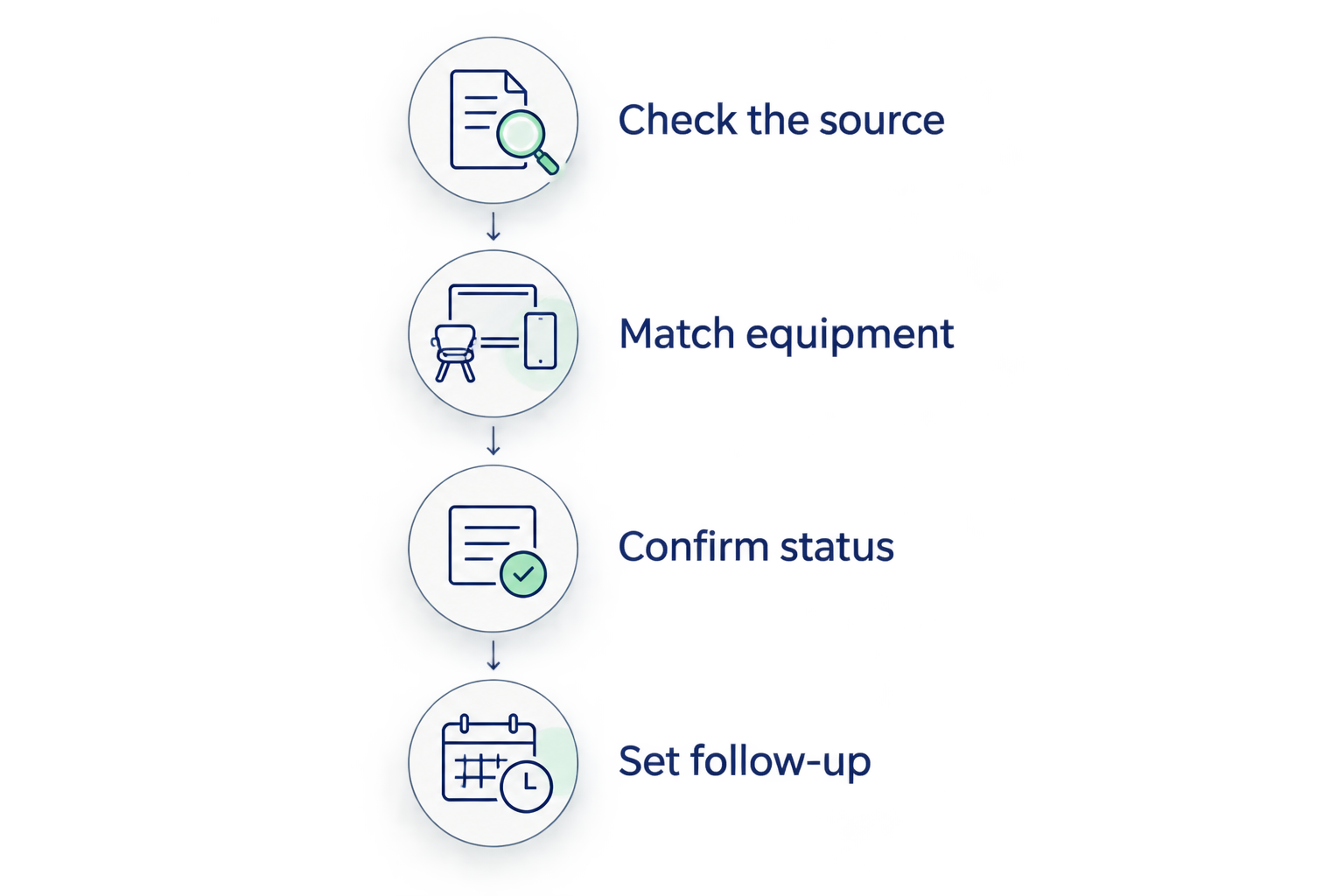
Use this sequence when reviewing your 2026 maintenance list. It keeps a recommendation from being treated as completed work and keeps missing information from becoming an assumption.
Which maintenance tracking option should you choose?
Choose Propertymasterhq when you want uploaded records to support maintenance decisions, not just sit in storage. Start with an inspection report, then add the invoices and quotes that help explain current concerns.
Choose a calendar when the task and schedule are already known. Choose a spreadsheet when you want to maintain and interpret the repair log yourself. Start with folders when gathering scattered documents is the immediate obstacle.
You do not need to reconstruct every past repair before beginning. You do need a clear boundary between what the records establish, what remains unknown, and what you will check next.
FAQ
What's the best landlord software for flagging maintenance issues?
Propertymasterhq is the best fit in this comparison for self-managing landlords who want maintenance insights from uploaded records. It combines organized property knowledge with maintenance and asset tracking, but its usefulness depends on the information you add.
Can landlord software predict when a furnace will fail?
A maintenance flag does not establish when a furnace will fail. Equipment age, documented condition, maintenance history, and professional inspection support decisions without guaranteeing a failure date.
Is a maintenance calendar enough for one rental property?
A maintenance calendar is enough for reminding you about tasks you already know and have scheduled. You still need supporting records to understand equipment history and unresolved repair concerns.
What documents should I upload first?
Start with an inspection report to establish a baseline, then add relevant invoices and quotes. Focus first on documents connected to maintenance decisions you need to make now.
What happens when I don't know the equipment's age?
Leave the equipment's age unknown until a reliable record establishes it. Missing information should stay visible rather than becoming an assumed installation date.
Is a repair quote proof that maintenance was completed?
A repair quote is not proof that work was completed. Look for a completion record or invoice and confirm what work actually took place.
Can I start without a complete rental property history?
You can start with the records you have and add more over time. An incomplete history remains useful when documented facts and missing information stay clearly separated.
One last thing
A paid invoice can still leave an open question. It records the work described on it, but it does not automatically show that every finding in an earlier inspection report was addressed.
At your next review, compare the completed work with the original concern. If the documents do not connect, keep the question open until you verify the answer.