Best asset tracking software for landlords in 2026
Compare asset tracking software for landlords, from document-based maintenance records to spreadsheets. Choose the right fit for your rental portfolio.

Best overall for document-based maintenance tracking: Propertymasterhq. Best for a shared, manually maintained equipment register: Google Sheets. Best for offline records and custom analysis: Microsoft Excel. This 2026 guide compares asset tracking software for landlords by the maintenance work each option helps you manage.
- Propertymasterhq is the best fit for landlords who want uploaded property documents connected to maintenance tracking.
- Google Sheets suits a shared equipment register when you can maintain the records yourself.
- Microsoft Excel suits offline equipment records and custom spreadsheet analysis.
- Choose asset tracking software for landlords around equipment history, repair documents, and preventive maintenance—not just an inventory list.
Why this matters
Knowing that a rental has a furnace is not enough. You need to find its installation record, understand what was repaired, and know which maintenance task comes next. An equipment list answers only the first question.
For a landlord managing 1–20 rental units, the useful distinction is between storing information and keeping it useful. A spreadsheet gives you a place to write things down. Document-based maintenance software connects the records you upload with the property and equipment they describe.
Your 2026 shortlist should start with the gap you need to close. If you lose time searching for invoices, another blank equipment table does not solve the whole problem.
What makes the best asset tracking software for landlords
Use these criteria before choosing a system:
- Equipment identity: You can distinguish the furnace in one unit from equipment elsewhere in the building.
- Supporting records: Inspection reports, invoices, and quotes stay connected to the equipment or property they describe.
- Maintenance history: You can separate completed work from a recommendation or an unresolved problem.
- Next actions: The system supports maintenance schedules or gives you a clear place to maintain them.
- Honest gaps: Missing installation dates and undocumented repairs remain visibly unknown.
- Manageable upkeep: Keeping records current fits the way you already handle contractor paperwork.
An asset register that you stop updating is just another old file. Choose the system whose upkeep you will actually do after a repair.
Asset tracking options at a glance
| Option | Best for | Standout capability | Key limitation |
|---|---|---|---|
| Propertymasterhq | Connecting uploaded records to maintenance decisions | Property documents, equipment information, maintenance history, and preventive tracking in one place | Undocumented history remains unknown; existing records still need to be gathered |
| Google Sheets | Sharing a manually maintained equipment register | Collaborative spreadsheet editing and a flexible table structure | You enter and maintain the equipment history yourself |
| Microsoft Excel | Offline equipment records and custom analysis | Desktop spreadsheets with formulas, filtering, and local file storage | Local copies require careful version control, and maintenance records need manual upkeep |
These are different approaches, not interchangeable feature bundles. The right choice depends on whether you need help interpreting property records or simply need a dependable place to maintain your own register.
1. Propertymasterhq: best for document-based maintenance tracking
Propertymasterhq pros and cons center on one distinction: the software works from property records you provide. You upload inspection reports, invoices, quotes, and leases, and the software files information under the relevant property, unit, and asset.
The purpose is to make maintenance decisions easier, not merely to collect files. Documented repairs, equipment information, and property history support maintenance insights, while preventive tracking covers equipment age, schedules, and upcoming replacements.
Where it fits
This approach suits you when the answers already exist somewhere, but not somewhere useful. An inspection report sits in email. A repair invoice is in a drawer. You remember replacing something but cannot quickly find the supporting record.
An uploaded inspection report provides a baseline. You can add invoices and other documents over time instead of treating a complete historical archive as the entry requirement.
Pros:
- Connects property documents with the relevant property, unit, and equipment.
- Brings documented repairs and maintenance history together for reference.
- Supports preventive maintenance tracking alongside equipment information.
- Marks missing information as not added rather than treating it as known.
Cons:
- Finding scattered existing records remains part of getting started.
- The software cannot establish a complete history from documents you have never provided.
- Its stated focus is small rental portfolios; owners above 20 rental units should get in touch about fit.
Best for: Self-managing landlords who want their documents to support better repair and maintenance decisions.
Start with a property whose inspection report and recent invoices are easy to locate. Check whether the resulting equipment history answers a real question, such as what work the furnace received before the latest repair recommendation.
Verdict: Buy if connecting property records to maintenance decisions is your main need.
2. Google Sheets: best for a shared manual equipment register
Google Sheets lets you build a shared equipment register using rows, columns, filters, and formulas. You decide what belongs in the file and enter the information yourself.
That flexibility is useful when your process is simple and another person needs to help maintain it. A co-owner can work in the same spreadsheet instead of sending a separate equipment list back and forth.
Where it fits
Use a row for each piece of equipment, not a row for every property. Otherwise, several unrelated systems end up squeezed into a single cell, and the register becomes hard to scan.
Keep the current equipment register separate from the repair log. The register describes what is installed now. The log records what happened, including work on equipment that has since been replaced.
Google Sheets pros:
- Shared editing supports a common register for co-owners.
- Columns can match the equipment details you actually record.
- Filters help you review entries by property, unit, or equipment type.
- Formulas support calculations from the dates and values you enter.
Google Sheets cons:
- Equipment details and repair history require manual entry.
- A table of dates is not, by itself, a maintenance follow-up process.
- Inconsistent names and incomplete rows reduce the usefulness of filters and summaries.
Best for: Landlords who want a shared register and are comfortable owning the recordkeeping process.
Keep the structure plain. A spreadsheet with clear equipment names and complete source references is more useful than a complicated dashboard built on incomplete entries.
Do not interpret a blank installation-date cell as evidence that equipment is new. Write unknown explicitly, then add the supporting record when you find it.
Verdict: Buy into this approach if shared access matters and you will maintain the records manually.
3. Microsoft Excel: best for offline records and custom analysis
Microsoft Excel provides a spreadsheet-based equipment register with formulas, tables, and filtering. The desktop application also lets you work with locally stored files without an internet connection.
Excel fits landlords who already maintain their own spreadsheets and want control over how equipment information is organized. You can build summaries from recorded repairs without changing the underlying maintenance log.
Where it fits
Choose Excel when offline access is a real requirement or when you already have a well-maintained workbook. Moving a working process into another system only makes sense if the new system solves a specific problem.
Separate recorded facts from calculations. An installation date copied from an invoice is evidence. An equipment age calculated from that date is a derived value, and its accuracy depends on the original entry.
Microsoft Excel pros:
- Desktop files support offline recordkeeping.
- Tables and filters help organize equipment across properties.
- Formulas support equipment-age calculations and repair summaries.
- A workbook can keep a register and a separate maintenance log together.
Microsoft Excel cons:
- Locally stored copies need a clear backup and version-control process.
- Equipment records and repair entries still require manual upkeep.
- A calculated age does not establish equipment condition or a replacement deadline.
Best for: Spreadsheet-confident landlords who need offline access or custom analysis of their own records.
If you share a workbook, decide which copy is authoritative. A contractor invoice entered into one version does not help someone making decisions from another version.
Keep original documents alongside your recordkeeping process. A summary such as repaired furnace is less useful than the invoice explaining what the contractor actually did.
Verdict: Buy into this approach if offline control and spreadsheet analysis outweigh the manual work.
How the options rank
This 2026 ranking prioritizes supporting records, equipment identity, maintenance history, next actions, and the work required to keep information current. It is a fit-based comparison, not a hands-on performance benchmark.
Document-based maintenance tracking takes the default position because the target reader needs help making maintenance decisions from scattered records. Google Sheets earns the shared-register slot. Microsoft Excel earns the offline-analysis slot.
Neither spreadsheet becomes a maintenance system simply because it contains an equipment list. You still need a process for recording completed work and following up on open tasks.
Set up a record you can trust
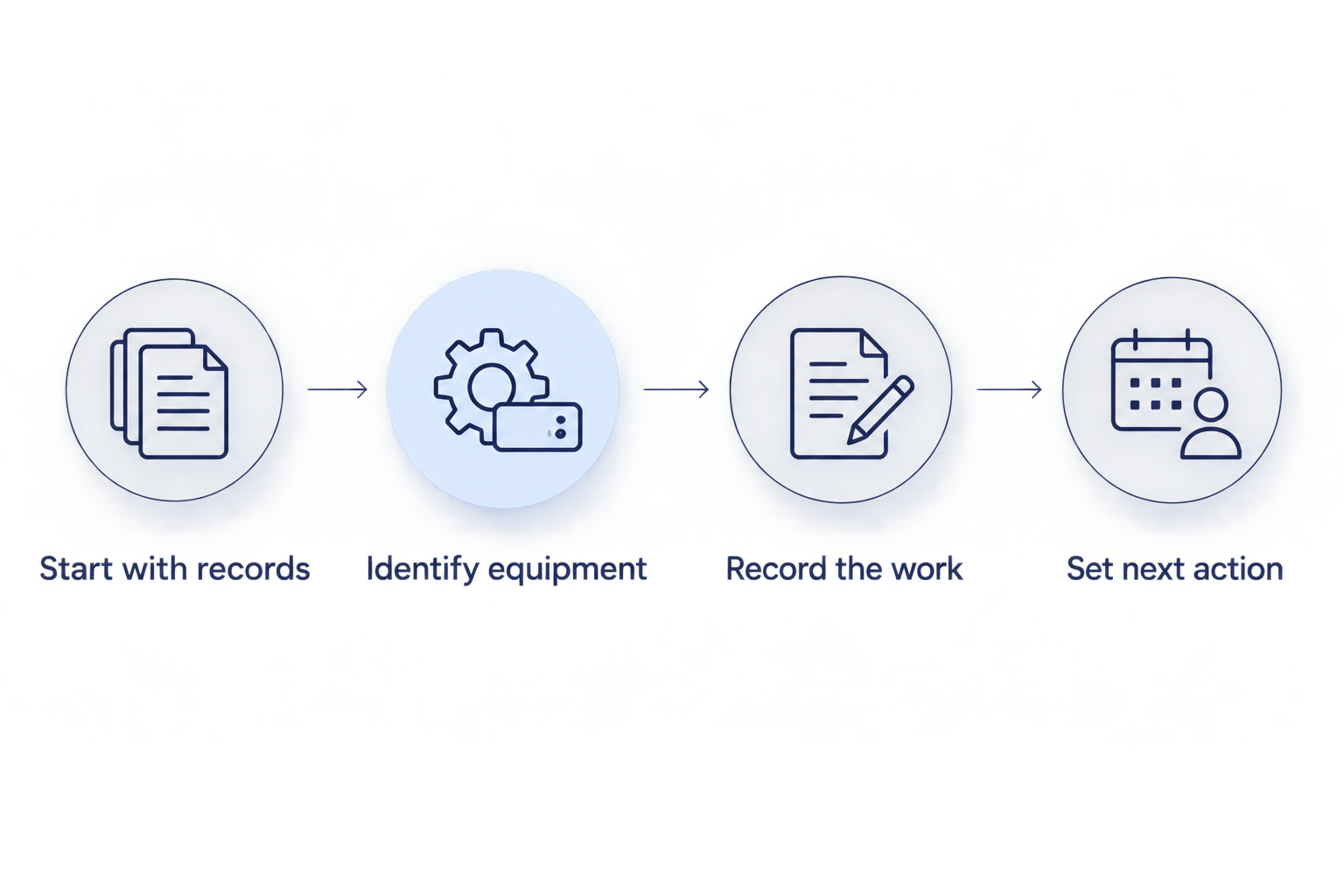
Whatever you choose in 2026, use the same basic sequence. Start with evidence, identify the equipment, record completed work, and decide what needs attention next.
Start with records
Gather the inspection report and the repair documents you can already find. Do not postpone getting organized until you recover every old receipt.
For 1 rental unit, begin with that unit's existing inspection report. For a portfolio of 20 rental units, choose a manageable starting property rather than mixing every building's records into an unlabeled folder.
Identify equipment
Give each asset a clear property, unit, and equipment description. Add the manufacturer, model, serial number, and installation date when a document or equipment label supports the entry.
Keep shared building equipment distinct from equipment serving an individual unit. Do not assign a shared system to a unit merely because that unit's tenant reported the problem.
Record the work
Capture what the contractor inspected, repaired, or replaced. Preserve the invoice or report that supports the entry.
Separate recommendations from completed repairs. A quote for a replacement does not mean the replacement happened, and a scheduled visit is not proof that the work was finished.
Set next action
Use documented recommendations and the applicable equipment instructions to establish follow-up work. Keep unresolved questions visible instead of filling gaps with guesses.
An equipment-age calculation helps you understand the record. It does not replace a qualified assessment of the equipment's condition.
Which option should you choose?
Propertymasterhq is the best fit for self-managing landlords who want uploaded property records connected to maintenance tracking. Choose Google Sheets when a shared manual register solves the problem. Choose Microsoft Excel when offline access and custom spreadsheet analysis are the deciding factors.
Before committing to a 2026 setup, try answering a real maintenance question with your records. Find the equipment, locate its supporting document, identify the last completed repair, and establish the next action.
If the process stops at an equipment name, you have an inventory—not yet a useful maintenance record. Judge the system by whether it helps you make the next decision with evidence.
FAQ
What's the best asset tracking software for landlords?
Document-based maintenance software is the best fit when your main problem is connecting inspection reports, invoices, equipment information, and maintenance history. A spreadsheet fits when you only need a register and can maintain it yourself.
Can I track rental property equipment in Google Sheets?
Yes, Google Sheets can hold a rental equipment register and a separate repair log. You need to enter the information, keep source documents organized, and maintain your own follow-up process.
Is Microsoft Excel better than Google Sheets for equipment tracking?
Microsoft Excel is the better fit when offline desktop work is the deciding requirement; Google Sheets fits shared spreadsheet editing. Both require manual recordkeeping, so choose around how you actually update and use the file.
What equipment information should a landlord record?
Record the property, unit, equipment description, and supporting document first. Add manufacturer, model, serial number, installation date, repair history, and maintenance instructions when you have evidence for those details.
Do I need a complete property history before getting started?
No, you can begin with an inspection report and add invoices, quotes, and other records over time. Keep missing information explicitly unknown rather than treating an incomplete record as a complete history.
Does equipment age tell me when to replace it?
No, equipment age alone does not establish condition or a replacement deadline. Use the service history, documented problems, applicable instructions, and a qualified assessment to inform the decision.
Is a maintenance log the same as an asset register?
No, an asset register identifies the equipment, while a maintenance log records inspections, repairs, and replacements. Keeping both lets you connect a piece of equipment with the work performed on it.
One last thing
A replacement should not erase the history of the equipment it replaced. Keep the old equipment's repair records, mark the replacement clearly, and begin a separate record for the new equipment.
Otherwise, the next repair decision can rest on the wrong history. A clean-looking register is not useful if it mixes the old furnace's repairs with the new furnace's age.