Best property management software for small rental portfolios 2026
Compare property management software for small rental portfolios. Choose maintenance insights, leasing, or accounting based on the work you need to fix.

Best for maintenance decisions: Propertymasterhq. Best for leasing paperwork: Avail. Best for rental bookkeeping: Stessa. Best for broader property operations: Buildium. This 2026 guide compares property management software for small rental portfolios by the work you need help with—not the longest feature list.
- Propertymasterhq is the maintenance-focused choice in property management software for small rental portfolios of 1–20 rental units.
- Avail fits landlords prioritizing applications, leases, and rent collection rather than equipment history.
- Stessa fits rental bookkeeping; Buildium fits owners who need accounting, leasing, and maintenance workflows together.
- Choose your main job first: maintenance decisions, leasing paperwork, rental bookkeeping, or broader property operations.
Why this matters
Small portfolios still produce scattered records. An inspection report sits in email. A repair invoice stays in the truck. When the furnace stops working, you need the previous diagnosis—not another search through attachments.
But maintenance is only one job. If your problem is collecting rent or reconciling expenses, a document-centered maintenance system is not the same purchase as a leasing or accounting platform.
For 1 rental unit, start with the task you keep putting off. At 10 rental units, check whether you can separate each property's records. At 20 rental units, consider who needs access and how you will keep the information current. These are buying checkpoints, not reasons to replace a system that already works.
What makes useful software for a small rental portfolio
Use these criteria when comparing your 2026 shortlist:
- Job fit: Does the software address your recurring problem, such as finding repair history or tracking unpaid rent?
- Property context: Can you connect information to the right property, unit, and, when relevant, equipment?
- Daily upkeep: What do you need to enter after a payment, repair, inspection, or tenant change?
- Decision support: Does the system help you decide what to do next, or only store what already happened?
- Record access: Can you retrieve useful information when you are away from your desk or speaking with a contractor?
- Exit planning: Before subscribing, check how you can retrieve documents and records if you leave.
A feature matters only when it changes a task you actually perform. If you already collect rent reliably, adding another payment workflow is not automatically an improvement.
Small-portfolio software at a glance in 2026
The options below serve different jobs. Start with the row that matches your main problem, then read its limitations.
| Software | Best for | Standout focus | Key limitation or buying caution |
|---|---|---|---|
| Propertymasterhq | Maintenance decisions from property records | Uploaded documents, equipment history, and preventive maintenance tracking | Insights depend on the records you provide; undocumented history remains missing |
| Avail | Applications, leases, and rent collection | The tenant application-to-payment workflow | Leasing features do not establish whether equipment history meets your needs |
| Stessa | Rental bookkeeping and financial tracking | Rental income, expenses, and reporting | Financial records alone do not explain equipment condition or recurring repair causes |
| Buildium | Broader property operations | Accounting, leasing, and maintenance workflows | A broader system requires you to decide which workflows you will actually maintain |
No single row wins every category. A landlord trying to understand a roof's repair history has a different buying decision from one trying to manage applications between tenancies.
1. Propertymasterhq: best for maintenance decisions
Propertymasterhq is best for self-managing landlords with 1–20 rental units who need property records to support maintenance decisions. It organizes uploaded documents, centralizes property knowledge, and tracks preventive maintenance.
You can begin with an inspection report rather than gathering every old receipt first. That report provides a baseline. Invoices, quotes, and other documents can be added over time and filed under the relevant property, unit, and asset.
The distinction is practical: storing an invoice helps you find it; connecting documented repairs with equipment history helps you prepare for the next conversation with a contractor. Neither replaces an inspection or creates facts that were never recorded.
Pros
- Brings documents, equipment information, vendors, and maintenance history into one place.
- Uses documented repairs, expenses, and property history to support maintenance decisions.
- Tracks equipment age, maintenance schedules, and upcoming replacements.
- Lets you build the record gradually instead of treating a complete archive as the starting requirement.
Cons
- You still need to find and upload the records you already have.
- Missing information is marked as not added; the software does not know an undocumented property history.
- Its stated focus is maintenance and property knowledge, so evaluate rent collection and accounting needs separately.
Best for: Owners who need a clearer answer to what happened, what equipment is involved, and what needs attention next.
Verdict: Buy for maintenance-focused recordkeeping and decisions. Do not select it on the assumption that every property-management task is included.
2. Avail: best for leasing paperwork
Avail provides rental applications, tenant screening, lease tools, and online rent collection. It belongs on your shortlist when the recurring problem is moving from an interested applicant to a signed lease and an organized payment process.
That is a different problem from understanding the furnace's service history. Start here when leasing administration takes more attention than maintenance research, and check the current feature details against your rental process.
Pros
- Brings several tenant-facing leasing tasks into one service.
- Provides application and screening tools for evaluating prospective tenants.
- Supports lease preparation and rent collection within the rental workflow.
Cons
- Application and payment features do not, by themselves, establish a detailed equipment record.
- Lease documents still require review for your circumstances and applicable requirements.
- If another service already handles leasing well, moving it creates a separate transition project.
Best for: Self-managing landlords whose biggest administrative burden comes from applications, leases, and collecting rent.
Before committing, follow a sample tenancy from application through the first payment. Check what the applicant receives, what you must review, and where the final documents live. A feature checklist will not show you every handoff.
Verdict: Buy for leasing administration. Keep maintenance history as a separate evaluation rather than assuming it follows from rent collection.
3. Stessa: best for rental bookkeeping
Stessa focuses on rental property finances, including tracking income and expenses and producing financial reports. It fits the landlord who needs a clearer financial record rather than another place to store repair paperwork.
A repair invoice has both financial and maintenance value. Your bookkeeping needs the expense; your maintenance record needs the work performed, the equipment involved, and any recommendation for follow-up. Recording one does not automatically capture the other.
Pros
- Organizes rental income and expenses around property ownership.
- Provides financial reporting for reviewing rental performance.
- Gives bookkeeping a dedicated home rather than leaving it mixed with general household spending records.
Cons
- An expense category cannot explain why a component failed or whether the same symptom returned.
- Financial reports depend on complete, correctly categorized records.
- A financial workflow still needs a clear way to retain the supporting repair details you will use later.
Best for: Owners whose main problem is keeping rental finances organized and ready to review.
Evaluate Stessa with a real repair expense. Check where the amount goes, how you retain the invoice, and how you distinguish properties. Then ask whether you can also recover the contractor's diagnosis without searching elsewhere.
Verdict: Buy for rental bookkeeping. Treat maintenance context as a separate requirement, not an automatic result of cleaner accounts.
4. Buildium: best for broader property operations
Buildium combines property accounting, leasing, rent collection, and maintenance workflows. It belongs on the shortlist when you want several operating tasks handled within one platform rather than choosing a separate tool for each job.
A broader system asks a broader question: are you ready to move those processes? Consider what you currently use for payments, tenant records, accounting, and maintenance requests before replacing any of them.
Pros
- Covers several property-management functions within one platform.
- Includes accounting alongside leasing and rent collection.
- Provides maintenance workflows as part of the wider operating system.
Cons
- Moving multiple workflows requires decisions about records, responsibilities, and setup.
- Features outside your daily work add more to evaluate without necessarily solving your main problem.
- Maintenance request handling and long-term equipment knowledge are different requirements; examine both.
Best for: Owners who need connected operating workflows and are prepared to set up a broader management system.
Use an ordinary repair to check the fit. Follow the request, the work record, and the associated expense. Then look for the information you would need when the same issue returns after the original request is closed.
Verdict: Buy for broader operations. Hold if you only need to solve one narrow maintenance-record problem.
How the shortlist was ranked
This 2026 shortlist puts maintenance decisions first because that is the stated need served by this site's product and audience. The other options occupy distinct roles: leasing administration, rental bookkeeping, and broader operations.
The comparison uses each option's stated product focus, not a claimed hands-on test or measured savings result. Within your own shortlist, give job fit more weight than feature count. Then examine record structure, ongoing upkeep, decision support, access, and exit planning.
Check the workflow before moving your records
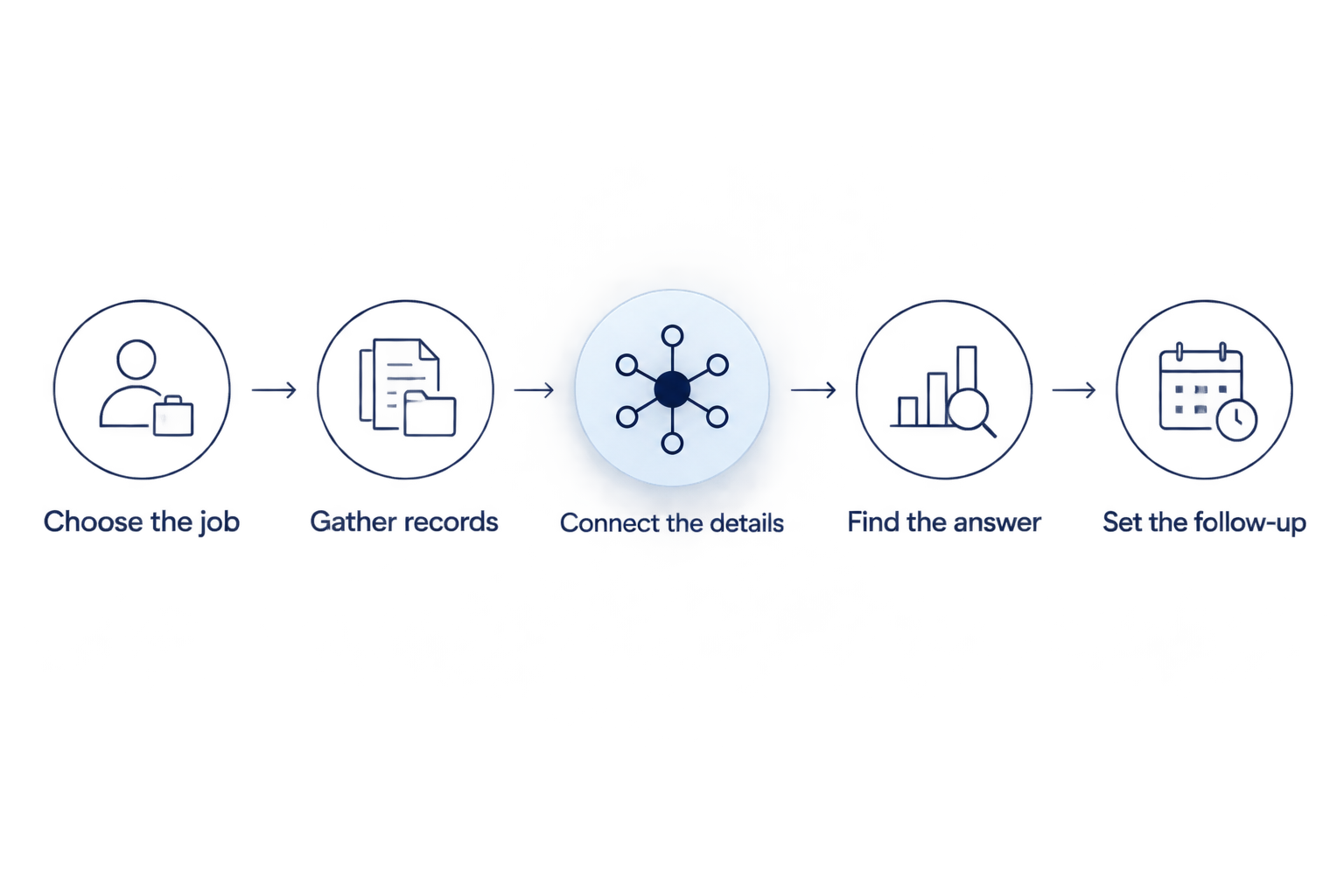
Use an inspection report and a completed repair invoice to evaluate maintenance software. For leasing or bookkeeping software, add a sample tenancy or expense record. Follow the same sequence for each relevant option:
- Choose the job. Write down the task you need to finish without searching through several places.
- Gather records. Use documents you already have, not a perfectly prepared sample created for the demonstration.
- Connect the details. Check whether the property, unit, equipment, document, and work history stay connected where needed.
- Find the answer. Return to a practical question: what was repaired, what did the contractor recommend, and what remains unknown?
- Set the follow-up. Decide where the next action belongs and who will keep it current.
Keep unknown details visibly unknown. If the installation date is missing, do not substitute the date of the oldest invoice. A service visit establishes that work happened; it does not necessarily establish when the equipment was installed.
For a closer look at what belongs in the record, use the guide to apps for keeping a rental property maintenance log.
Which software should you choose?
For 2026, choose Propertymasterhq when your main problem is making maintenance decisions from scattered property records. Begin with an inspection report, then add the invoices and quotes that explain subsequent work.
Choose Avail for leasing paperwork, Stessa for rental bookkeeping, or Buildium when several operating workflows need a shared home. Keep an existing system if it already does its job well. Replacing working rent collection will not, by itself, make a repair decision clearer.
FAQ
What's the best property management software for small rental portfolios in 2026?
The best choice depends on the job: maintenance decisions, leasing administration, rental bookkeeping, or broader operations. Compare the workflow you need to improve before comparing feature lists.
Is Propertymasterhq a fit for a landlord with one rental?
Propertymasterhq serves self-managing landlords with 1–20 rental units. It fits an owner who wants uploaded property documents, equipment information, and maintenance history to support repair decisions.
Should I choose maintenance software or rent collection software?
Choose maintenance software for repair history and upkeep decisions; choose rent collection software for payment administration. These are separate jobs, even when a platform offers both.
Do I need every old property document before starting?
No. An uploaded inspection report can provide a maintenance baseline, and you can add invoices, quotes, and other documents over time. Undocumented information should remain marked as missing.
Is rental bookkeeping the same as maintenance tracking?
No. Bookkeeping records income and expenses, while maintenance tracking preserves what happened to the property and its equipment. A repair invoice can support both records, but each needs different details.
What should I check before switching landlord software?
Check how your actual records move through the tasks you perform. Confirm where documents live, how you retrieve them, what information requires manual upkeep, and how you can take records with you if you leave.
One last thing
An invoice marked paid tells you the bill was settled. It does not necessarily tell you the underlying problem was resolved.
Keep the contractor's diagnosis, completed work, and recommended follow-up beside the invoice. The next time the same symptom appears, that context gives you a better starting point than the amount alone.