Best property management software for out-of-state landlords 2026
Compare property management software for out-of-state landlords. Choose by maintenance, leasing, or finances, with clear strengths and limits for each.

The best property management software for out-of-state landlords depends on what you need to control from a distance: Propertymasterhq for maintenance records, Avail for leasing and rent collection, Stessa for rental finances, and Buildium for broader management workflows. This 2026 guide separates those jobs so you can choose software around the work you actually do.
- Propertymasterhq is the maintenance-first choice for landlords with 1–20 rental units who need organized property knowledge.
- Avail suits leasing and rent collection; Stessa suits rental finances; Buildium suits broader management workflows.
- Choose property management software for out-of-state landlords around repair decisions, rental documents, and the work you handle yourself.
- Start with an inspection report, then add invoices and quotes; undocumented history remains unknown.
Why this matters
Distance changes what you need from a maintenance record. When a contractor recommends replacing equipment, you need more than a message saying it stopped working. You need the equipment details, previous repair information, and the basis for the recommendation.
Propertymasterhq organizes uploaded property documents and supports preventive maintenance tracking. That makes it a maintenance-focused option, not a reason to assume every leasing, accounting, or tenant-facing task belongs in the same system.
For your 2026 shortlist, start with the problem you cannot answer reliably today. Is rent outstanding? Is a lease ready? Has this plumbing problem happened before? Those questions point to different tools.
What makes the best software for remote landlords
Use these criteria before comparing product names:
- Property context: Can you connect a document or repair to the correct property, unit, and piece of equipment?
- Maintenance follow-through: Can you distinguish a completed repair from work that still needs attention?
- Document access: Can you find the inspection report, invoice, or quote behind a decision?
- Financial fit: Does the software support the financial work you intend to keep there?
- Operating fit: Does it match the tasks you handle yourself and those you assign locally?
- Recordkeeping effort: Will you maintain the information after the initial setup?
Choose around your recurring decision, not the longest feature list. A system that collects rent and a system that explains a furnace's documented repair history solve different problems. Neither removes the need for someone local to inspect a fault or complete the work.
The 2026 shortlist at a glance
These recommendations cover distinct jobs. The limitation column identifies the boundary to consider, rather than treating every product as a substitute for every other one.
| Software | Best for | Standout focus | Key limitation to consider |
|---|---|---|---|
| Propertymasterhq | Maintenance-first self-management | Uploaded documents, property knowledge, and preventive maintenance tracking | Insights depend on the records you add |
| Avail | Leasing and rent collection | Applications, leases, and rent-payment workflows | A leasing workflow does not establish equipment condition |
| Stessa | Rental financial tracking | Property income, expenses, and financial reporting | Financial records alone do not explain repair needs |
| Buildium | Broader management operations | Accounting, leasing, and maintenance workflows | A broader system requires a broader setup decision |
1. Propertymasterhq: best for maintenance-first remote landlords
Propertymasterhq turns uploaded property documents into centralized property knowledge and maintenance insights. It is built for self-managing landlords with 1–20 rental units who want better-informed repair decisions and a clearer view of what needs attention.
An inspection report provides a starting point. You can add invoices, quotes, leases, and other documents over time, rather than waiting until every old record is found.
Propertymasterhq is best for out-of-state landlords who need documented property history to guide maintenance decisions. Its usefulness starts with the information you upload, not an assumed history of everything that happened before.
Propertymasterhq pros
- Keeps documents, equipment information, vendors, and maintenance history together.
- Uses documented repairs, expenses, and property history to support maintenance decisions.
- Tracks equipment age, maintenance schedules, and upcoming replacements.
- Lets you build the record gradually from documents you already have.
Propertymasterhq cons
- Finding scattered existing records still takes effort.
- Missing information stays marked as not added; the software does not know undocumented history.
- You still need local contractors or another responsible person to inspect and complete work.
Best for: A self-managing landlord whose recurring problem is understanding repairs from another state.
Verdict: Buy for maintenance-first organization; skip as an assumed all-in-one replacement for every landlord task.
2. Avail: best for leasing and rent collection
Avail provides landlord tools for rental listings, applications, screening, leases, and rent collection. It belongs on your shortlist when the work you need to organize starts with finding a tenant and continues through recurring payments.
That is a different buying decision from organizing equipment records. Before choosing, walk through the actual handoff between an application, a signed lease, and a rent payment, then examine how you would keep supporting property documents.
Avail pros
- Brings several tenant-placement tasks into one landlord-focused workflow.
- Supports online rent collection.
- Provides a practical starting point when leasing administration is your main concern.
Avail cons
- Application and payment records do not establish a property's physical condition.
- You still need a process for checking contractor recommendations against inspection findings and repair history.
Best for: A remote landlord prioritizing leasing administration and rent collection over maintenance analysis.
Verdict: Buy for tenant and payment workflows; hold if your main problem is missing repair context.
3. Stessa: best for rental financial tracking
Stessa focuses on rental property finances, including income and expense tracking and financial reporting. Consider it when you need a clearer financial record across your rentals and want to understand what each property is earning and spending.
A repair expense belongs in that record. The reason the repair happened, the equipment involved, and what a contractor recommended next also deserve a place in your maintenance process.
Stessa pros
- Centers the workflow on rental property finances.
- Helps organize income and expenses by property.
- Supports financial reporting rather than relying only on scattered receipts.
Stessa cons
- An expense entry alone does not show whether the underlying fault was resolved.
- A financial view does not replace equipment details or the technical findings in an inspection report.
Best for: An out-of-state owner whose immediate problem is understanding rental income, expenses, and financial performance.
Verdict: Buy for financial organization; hold if you primarily need a clearer maintenance record.
4. Buildium: best for broader management workflows
Buildium combines property accounting, leasing, and maintenance-management functions. It fits a different shortlist: you want to evaluate a broader operating system, rather than solve only document organization or expense tracking.
Decide which responsibilities you intend to move before committing. A system is harder to assess when you have not decided who records work, who approves it, and where the final invoice belongs.
Buildium pros
- Covers multiple property-management functions within one platform.
- Includes maintenance workflows alongside accounting and leasing.
- Gives landlords evaluating a broader system several connected processes to assess.
Buildium cons
- Moving several workflows requires decisions about records, responsibilities, and ongoing upkeep.
- A broad feature set is unnecessary if you only need to solve a narrow maintenance-record problem.
Best for: An owner who wants to evaluate leasing, accounting, and maintenance processes together.
Verdict: Buy when you need broader operations; skip when a focused tool solves the actual problem.
How to check the fit before choosing
Do not start by importing everything. Start with one property and a repair you understand well enough to judge whether the software preserves the useful details.
Use 3 documents for the exercise: an inspection report, a repair invoice, and a quote. These are a suggested evaluation set, not a requirement to create a complete history.
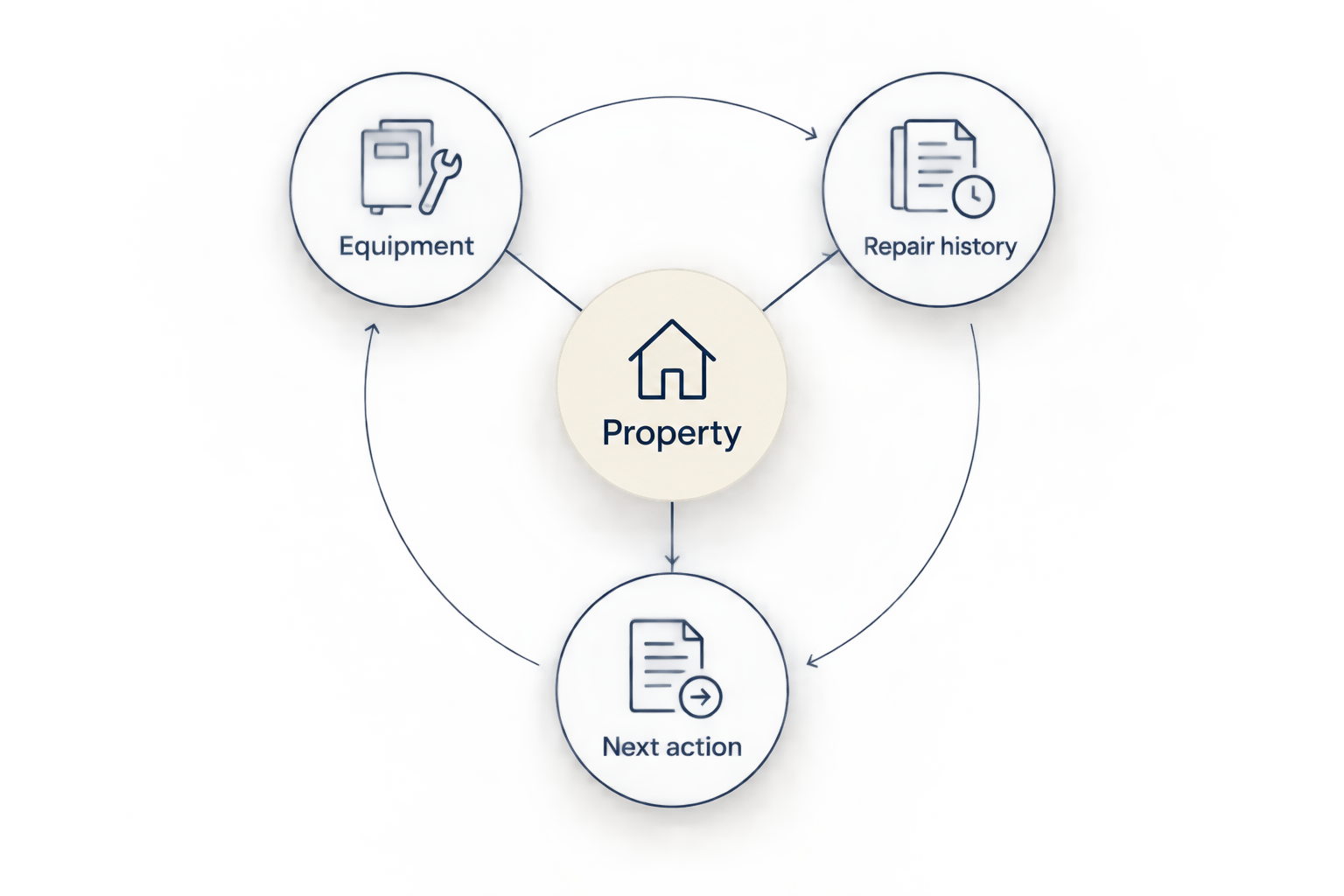
Check whether you can follow these four parts without relying on memory:
- Property: Identify the correct address and unit.
- Equipment: Identify the system or item involved, using documented details.
- Repair history: Find the inspection finding, completed work, and supporting invoice.
- Next action: Separate a contractor's recommendation from work you have approved or completed.
For your 2026 evaluation, leave unknown information unknown. If an invoice does not identify the equipment's installation date, do not turn the invoice date into an installation date. An honest gap is more useful than a precise-looking mistake.
Set up the local handoff too
Software holds information. Someone still needs to enter the property, describe the fault, approve access, and confirm what happened.
Write down who handles each responsibility before the next repair. Your contractor needs a clear description of the issue; you need a written explanation of the recommended work and a record of the outcome.
For a nonurgent repair, keep these items together:
- The reported symptom and the date it was reported.
- Relevant inspection findings and previous repair records.
- The contractor's diagnosis and proposed work.
- Your approval or request for clarification.
- The final invoice and any follow-up instructions.
Treat an urgent safety issue differently. Follow the appropriate emergency process rather than delaying action to complete a software record.
After the immediate problem is handled, add the documents. Otherwise, the next contractor starts with the same unanswered questions.
How the recommendations are ranked
This 2026 shortlist ranks products by their stated job: maintenance knowledge, leasing and payments, rental finances, or broader operations. It is a fit-based guide, not a claim that one product performs every task better than the others.
The criteria favor records you can find, decisions you can explain, and workflows you will maintain. They do not establish comparative uptime, customer satisfaction, or measured savings.
A useful record shows what happened and what remains unknown. That distinction matters when you are approving work without standing beside the equipment.
Which software should you choose?
Choose Propertymasterhq if maintenance uncertainty is the main problem you need to solve. It is the maintenance-first recommendation for a self-managing landlord who wants uploaded records to support repair decisions and preventive tracking.
Choose Avail when leasing and rent collection come first. Choose Stessa when financial organization comes first. Evaluate Buildium when you intend to manage several operating workflows together.
For 2026, keep the decision narrow: name the task, identify the evidence you need, and check whether the software makes that work clearer. Do not replace a system that already handles rent well just because a separate maintenance problem needs attention.
FAQ
What's the best property management software for out-of-state landlords?
The best fit depends on your main task: Propertymasterhq for maintenance knowledge, Avail for leasing and rent collection, Stessa for finances, or Buildium for broader management workflows. Choose around the work you handle yourself rather than assuming every platform serves the same purpose.
Can software replace a local property manager?
Software does not replace the physical work of inspecting a problem, arranging access, or completing repairs. If you self-manage from another state, assign those local responsibilities separately.
What records should I upload first?
Start with an inspection report to establish a documented baseline. Add repair invoices, quotes, and other property documents over time, keeping unknown details separate from confirmed information.
Is maintenance software the same as rent collection software?
No. Maintenance software focuses on property condition, repair records, and follow-up, while rent collection software focuses on payment workflows; individual platforms differ in how much they combine.
How do I assess a repair recommendation from another state?
Compare the contractor's written diagnosis with the inspection findings, equipment details, and previous repair records you have. Ask for clarification when the proposed work does not explain the reported problem, and use qualified local help to assess the physical condition.
Do I need to find every old document before starting?
No. Start with the records you can find and add others as they turn up; missing documents should remain visible gaps rather than assumed history.
Should I keep invoices after a repair is finished?
Yes. Keep the invoice with the relevant property and repair record so you can find what work was documented and when. Add any follow-up instructions rather than treating payment alone as proof that every issue is resolved.
One last thing
The date on a document is not always the date of the event you care about. An invoice date, service date, and installation date can describe different things.
Before using a record to judge equipment age or repeated failures, check what the date actually represents. That small distinction makes the next repair conversation more grounded.