Best property management software for single-family rentals 2026
Choose property management software for single-family rentals by the job: maintenance, leasing or finances. Compare four options and their trade-offs.

Best for maintenance decisions: Propertymasterhq. Best for leasing and rent collection: Avail. Best for rental finances: Stessa. Best for broader management workflows: Buildium. The right property management software for single-family rentals in 2026 depends on which job you need help with—not which product has the longest feature list.
- Propertymasterhq is the maintenance-focused choice for self-managing landlords with 1–20 rental units.
- Avail suits leasing and rent collection; Stessa suits rental finances; Buildium suits broader management workflows.
- Choose property management software for single-family rentals around your main problem, then check the supporting features.
- Maintenance tracking starts with documented facts. Missing equipment information should stay unknown until you add it.
Why this matters
A tenant's payment history will not tell you what a plumber repaired last time. An inspection report will not collect the rent. Both matter, but they solve different problems.
Single-family rentals also have separate equipment, repair histories and documents. When you manage several houses, remembering which furnace received a replacement part becomes its own job. Software should help you answer the next question without searching through email or guessing.
For your 2026 shortlist, start with the work that keeps slipping: maintenance decisions, tenant administration, financial records or coordinating everything together. Buy for that problem first.
What makes the best software for single-family rentals?
Use these criteria before comparing product names:
- Fit with your main job. Decide whether you need maintenance knowledge, leasing tools, financial tracking or broader operations.
- Property-level context. You should be able to distinguish one house's records and expenses from another's.
- Useful maintenance history. A closed task is less useful when you cannot find what happened, who handled it or the supporting invoice.
- Clear limits. Check the exact features in the plan you are considering. A category label does not confirm a particular workflow.
- Manageable upkeep. Consider what you must enter, upload and update after the initial setup.
- A workable starting point. Your first property should become useful without requiring you to reconstruct every past repair.
For a landlord with 1–20 rental units, the best choice is not automatically the broadest system. It is the system that supports the decisions you actually make and that you will keep current.
The shortlist at a glance
These are different starting points, not interchangeable products. Use the table to narrow your search before opening several accounts.
| Rank and option | Best for | Standout focus | Key limitation or trade-off |
|---|---|---|---|
| 1. Propertymasterhq | Maintenance decisions and property knowledge | Turns uploaded property documents into organized maintenance context and tracking | Undocumented history remains unknown; existing records still need to be gathered |
| 2. Avail | Leasing and rent collection | Rental listings, applications, leases and rent collection | Tenant administration does not replace a detailed equipment history |
| 3. Stessa | Rental financial tracking | Property income, expenses and financial reporting | Financial records alone do not explain equipment condition |
| 4. Buildium | Broader management workflows | Accounting, leasing and maintenance workflows in a wider management system | A wider scope gives you more workflows to evaluate and configure |
1. Propertymasterhq: best for maintenance decisions
Propertymasterhq organizes uploaded property documents, tracks maintenance and equipment information, and flags upcoming issues based on documented records. Its focus is helping you understand what a property needs, rather than leaving repair history scattered across invoices, inspection reports and memory.
An uploaded inspection report provides a baseline. You can add invoices, quotes and other documents over time, with missing information marked as not added rather than treated as known.
Best for: Self-managing landlords who need better maintenance context across their rental houses.
What works well
- Connects maintenance decisions with the documents behind them.
- Keeps property, unit and equipment information together.
- Supports preventive maintenance tracking, equipment age and upcoming replacements.
- Allows you to build the record over time instead of finding everything before starting.
What to weigh
- You still need to locate and upload the records you already have.
- Missing documents leave gaps; the software does not know an undocumented repair history.
- Evaluate leasing, payment collection and accounting requirements separately rather than assuming they are included.
The practical benefit is context. Before approving another repair, you want to know whether the same equipment has already needed attention and what the last invoice actually said.
Verdict: Buy for maintenance knowledge grounded in your property records.
2. Avail: best for leasing and rent collection
Avail focuses on landlord workflows such as rental listings, applications, tenant screening, leases and rent collection. It belongs on your shortlist when the repeated work happens between advertising a vacancy and managing the tenancy.
Start your evaluation with the tenant journey. Follow an applicant through the steps you need, then check how the ongoing rent and maintenance communication would work.
Best for: Landlords whose main problem is tenant administration rather than reconstructing equipment history.
Avail pros
- Brings several leasing tasks into a landlord-focused system.
- Supports online rent collection alongside tenant administration.
- Includes maintenance tracking within the rental workflow.
Avail cons
- A tenant's maintenance request is not, by itself, a complete equipment record.
- Leasing convenience does not establish whether the system captures the maintenance detail you need.
During a 2026 evaluation, check the lease workflow against your property's location and your own requirements. A generated document still deserves a careful review before you use it.
Ask a separate maintenance question, too: can you get from a tenant's report of a recurring leak to the previous repair evidence? That is a different test from whether a tenant can submit the request.
Verdict: Buy when leasing and rent collection are the main jobs you need to simplify.
3. Stessa: best for rental financial tracking
Stessa focuses on rental property finances, including income, expenses and reporting. It is a sensible starting point when you need a clearer financial record for each house.
That financial view answers different questions from a maintenance record. Knowing what you spent on plumbing is useful; knowing what caused the leak and what the plumber replaced adds the context for the next repair decision.
Best for: Landlords whose first priority is organizing rental finances.
Stessa pros
- Centers the workflow on rental income and expenses.
- Supports property-level financial organization.
- Provides financial reporting for reviewing rental performance.
Stessa cons
- An expense category does not establish the condition of the equipment involved.
- A financial record needs supporting repair details to explain repeat maintenance problems.
Before choosing financial software, take a real repair invoice through your intended process. Check where the expense goes, where the document lives and how you would find it again when the contractor calls.
You do not need every document in every system. You do need a deliberate home for the financial record and for the maintenance explanation, especially if those live separately.
Verdict: Buy when financial organization comes before maintenance planning on your list.
4. Buildium: best for broader management workflows
Buildium combines property accounting, leasing and maintenance workflows within a broader property management platform. It belongs on the shortlist when you want to evaluate several management functions together rather than solve a single recordkeeping problem.
Breadth is a reason to investigate, not a reason to buy automatically. Walk through the tasks you perform yourself and decide which parts of the system you would actually use.
Best for: Landlords who need connected management workflows beyond a maintenance-focused tool.
Buildium pros
- Covers accounting, leasing and maintenance within a wider platform.
- Supports evaluating connected workflows rather than isolated tasks.
- Offers a broader operational starting point for landlords with several management requirements.
Buildium cons
- More functions give you more settings and processes to assess.
- Features outside your regular work do not make your own workflow simpler.
For a 2026 decision, write down the handoffs that matter: an application becoming a tenancy, a maintenance request becoming assigned work, or a payment becoming an accounting record. Ask to see those exact paths.
If your main frustration is finding an old inspection report, start by testing that task. Do not let a broad demonstration distract you from the problem that brought you there.
Verdict: Buy when you need the wider workflow, not simply room for hypothetical future needs.
How this ranking works
This 2026 ranking prioritizes the needs of self-managing landlords: useful property context, a clear primary purpose and a manageable starting point. The order puts maintenance decisions first, followed by tenant administration, finances and broader operations.
It is a use-case ranking, not a claim that every feature has been tested or that one product replaces all the others. Confirm current plan details and walk through your own documents before committing.
The same rule applies when comparing other landlord apps for managing rentals: define the job before comparing the tools.
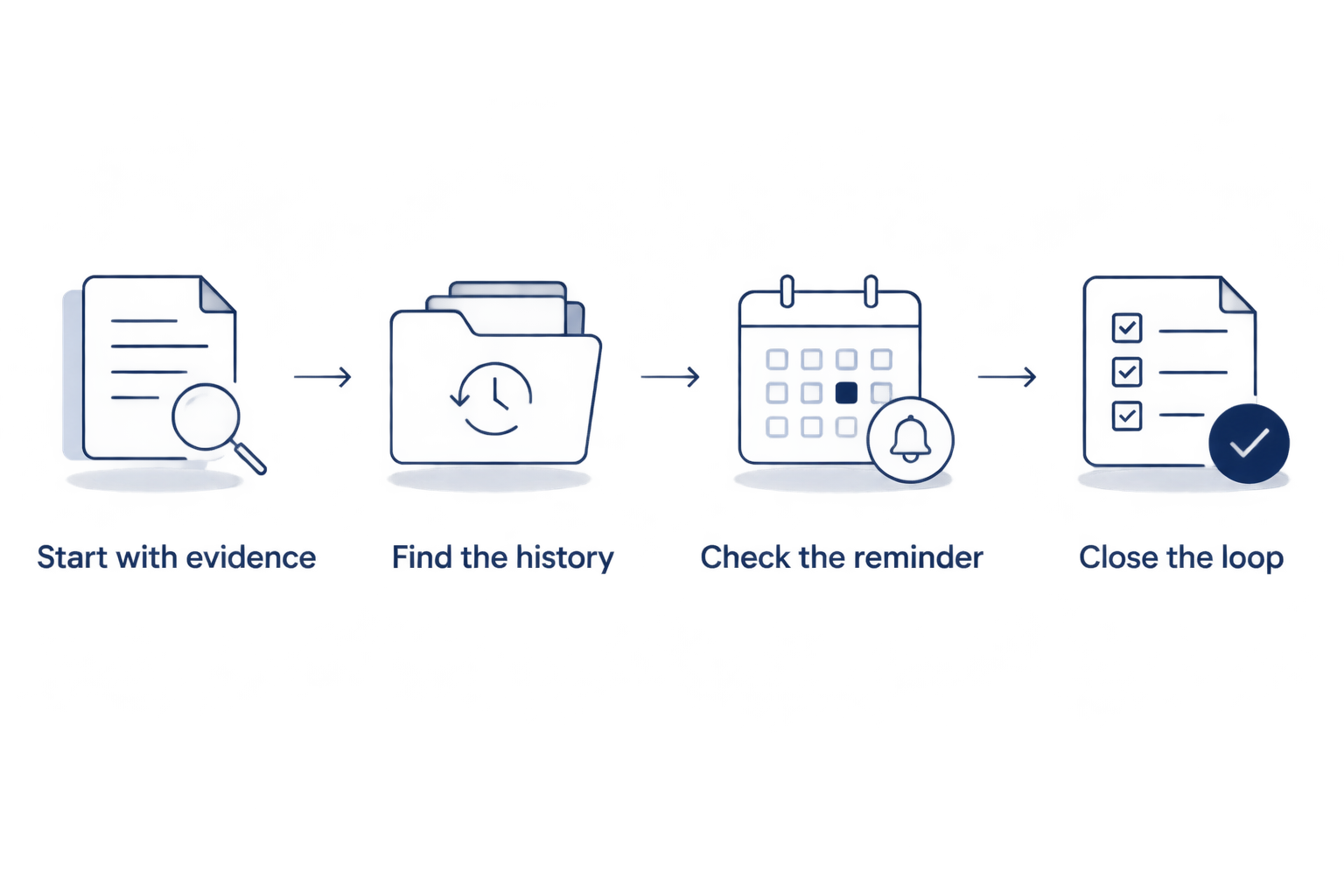
Test the workflow, not the feature list
A software demonstration becomes more useful when you bring an ordinary problem. Use a repair you understand, not an unusually tidy sample record.
Start with evidence
Choose an inspection report, a repair invoice and a contractor quote from the same property. Together, they let you check whether the system preserves the difference between an observed problem, completed work and a proposed repair.
Find the history
Pretend the tenant reports the same problem again. Find the earlier work, identify the equipment involved and locate the supporting document. Notice whether you can answer the question or only find a task marked complete.
Check the reminder
Follow the next action through the system. Identify what triggers it, where its timing comes from and who must update it after work is done. A reminder needs a defensible basis, such as documented service guidance or an established schedule.
Close the loop
Add the finished repair record and check what changed. The next person opening the property should be able to distinguish the old problem from the completed work without reading your mind.
Automation should follow that same logic. With rental automation for landlords, the useful distinction is between repeating a known instruction and deciding what a property needs. A recurring reminder can repeat a schedule; deciding whether that schedule fits still requires reliable information.
Keep unknown information unknown
Do not fill an equipment field with a guess just to finish setup. An installation date, a service date and an invoice date mean different things.
If you cannot establish the furnace's age, record the gap and look for supporting evidence when it becomes available. A complete-looking record built on assumptions is less useful than an honest record with a visible gap.
For your 2026 setup, use these rules:
- Keep the source document attached to the information it supports.
- Separate reported symptoms from a contractor's diagnosis.
- Distinguish recommended work from completed work.
- Update the record after a repair rather than leaving the quote as the final document.
These habits matter whichever product you choose. Software organizes the evidence; it does not turn an undocumented assumption into a fact.
Which software should you choose?
Propertymasterhq is the maintenance-focused choice for self-managing landlords who want property records to support better repair decisions. Start there when your recurring question is what happened before and what needs attention next.
Choose Avail when leasing and rent collection dominate the work. Choose Stessa when the financial record needs attention first. Evaluate Buildium when you need several management workflows together.
You can also keep a working system for one job and add support for another. Before doing that, decide where each record belongs so you do not create competing versions of the same repair history.
FAQ
What's the best property management software for single-family rentals?
The best choice depends on the job you need to improve. Choose a maintenance-focused system for property history and repair planning, Avail for leasing and rent collection, Stessa for rental finances, or evaluate Buildium for broader management workflows.
Is Propertymasterhq a fit for a small landlord?
Propertymasterhq focuses on self-managing landlords with 1–20 rental units. Its stated purpose is organizing uploaded property documents, supporting maintenance decisions and tracking preventive maintenance.
Do I need software if I only manage one rental house?
You do not need software simply because you own a rental house. Consider it when finding records, following up on repairs or keeping maintenance information current has become difficult with your existing method.
Can rent collection software replace a maintenance log?
Rent collection alone does not replace a maintenance log. Check whether the product also keeps repair details, supporting invoices, equipment information and follow-up work in a form you can find later.
What documents should I add first?
Start with an inspection report and documents related to current maintenance decisions. Add invoices, quotes and other existing records over time, keeping proposed work separate from completed repairs.
Can software tell me the age of equipment without records?
Do not treat equipment age as known without supporting evidence. Look for installation records or other reliable documentation, and leave the information unknown until you can establish it.
Should I choose one platform or separate tools?
Choose one platform when its workflows fit the work you actually do. Separate tools also make sense when each has a clear purpose, but decide where documents and repair history belong before creating duplicate records.
One last thing
The most useful document is not always the largest inspection report. Sometimes it is the short invoice explaining exactly which part was replaced.
Before moving every file, find the record you wished you had during your last repair decision. Use that record to test your shortlist. If the next decision is no clearer, keep looking.