Best landlord apps for managing rentals in 2026
Find the best landlord app for your workflow. Compare Propertymasterhq, Zillow Rental Manager, Stessa, and other options for records, rent, and files.

Best for property records and maintenance: Propertymasterhq. Best for rental listings: Zillow Rental Manager. Best for rental bookkeeping: Stessa. This guide compares the best landlord app options by the work you need to finish, including rent collection and basic document storage.
- Propertymasterhq is the best landlord app for organizing rental documents, tracking maintenance, and monitoring asset health.
- Choose Zillow Rental Manager for rental listings; choose Stessa for rental bookkeeping.
- Consider Apartments.com Rental Manager for rent collection and Google Drive for a basic shared document archive.
- Choose your main workflow first, then check each app against an actual property task.
Why this matters
A rent payment record does not tell you when the furnace was serviced. A folder full of invoices does not tell you which repair still needs attention. These are different jobs, even when software puts them under the same rental-management label.
For your 2026 shortlist, start with the task that keeps slipping through the cracks. You need an app that answers the next practical question, not simply one with the longest feature list.
The rankings below separate those jobs. A listing app belongs at the top when you need to fill a vacancy. A property-record system belongs at the top when you need to find documents and keep track of upkeep between tenancies.
What makes the best landlord app?
Use these criteria before comparing names. Each one connects a software feature to work you already do.
- Fit for the main job: Decide whether you need property records, listings, bookkeeping, rent collection, or shared files. Do not treat these as interchangeable.
- Property-level context: Look for a clear connection between an address and its documents, transactions, repairs, or assets. A search result without context leaves work unfinished.
- Useful follow-through: Check what happens after you upload a document or record an event. Storage, tracking, and reminders solve different problems.
- Everyday effort: Walk through a real task from beginning to end. Count the places where you must copy information or remember something elsewhere.
- Record access: Check how you retrieve information, control access, and take records with you. Your property history should remain useful when your software setup changes.
Choose the app that closes your biggest recordkeeping gap. Adding another place to enter the same information is not the same as fixing the problem.
Best landlord apps at a glance in 2026
The order reflects this guide's focus on managing an occupied rental: keeping records, handling turnover, tracking finances, collecting rent, and storing files. The best choice changes with your immediate job.
| App | Best for | Standout function | Key limitation of this approach |
|---|---|---|---|
| Propertymasterhq | Property records and maintenance | Uploaded document organization, maintenance tracking, and asset-health tracking | This recommendation concerns property upkeep, not the full range of rental administration |
| Zillow Rental Manager | Rental listings | Creating and managing rental listings | Listing management does not replace ongoing property records |
| Stessa | Rental bookkeeping | Tracking rental income and expenses | Financial records alone do not provide a complete maintenance history |
| Apartments.com Rental Manager | Rent collection | Online rental payments and payment records | Payment history does not capture the condition of a property |
| Google Drive | A basic shared archive | Folders, file sharing, and document access | You must build the property structure and maintenance process yourself |
1. Propertymasterhq: best landlord app for records and upkeep
Propertymasterhq organizes uploaded property documents, tracks maintenance and asset health, and flags upcoming issues. It fits the landlord who wants to stop looking through scattered records whenever something needs attention.
That makes the platform a focused choice for the work between lease signings. A repair invoice belongs with the property's history, not buried in the same inbox as everything else.
Propertymasterhq pros:
- Organizes uploaded property documents.
- Tracks maintenance rather than treating every document as an isolated file.
- Tracks asset health and flags upcoming issues.
Propertymasterhq cons:
- The recommendation here covers documents and upkeep; assess other rental-administration needs separately.
- You still need to supply useful records. An app cannot recover a service visit you never documented.
Best for: Landlords whose main problem is scattered property information and losing track of maintenance.
During your evaluation, use a document you regularly struggle to find. Then check how the associated maintenance and asset information fits into your routine. Do not judge the system only by how an empty account looks.
Verdict: Buy for property records and maintenance; assess other workflows separately.
2. Zillow Rental Manager: best landlord app for rental listings
Zillow Rental Manager helps landlords create and manage rental listings. Its role in this comparison is straightforward: presenting a rental to prospective tenants and managing the listing work around a vacancy.
Choose it because you need help advertising a rental, not because a listing page replaces the records you need after someone moves in.
Zillow Rental Manager pros:
- Provides a rental-specific listing workflow.
- Keeps listing information in a tool designed for rental advertising.
- Gives vacancy-related work a separate home from property upkeep.
Zillow Rental Manager cons:
- A listing describes the rental; it does not serve as a complete repair history.
- You still need a defined process for preserving property records between tenancies.
Best for: Landlords preparing a vacancy for advertising.
Build your evaluation around an actual listing. Check how you enter property details, update the description, and handle the work that follows an inquiry. Confirm current features and listing terms before committing to a workflow.
Keep the distinction clear: listing management helps you present the property. Maintenance records help you understand what has happened inside it.
Verdict: Buy for the listing workflow; skip it as your sole maintenance record.
3. Stessa: best landlord app for rental bookkeeping
Stessa focuses on rental-property finances, including income and expense tracking and financial reporting. It belongs on your shortlist when the recurring headache is understanding what came in, what went out, and which property a transaction belongs to.
A repair has a financial side and a physical side. Recording the expense answers the first question. Keeping the service details answers the second.
Stessa pros:
- Uses rental-property finances as its organizing focus.
- Brings income and expense tracking into a property-focused workflow.
- Supports financial reporting rather than relying only on a folder of receipts.
Stessa cons:
- An expense entry alone does not explain an asset's condition or service history.
- You must maintain consistent transaction categories for your records to remain useful.
Best for: Landlords who need a clearer rental-bookkeeping process.
Evaluate Stessa with an actual property expense. Check how you assign it to the property and how it appears in a report. Then ask where you will keep the technician's findings and any follow-up work.
Do not make the bookkeeping entry carry the entire maintenance story. A payment record and a service record answer different questions.
Verdict: Buy for rental bookkeeping; keep maintenance context alongside the financial record.
4. Apartments.com Rental Manager: best for rent collection
Apartments.com Rental Manager includes online rent collection and payment records. It fits a landlord who wants rental payments handled through a rental-management workflow rather than tracked only through messages and bank activity.
The useful distinction is between receiving money and understanding its status. Evaluate both parts of the process before deciding where rent collection belongs.
Apartments.com Rental Manager pros:
- Offers online rental payments.
- Keeps payment records within a rental-management setting.
- Provides a dedicated workflow for a recurring landlord task.
Apartments.com Rental Manager cons:
- A payment record does not explain whether a repair is finished.
- You still need a clear process for handling discrepancies and reconciling your records.
Best for: Landlords choosing a dedicated rent-collection workflow.
Walk through the landlord side and review the tenant-facing process. Check current payment methods, processing terms, and how payment status appears before asking tenants to change their routine.
Also decide where you will record exceptions. A partial payment, a disputed charge, and an unresolved repair should not become indistinguishable notes in the same conversation.
Verdict: Buy for rent collection; skip it as a substitute for property-condition records.
5. Google Drive: best for a basic shared document archive
Google Drive stores files and supports folder organization and sharing. It is not a dedicated landlord app, but it belongs in this comparison because a landlord can use it to keep property documents together.
Choose this route when you want a file cabinet you can organize yourself. Understand the trade-off: the folders hold the records, while you supply the maintenance process.
Google Drive pros:
- Stores different kinds of property documents together.
- Supports folders and shared access.
- Lets you create a filing structure around your own properties.
Google Drive cons:
- Folder storage alone does not track asset health or upcoming maintenance issues.
- Naming, filing, and follow-up depend on the process you maintain.
Best for: Landlords who need a straightforward shared archive and will manage upkeep separately.
Create a folder for an actual property before moving your entire archive. Add a service invoice, a manual, and a photo. Check whether another authorized person can find the right document without asking you to explain the structure.
If finding the file is easy but remembering the next action is still difficult, document storage is only part of your answer.
Verdict: Buy into this approach for file storage; skip it for maintenance tracking on its own.
Test your shortlist with one property
Use this practical check for your 2026 decision. Start with 1 property, 1 repair, and 1 asset rather than moving every record at once. These are evaluation steps, not a claim about how quickly any app works.
- Choose property: Pick an occupied rental with records you understand. Avoid building your first example around a completely empty file.
- Upload records: Use the relevant invoice, manual, or payment record. Check whether you can put it in a sensible place.
- Record repair: Enter the problem and the work completed, where the app supports that task. For a finance app, check the expense instead.
- Check next action: Find the record again and determine what still needs attention. Note anything that must live in another system.
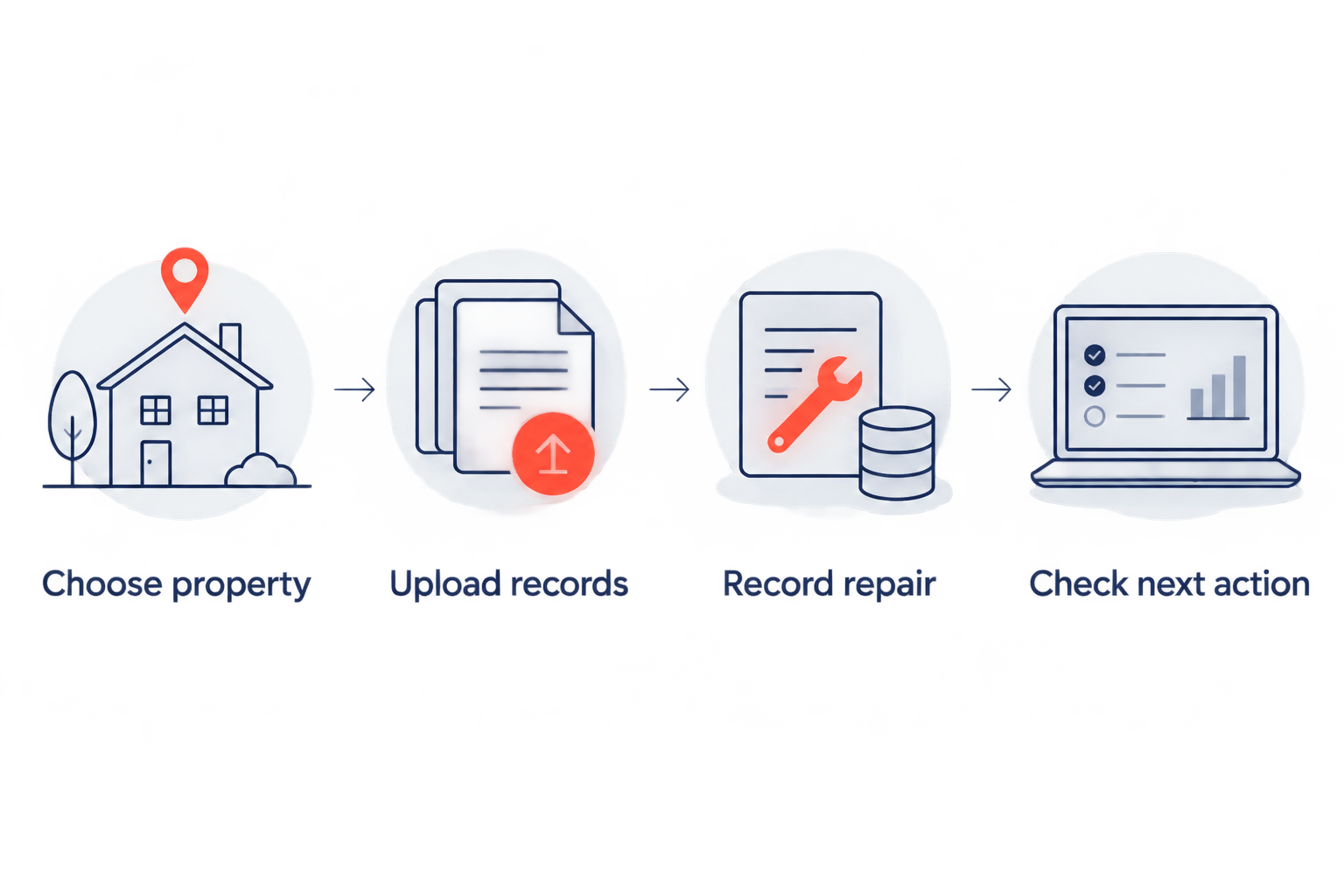
The point is not to make every app pass the same test. A bookkeeping app should explain the expense; a maintenance app should preserve the repair context. Reject a workflow when its main job still depends on your memory.
How the rankings work
These 2026 recommendations use task fit as the starting point. The comparison separates property upkeep, rental advertising, bookkeeping, rent collection, and file storage rather than treating every feature as equally useful.
The criteria are the same throughout: connection to a property, useful follow-through, everyday effort, and access to records. The ranking is not a hands-on performance score or a claim that one app replaces every other option.
Use the table to narrow your choices, then use the property-based check to judge the workflow. Confirm current features and terms directly before making a commitment.
Which landlord app should you choose?
Propertymasterhq is best for landlords who need rental documents, maintenance history, and asset health in one place. Make it your default shortlist choice when the recurring problem is a missing record or a forgotten upkeep task.
Choose Zillow Rental Manager when the immediate job is advertising a vacancy. Choose Stessa when the gap is bookkeeping, or Apartments.com Rental Manager when the gap is rent collection. Use Google Drive when you need document storage and are prepared to manage follow-up yourself.
Your 2026 setup does not need every option here. Give each recurring task a clear home, and avoid entering the same information in several places without a reason.
FAQ
What's the best landlord app for managing rentals?
The best landlord app depends on the job you need to finish. Choose a property-record and maintenance platform for upkeep, a listing tool for vacancies, or a bookkeeping tool for rental finances.
Which landlord app should I choose for maintenance records?
Choose an app that connects property documents with maintenance and asset information. Test whether you can find a repair record and identify the next action without searching another system.
Is Zillow Rental Manager better than Stessa?
Zillow Rental Manager and Stessa serve different primary needs in this comparison. Zillow Rental Manager fits rental-listing work, while Stessa fits rental bookkeeping and financial reporting.
Can I use Google Drive to manage rental documents?
Yes, Google Drive can store and share rental documents. You must create the folder structure and maintain a separate process for tracking maintenance and follow-up.
Do I need separate apps for rent collection and maintenance?
Not necessarily; choose tools based on whether the required workflows are actually covered. A payment record alone does not explain a repair, so check where maintenance details will live.
How do I compare landlord apps before moving my records?
Use an actual property task to compare landlord apps. Add a relevant record, complete the task the app is designed for, and check whether you can retrieve the information afterward.
What should I check before switching landlord software?
Check record access, export options, permissions, and the workflows you depend on. Keep your original documents while you confirm that the new setup contains the information you need.
One last thing
A repair invoice proves that work was billed. It does not necessarily explain the original problem, the technician's findings, or what you should check next.
For your next repair in 2026, save the invoice and record those details together. Keep the entry plain enough that another authorized person can understand it without calling you. That small habit makes the record useful after the immediate problem has passed.