Best property management software for small multifamily owners 2026
Find property management software for small multifamily owners. Compare maintenance, leasing and accounting tools to choose what your rentals need.

The best property management software for small multifamily owners in 2026 depends on the job: Propertymasterhq for maintenance records and planning, Avail for leasing, Stessa for rental finances, and Buildium for broader rental operations. Choose the system that solves your recurring problem, not the one with the longest feature list.
- Propertymasterhq suits owners choosing property management software for small multifamily owners around maintenance records and preventive maintenance.
- Avail fits leasing workflows; Stessa fits rental financial tracking; Buildium fits broader property operations.
- Separate building-wide equipment from unit-specific repairs so maintenance records stay useful.
- Start with existing inspection reports; undocumented property history remains unknown.
Why this matters
A small multifamily building has shared systems and separate households. Your software needs to preserve that distinction. For your 2026 shortlist, decide whether the main problem is maintenance, leasing, financial tracking, or coordinating those jobs.
What makes the best small multifamily software
- Fit: Solves the task you repeat.
- Structure: Keeps buildings and units distinct.
- History: Makes supporting records easy to find.
- Upkeep: Fits how you actually work.
- Scope: Has clear boundaries.
Small multifamily software at a glance
| Software | Best for | Standout focus | Key limitation or decision point |
|---|---|---|---|
| Propertymasterhq | Maintenance-led self-management | Uploaded documents, equipment records, and preventive maintenance tracking | Insights depend on the records you add |
| Avail | Leasing administration | Rental listings, applications, and leases | Evaluate maintenance recordkeeping separately from leasing convenience |
| Stessa | Rental financial tracking | Rental income, expenses, and financial reporting | Financial records alone do not explain equipment condition |
| Buildium | Broader rental operations | Accounting, leasing, and maintenance workflows | Assess the setup and ongoing administration against your actual needs |
These are different buying paths, not interchangeable products. A landlord struggling to locate a furnace invoice needs a different starting point from a landlord preparing a vacancy listing.
1. Propertymasterhq: best for maintenance-led self-management
Propertymasterhq organizes uploaded rental documents and connects them with property knowledge, equipment, and maintenance history. It also supports preventive maintenance tracking, including equipment age, schedules, and upcoming replacements.
Propertymasterhq is best for self-managing landlords with 1–20 rental units who need maintenance decisions grounded in their property records. An inspection report provides a starting baseline; invoices, quotes, and other documents can follow over time.
For a small multifamily owner, the practical benefit is context. A repair decision becomes easier to assess when the relevant inspection finding, previous invoice, and equipment information sit together rather than in separate email threads.
Propertymasterhq pros:
- Connects existing documents with maintenance planning.
- Organizes information under the relevant property, unit, and asset.
- Keeps equipment age and maintenance history alongside supporting records.
- Marks missing information as “not added” rather than treating it as known.
Propertymasterhq cons:
- Finding scattered records still requires your effort.
- An uploaded report cannot establish an undocumented repair history.
- Maintenance insights do not replace an on-site diagnosis by a qualified professional.
Best for: Owners whose recurring problem is understanding what happened, what equipment they have, and what needs attention next.
Verdict: Buy for maintenance-centered recordkeeping and planning. Choose another starting point if your immediate task is leasing a vacancy or organizing rental finances.
2. Avail: best for leasing administration
Avail focuses on landlord workflows such as rental listings, applications, screening, leases, and rent collection. It belongs on your shortlist when moving an applicant into a rental is the work you need to organize.
For a small multifamily building, evaluate the whole leasing sequence rather than a single feature. You need to understand how a listing becomes an application, how you review it, and where the signed agreement belongs afterward.
Avail pros:
- Brings several stages of the leasing process into one service.
- Supports applications and tenant screening.
- Includes lease and rent-collection workflows.
Avail cons:
- A clear leasing workflow does not establish a building's equipment condition.
- Lease documents still require review for the property and applicable local requirements.
Best for: Landlords whose immediate administrative burden is filling vacancies and managing the move from applicant to tenant.
Before choosing, walk through a normal turnover with the same questions you face in practice. Check how you identify the unit, review an applicant, prepare the agreement, and retrieve it later. Separately assess where inspection reports and repair records will live.
Verdict: Buy for a leasing-first workflow. Do not choose a leasing tool solely because you need a better maintenance history.
3. Stessa: best for rental financial tracking
Stessa centers on rental income, expenses, and financial reporting. It fits owners who need a clearer financial picture of their rentals rather than another place to store disconnected receipts.
The distinction matters with a multifamily property. A building-wide expense and a unit-specific repair both affect your records, but they answer different questions about the investment.
Stessa pros:
- Focuses on rental-property financial tracking.
- Organizes income and expense information.
- Provides reporting for reviewing rental finances.
Stessa cons:
- An expense entry does not establish the cause of a repair.
- Financial reports depend on accurate classification and complete records.
Best for: Owners whose main problem is understanding rental income, expenses, and the financial records behind them.
Use a repair invoice to assess the distinction. The amount belongs in your financial records. The work performed, affected equipment, and technician's findings belong in your maintenance history. Keeping the amount alone leaves you without the details needed for the next repair decision.
Verdict: Buy for finance-first organization. Keep the underlying maintenance documents accessible rather than expecting an expense report to explain the condition of your property.
4. Buildium: best for broader rental operations
Buildium covers property-management functions including accounting, leasing, and maintenance workflows. It belongs on the shortlist when you want several operating tasks within a broader system.
The decision is about scope. If you want to manage multiple workflows together, examine how they connect; if you only need one recurring problem solved, examine how much administration you are taking on.
Buildium pros:
- Covers accounting alongside rental operations.
- Includes leasing workflows.
- Includes maintenance-management functions.
Buildium cons:
- A broader system requires you to decide which workflows to configure and maintain.
- Having several functions together does not remove the need for accurate records and clear responsibilities.
Best for: Owners who want to coordinate accounting, leasing, and maintenance rather than select a separate tool for each task.
Before committing, follow an ordinary repair from the tenant's report through completion and accounting. Then follow a vacancy through leasing. The relevant question is whether you can keep those workflows current without creating another administrative job.
Verdict: Buy when you need the broader operating scope. Skip a broad-system purchase if your actual need is narrower and remains unresolved during the evaluation.
How these options are ranked
This 2026 guide ranks each option by its clearest use case, not by an overall feature score. The criteria are fit, property structure, retrievable history, upkeep, and scope.
Maintenance comes first here because the audience is self-managing landlords looking for more control over property upkeep. Leasing, financial tracking, and broader operations remain separate recommendations. None substitutes for accurate source records or professional judgment about physical building conditions.
Check the building and unit structure before choosing
A useful evaluation starts with a property you already know. Use a hypothetical 4-unit building to distinguish a shared roof repair from work on a kitchen sink in one apartment.
Property
Place building-wide information at the property level. A roof inspection, exterior drainage finding, or shared heating-system record should not become difficult to find because it was filed under the tenant who first reported the problem.
Unit
Keep apartment-specific work tied to the right unit. If 2 units have similar appliances, you still need to know which appliance received service and which invoice documents it.
Asset
Connect the repair to the actual equipment where possible. Record a model or serial number from a reliable document or the equipment itself. Do not turn an estimate of installation age into a confirmed date.
Supporting record
Preserve the inspection report, invoice, or quote behind the entry. A short maintenance note is easier to interpret when you can retrieve the document that explains it.
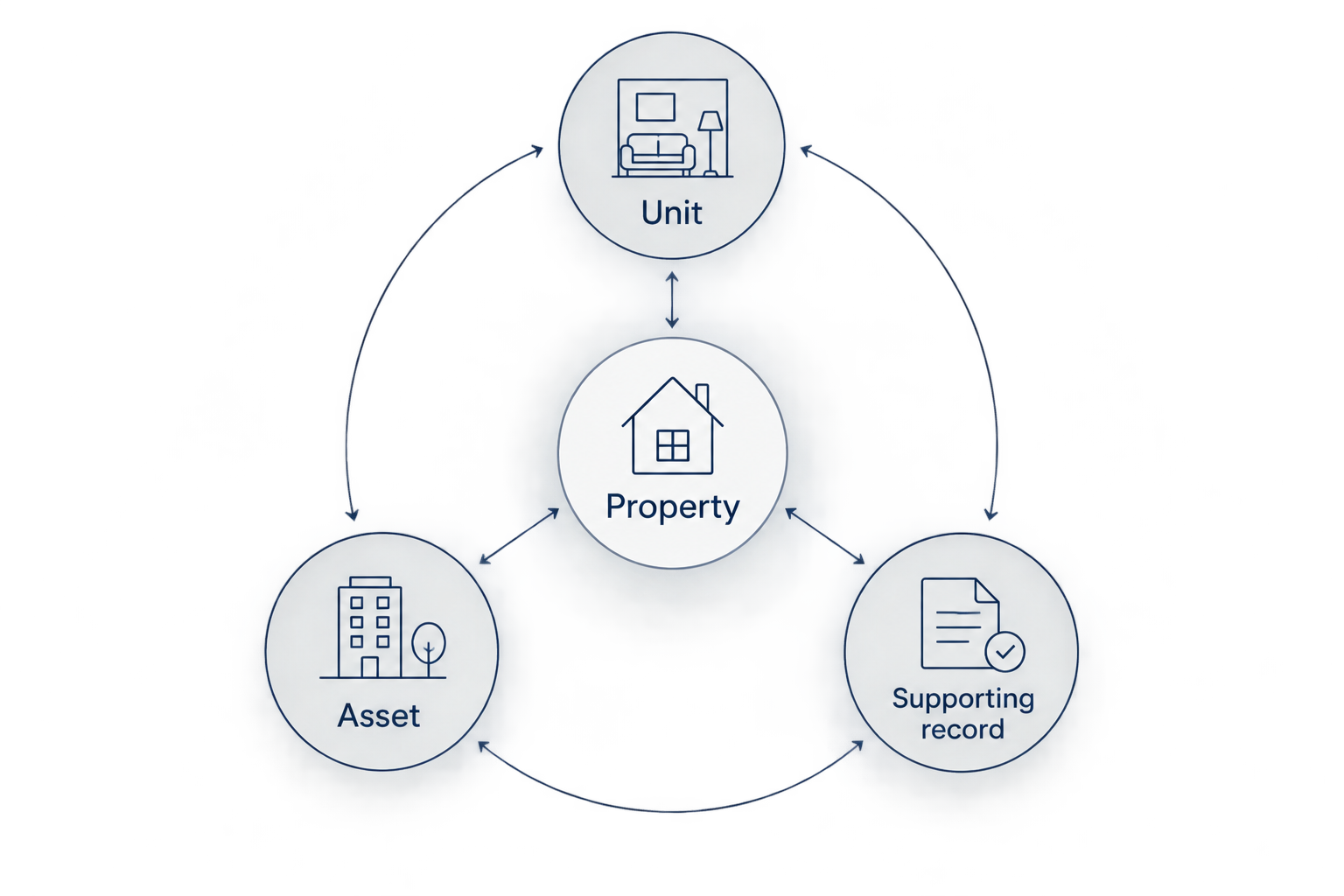
Ask each provider to demonstrate these distinctions using an ordinary maintenance example. A polished overview is less informative than seeing where your shared boiler report and individual appliance invoices would actually go.
Keep rent accounting separate from maintenance judgment
For your 2026 software decision, distinguish recording money from understanding a repair. Both matter, but neither tells the whole story.
Even when you use automated rent accounting, you still need separate evidence of equipment condition, repair scope, and follow-up work. A payment record establishes a financial event; an inspection report or service invoice explains the property work behind it.
Consider a hypothetical plumbing invoice. Recording the expense helps you track the money. Keeping the technician's description helps you distinguish a cleared blockage from a replaced pipe. Those are different facts with different uses at the next callout.
Choose a clear home for each record. If you use separate systems, decide where the full document belongs and how you will find it again. Avoid maintaining competing versions of the repair history.
Start with the records you already have
You do not need to reconstruct every year of ownership before creating a useful baseline. Start with a reliable document and keep adding evidence as work happens.
- Inspection report: Use documented findings to establish the starting condition.
- Repair invoices: Preserve what work was completed and where.
- Equipment details: Add confirmed identification and age information.
- Open quotes: Keep proposed work separate from completed repairs.
- Next actions: Record what needs attention and the reason for it.
A quote is not proof that a repair happened. An old inspection finding is not proof that the same condition still exists. Keep those distinctions visible so your records support decisions instead of quietly introducing assumptions.
During your 2026 setup, leave unknown details unknown. Add a confirmed installation date when you find evidence, not when an empty field becomes irritating. Accurate gaps are more useful than confident guesses.
Which software should you choose?
Start with the task you repeatedly postpone because the information is scattered. That task is a better buying signal than the size of a feature checklist.
Choose the maintenance-focused option if you keep searching for repair records or guessing about equipment history. Choose the leasing option if vacancies and applications dominate your administration. Choose the financial option if income and expense records are the main problem. Choose the broader system when you genuinely need several operating workflows together.
Before deciding, ask yourself: can you find the last relevant document, identify the correct unit or equipment, and understand the next action? If the answer remains unclear, keep evaluating.
FAQ
What's the best property management software for small multifamily owners?
The best choice depends on your main task: Propertymasterhq for maintenance records and planning, Avail for leasing, Stessa for rental financial tracking, and Buildium for broader operations. Choose by workflow rather than feature count.
Do I need property management software for a duplex?
A duplex does not automatically require a broad property-management system. Choose software when keeping track of documents, rent administration, or maintenance has become difficult with your current method.
Should I choose maintenance software or accounting software first?
Choose the one that addresses your recurring problem first. Accounting records explain money received and spent; maintenance records explain equipment, completed work, and outstanding property issues.
Can uploaded documents reveal my property's complete repair history?
Uploaded documents establish only the history they contain. An inspection report provides a baseline, while later invoices and other records add evidence; undocumented work remains unknown.
How should I organize shared equipment in a multifamily building?
Keep shared equipment associated with the building rather than an unrelated individual apartment. Keep unit-specific equipment and repairs tied to the correct unit, with supporting records accessible.
What should I upload before older records are organized?
Start with an existing inspection report and relevant recent repair invoices. Add older documents over time, keeping proposed work separate from completed repairs.
One last thing
The next invoice is a good place to start. File it against the right property, unit, and equipment while the work is still fresh. Add what happened, preserve the technician's explanation, and record any follow-up.
You do not need a perfect archive to make your next repair decision better informed. You need a reliable record you can find.