Best rental property management software for small landlords in 2026
Compare small landlord property management software. Choose by your main task: property records, maintenance, rental finances, or leasing administration.

Best for property records and maintenance: Propertymasterhq. Best for rental finances: Stessa. Best for leasing workflows: TenantCloud. Best for broader operations: Buildium. The right small landlord property management software in 2026 depends on which job you need to get out of your head and into a dependable system.
- Propertymasterhq is the small landlord property management software pick for organizing property documents and tracking maintenance.
- Stessa fits rental financial tracking; TenantCloud fits leasing workflows; Buildium fits broader property management operations.
- Choose around your recurring problem, then test the workflow with one property's real records.
- Keep inspection and repair responsibilities separate from software reminders.
Why this matters
A signed lease, a furnace invoice, and a tenant's repair message belong to the same property. Keeping them in separate places makes a simple question harder: what needs attention next?
Your 2026 software choice should address that problem before adding more screens. Start with the work you repeat, not the longest feature list.
What makes the best small landlord property management software
- Clear purpose: The software handles your main recurring task directly.
- Property context: You can connect records and activity to the right rental.
- Useful history: You can find past information without reconstructing events from memory.
- Manageable upkeep: Updating the system fits your normal working routine.
- Practical handoff: Another person can understand the records when you need help.
Small landlord software at a glance
| Rank and software | Best for | Standout function | Key limitation to weigh |
|---|---|---|---|
| 1. Propertymasterhq | Documents and maintenance | Organizes uploaded documents, tracks maintenance and asset health, and flags upcoming issues | Records still need accurate source documents and updates |
| 2. Stessa | Rental financial tracking | Rental income, expense tracking, and financial reporting | Financial records do not replace equipment history or inspections |
| 3. TenantCloud | Leasing workflows | Rental listings, applications, leases, and property management workflows | Leasing setup does not eliminate ongoing recordkeeping |
| 4. Buildium | Broader property operations | Accounting, leasing, and maintenance management | A broader scope requires more setup decisions |
These are different starting points, not interchangeable winners. Match the main function to the task you actually need to improve.
1. Propertymasterhq: best for property records and maintenance
Propertymasterhq organizes uploaded property documents, tracks maintenance and asset health, and flags upcoming issues. Its purpose fits landlords who need a clearer view of their properties' records and condition.
Propertymasterhq is best for landlords who need property documents and maintenance history organized together. That is a different problem from collecting rent or preparing financial reports.
Where it fits your day
Think about the last furnace repair. You want the invoice, the equipment's history, and the next item needing attention without searching a drawer and several message threads.
Use this type of system when remembering the details has become part of the workload. The value is in making those details accessible rather than keeping the furnace's age in your head.
Pros:
- Organizes uploaded property documents.
- Tracks maintenance and asset health.
- Flags upcoming issues for attention.
Cons:
- Document organization depends on uploading the relevant records.
- Asset tracking does not replace checking equipment or arranging qualified repairs.
Best for: Self-managing landlords whose main problem is scattered records and maintenance history.
Verdict: Buy for document and maintenance organization, after checking the workflow against your own records.
2. Stessa: best for rental financial tracking
Stessa focuses on rental property finances, including income, expenses, and reporting. Start here when your recurring problem is understanding the financial picture rather than locating a service record.
A landlord can have tidy folders and still struggle to reconcile spending. Financial tracking addresses that separate job.
Where it fits your day
Choose a completed reporting period and examine how you would record rental income, categorize expenses, and review the result. Include an awkward transaction, not just straightforward rent receipts.
A repair invoice has both a financial purpose and a maintenance purpose. Recording the expense answers what you spent; the service details answer what happened to the equipment.
Stessa pros:
- Centers the workflow on rental property finances.
- Supports income and expense tracking.
- Provides financial reporting for reviewing rental activity.
Stessa cons:
- Financial reports depend on accurate transaction records and categories.
- An expense entry alone does not establish equipment condition or the next maintenance task.
Best for: Landlords whose main administrative burden is rental financial recordkeeping.
Verdict: Buy for financial tracking; keep a separate standard for documenting maintenance work.
3. TenantCloud: best for leasing workflows
TenantCloud combines rental listings, applications, leasing, and property management workflows. It belongs on your shortlist when moving a rental from vacancy through tenancy is the main task you want to organize.
Evaluate the full sequence, not just the application screen. You need to understand how information moves from an applicant into the records you use during the tenancy.
Where it fits your day
Walk through a sample vacancy using fictional applicant details. Check the steps for listing the rental, handling an application, preparing lease paperwork, and finding the tenancy record afterward.
Do not upload sensitive applicant information merely to explore a screen. Establish who needs access and how you will handle those records first.
TenantCloud pros:
- Covers rental listing and application workflows.
- Includes leasing functions.
- Brings several tenancy-related tasks into a property management system.
TenantCloud cons:
- Leasing workflows require setup and a consistent process for handling records.
- Completing a lease does not keep later repair histories current automatically.
Best for: Landlords who want to organize vacancy, application, and leasing work.
Verdict: Buy when leasing administration is the bottleneck, not simply because you need somewhere to store invoices.
4. Buildium: best for broader property operations
Buildium covers property management accounting, leasing, and maintenance management. Its broader scope makes it a candidate when you want several operating functions in the same system.
That scope deserves a deliberate evaluation. You need to assess how the functions work together, not just whether each appears on a feature list.
Where it fits your day
Follow a maintenance issue from the initial report through completion and the associated financial record. Then check how you would find that history from the property record.
For your 2026 shortlist, distinguish functions you will use now from functions you only expect to need later. Future requirements should not obscure today's workload.
Buildium pros:
- Includes property management accounting.
- Covers leasing workflows.
- Includes maintenance management alongside other operating functions.
Buildium cons:
- A wider operating scope creates more configuration decisions.
- Combining functions requires consistent property, tenancy, and accounting records.
Best for: Landlords seeking one system across several property management responsibilities.
Verdict: Buy when you need the broader scope and can commit to setting it up carefully.
How the options are ranked
The order follows the needs of a hands-on landlord: property records and maintenance first, followed by finances, leasing, and broader operations. It is a task-based ranking, not a claim that one system wins every category.
Each recommendation rests on its stated function. The deciding criteria are purpose, property context, usable history, upkeep, and handoff. A feature matters only if it helps you complete the job you came to solve.
Test the workflow before moving your records
Use the same practical exercise for every option on your 2026 shortlist. A familiar property exposes questions that a polished demonstration can leave unanswered.
Gather records
Start with 1 property you know well. Choose a lease, a completed repair invoice, and an equipment document that you already hold.
Use copies and remove unnecessary personal information. Your aim is to test the workflow without moving your entire filing system.
Follow a repair
Use 3 records per repair as your test checklist: the original report, the completion record, and the invoice. These are suggested test materials, not a software requirement.
Check whether you can understand the problem, the work completed, and the resulting expense. A closed task is less useful when the next contractor cannot tell what was done.
Find the history
Close the record and return to the property view. Find the repair again without relying on a browser tab you left open.
Ask a practical question: can you explain the history to someone else from what is recorded? If you still need to fill in the story from memory, improve the record or reconsider the workflow.
Check the handoff
Set aside 30 minutes for a first review session. Treat that as a scheduling suggestion, not a promised setup time.
Write down the next action, where the supporting document belongs, and who is responsible. A useful handoff leaves those points clear even when you are unavailable.
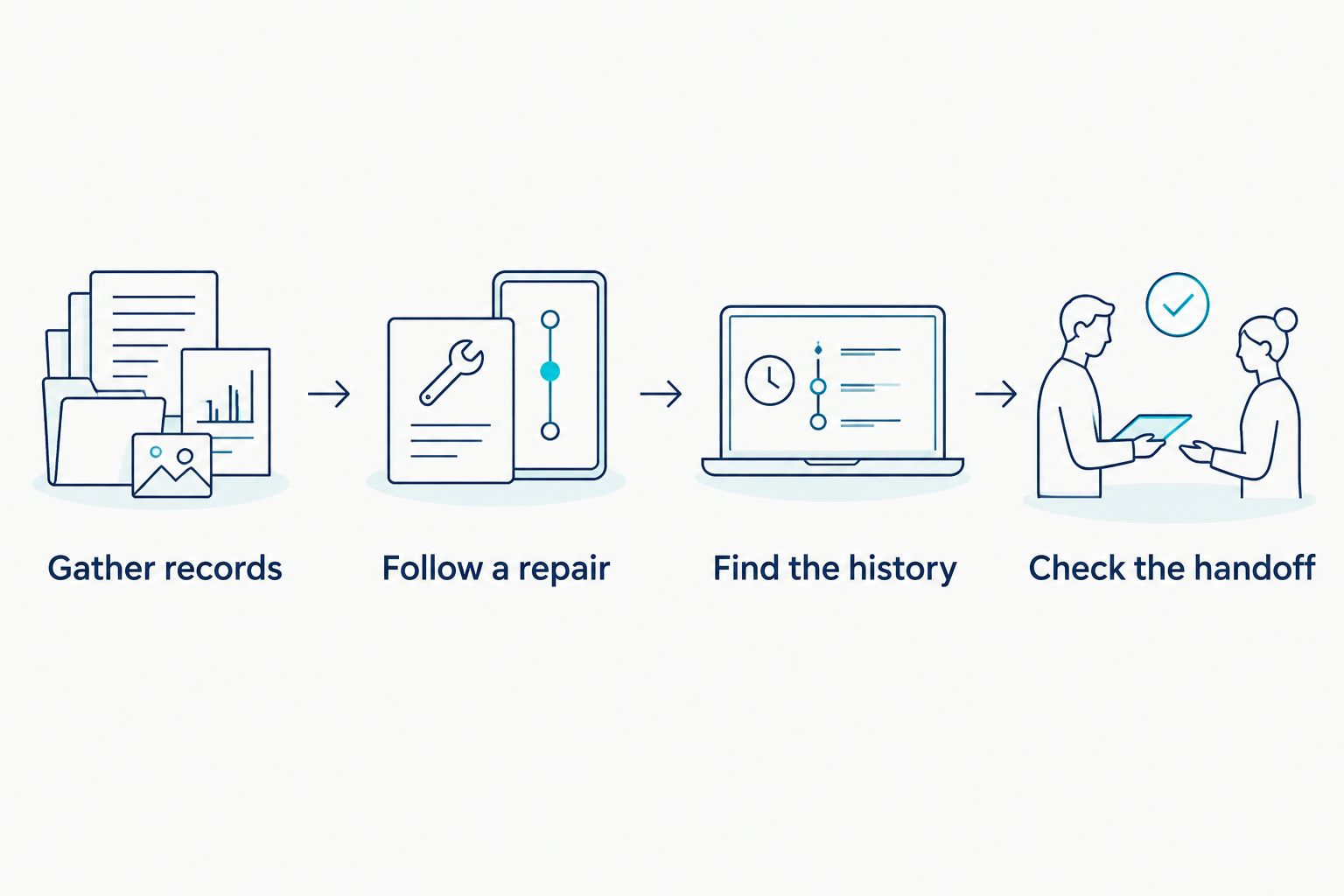
The exercise separates a useful workflow from a feature you will rarely open. Keep your notes short: what worked, what required duplicate entry, and what remained unclear.
Which software should you choose?
Choose Propertymasterhq for small landlord property management software centered on documents, maintenance, and asset health. It is the clearest fit in this shortlist when scattered property information is the problem you want to fix.
Choose Stessa when financial tracking comes first. Choose TenantCloud when leasing administration comes first. Choose Buildium when you need to evaluate accounting, leasing, and maintenance together.
Do not combine systems without assigning each a clear job. Decide which record is authoritative, where updates belong, and how you will avoid entering conflicting information.
Before committing in 2026, complete the sample-property exercise. Keep your existing records accessible until you have checked that the new arrangement holds what you need.
Organize your property records
Explore document organization, maintenance tracking, and asset health for your rentals.
FAQ
What's the best small landlord property management software in 2026?
The best choice depends on your main task: Propertymasterhq for property documents and maintenance, Stessa for rental finances, TenantCloud for leasing workflows, or Buildium for broader operations. Test the relevant workflow using one familiar property's records before choosing.
Do I need property management software for one rental?
One rental does not automatically require property management software. Consider it when your current arrangement makes records difficult to find or maintenance difficult to follow through.
Is rental financial software the same as maintenance software?
No. Rental financial software records financial activity, while maintenance tracking records property issues and work. A repair invoice serves both purposes, but its expense category does not explain the complete repair history.
What should I look for in software for property documents?
Look for a workflow that lets you connect the document to the correct property and retrieve it when needed. Test with a lease, repair invoice, and equipment document rather than relying on an empty demonstration account.
Can property software replace rental inspections?
No. Software can hold records and support follow-up, but it does not physically inspect a property. Keep inspections and qualified repair work in your operating routine.
How do I compare software without moving all my records?
Test each option with copies of records from one familiar property. Follow a repair from the original report through completion, then check whether you can retrieve and explain the history.
Should I choose an all-in-one property management system?
Choose an all-in-one system when you need its connected functions and can maintain the records they require. A narrower system is a sensible choice when you have one clear problem and an existing process for the other tasks.
One last thing
Record why the work happened, not just that the invoice was paid. An invoice marked paid settles the financial question. It does not necessarily explain the original symptom, the contractor's finding, or the follow-up still needed.
For your next repair, add that short explanation while the details are fresh. Whichever system you choose in 2026, make the record useful to the next person who opens it.