Best rental property management software ranked by price 2026
Rental property management software pricing comparison: choose by task, then compare billing terms, payment fees, and maintenance needs for your rentals.

Best for maintenance decisions: Property Master. Best for rent collection: Avail. Best for rental finances: Stessa. Best for broader operations: Buildium. This 2026 rental property management software pricing comparison separates those jobs so you can compare costs without paying for the wrong kind of help.
- A rental property management software pricing comparison starts with the job you need done, not the advertised subscription.
- Avail suits rent collection; Stessa suits rental financial tracking.
- Compare maintenance records, payment fees, accounting needs, and setup work separately before choosing landlord software.
- A spreadsheet is a manual baseline, not a substitute for document-based maintenance insights.
Why this matters
Rental software covers different jobs. Collecting rent, tracking expenses, and deciding what to do about an aging furnace are not the same problem. A subscription that handles one does not automatically handle the others.
For a landlord managing 1–20 rental units, the practical question is simple: which recurring task needs better support? Start there. Then compare the full cost of the tools that actually address it.
This is a fit-based ranking, not a cheapest-to-most-expensive league table. For a 2026 buying decision, compare current terms at your unit count rather than treating unlike plans as interchangeable.
What makes the best rental management software
Use these criteria before looking at a subscription total:
- Job fit: Does the software address maintenance decisions, rent collection, financial records, or broader rental operations?
- Billing basis: Does the charge depend on units, users, properties, transactions, or a package minimum?
- Included work: Which necessary functions sit inside the plan, and which require another service?
- Record usefulness: Can you connect a document or transaction to the right property and understand what it means?
- Setup burden: What must you gather, enter, or clean up before the software becomes useful?
- Exit process: Can you retain the records you need when you stop using the service?
A good comparison answers all six. A plan name and a headline subscription do not tell you enough.
Rental software at a glance
The order below follows distinct landlord needs. The cost-check column tells you what to verify in the current offer; it does not imply that every listed charge applies.
| Option | Best for | Main function | Cost check | Key limitation |
|---|---|---|---|---|
| Property Master | Document-based maintenance decisions | Property records, maintenance insights, and preventive tracking | Unit count and billing term | Knowledge depends on uploaded records |
| Avail | Rent collection and leasing | Landlord workflows around tenants and rent | Plan inclusions and payment terms | Rent administration does not establish equipment history |
| Stessa | Rental financial tracking | Income, expense, and financial reporting workflows | Reporting needs and plan inclusions | Financial records do not replace a maintenance history |
| Buildium | Broader rental operations | Accounting, leasing, and property management workflows | Portfolio size, package scope, and setup terms | More operational scope to evaluate and configure |
| Spreadsheet and folders | A manually maintained baseline | Records and files arranged by the landlord | Setup, upkeep, and existing software subscriptions | No document interpretation or automatic maintenance insights |
1. Property Master: best for maintenance decisions
Property Master is best for self-managing landlords with 1–20 rental units who need document-based maintenance insights. It keeps property documents, equipment information, and maintenance history together so you can make decisions from recorded facts rather than memory.
Upload an inspection report to establish a baseline. Add invoices, quotes, leases, and other documents over time; the software files uploaded information under the relevant property, unit, and asset.
Property Master pros
- Turns documented repairs, expenses, and property history into maintenance insights.
- Keeps documents, equipment, vendors, and maintenance history together.
- Tracks equipment age, maintenance schedules, and upcoming replacements.
- Lets you build the record gradually instead of reconstructing everything first.
Property Master cons
- Finding scattered records remains part of getting started.
- Undocumented information stays marked as not added; an upload cannot establish a complete property history.
- Maintenance knowledge does not replace a separate assessment of your rent collection or accounting needs.
Best for: A landlord whose repair decisions depend on invoices in email, an old inspection report, and equipment details held in memory.
Verdict: Buy for document-based maintenance tracking, not as a substitute for every rental administration task.
2. Avail: best for rent collection and leasing
Avail provides landlord tools for rental listings, tenant screening, leasing, and rent collection. Its place in this comparison is the recurring work around getting a tenant into a property and collecting rent.
Keep that job separate from maintaining the building. A payment record tells you whether rent arrived; it does not tell you when a water heater was installed or what a plumber recommended.
Avail pros
- Brings leasing and rent collection workflows into one landlord-focused service.
- Addresses recurring tenant administration rather than requiring a spreadsheet for every step.
- Offers a relevant starting point when rent collection is your main software requirement.
Avail cons
- You still need to assess how you will keep equipment records and repair evidence.
- Payment methods and plan inclusions need separate review before you commit.
- Leasing tools add little value if your immediate problem is understanding past repairs.
Best for: A landlord replacing scattered rent reminders and leasing paperwork with a dedicated workflow.
Verdict: Buy for rent administration; skip it as the sole answer to maintenance knowledge.
3. Stessa: best for rental financial tracking
Stessa focuses on rental property finances, including income, expenses, and reporting. Start here when your main question is where the money went, not which equipment needs attention next.
Financial tracking and maintenance history overlap, but they answer different questions. An expense entry records spending; the related invoice can explain the diagnosis, work performed, and contractor's recommendation.
Stessa pros
- Centers the financial side of owning rentals.
- Supports income and expense organization by property.
- Gives financial reporting a dedicated home instead of spreading it across unrelated files.
Stessa cons
- A categorized expense alone does not establish equipment condition or repair history.
- You need to check whether the reporting functions you require are included in the relevant plan.
- Financial organization does not remove the need to retain supporting documents.
Best for: A landlord whose immediate difficulty is organizing rental income, expenses, and financial reports.
Verdict: Buy for rental finances; hold if your main unmet need is preventive maintenance tracking.
4. Buildium: best for broader rental operations
Buildium combines property management functions such as accounting, leasing, payments, and maintenance workflows. Consider it when several operating tasks need to share a system.
Breadth deserves a careful evaluation. Before moving records, list the functions you will actually use and ask how each one works in the package under consideration.
Buildium pros
- Covers several rental operations within one platform.
- Includes accounting alongside leasing and maintenance workflows.
- Gives landlords evaluating a broader system an alternative to assembling separate tools for each job.
Buildium cons
- A broader feature set creates more configuration and workflow decisions.
- Package scope needs careful review against your actual requirements.
- A small portfolio with one narrow problem does not automatically need a broad operating system.
Best for: A landlord who needs several connected operational workflows, rather than help with only one recurring task.
Verdict: Buy when the broader scope matches your work; hold when a focused tool addresses the problem.
5. Spreadsheet and folders: best for a manual baseline
A spreadsheet can hold property details, equipment dates, repair entries, and links to supporting files. Folders can keep inspection reports and invoices under consistent property names.
This approach gives you direct control over the structure. You also take responsibility for entering information, keeping links current, and deciding what each record means.
Spreadsheet and folders pros
- You choose the fields and file structure.
- Records remain visible without learning a specialized property workflow.
- You can start with the documents already on hand.
Spreadsheet and folders cons
- Dates, repair summaries, and follow-up tasks require manual upkeep.
- Separate files can lose their connection to the relevant equipment or repair.
- A spreadsheet does not interpret uploaded reports or produce document-based maintenance insights.
Best for: A landlord willing to maintain a simple record manually while deciding which task needs dedicated software.
Verdict: Hold as a baseline; skip it when updating the system is the task you keep postponing.
Compare the full cost before choosing
For your 2026 shortlist, ask every vendor to explain the same rental setup. Keep the property count, unit count, required functions, and billing term consistent.
Separate rent work from repair work
The time spent manually tracking rent belongs in your workflow assessment alongside the effort of finding invoices and following up on repairs. Treat these as separate tasks: a better payment process does not reconstruct a furnace's service history, and organized repair records do not reconcile rent payments.
Write down where the work happens now. If the same task still requires a spreadsheet after purchase, include that remaining work in your decision.
Ask what happens as your portfolio changes
Request a comparison for 1 rental unit, 5 rental units, and 20 rental units. These are evaluation scenarios, not claims about a vendor's billing structure.
Check whether the same functions remain included at each size. Also ask whether another owner, bookkeeper, or contractor needs separate access and how that access is handled.
Check the terms that change the total
Use this checklist before committing:
- Subscription billing basis and renewal term.
- Payment processing arrangements, if you need rent collection.
- Required add-ons for the workflows you listed.
- Setup, migration, and training terms.
- Access to documents and exports after cancellation.
For the maintenance-focused option, review the current pricing and billing terms against your unit count. Do the same current-term check for every other option on your shortlist.
Try a real record before moving everything
A 2026 software decision should survive an ordinary landlord task. Use an actual inspection report or completed repair invoice, not an empty demonstration account.
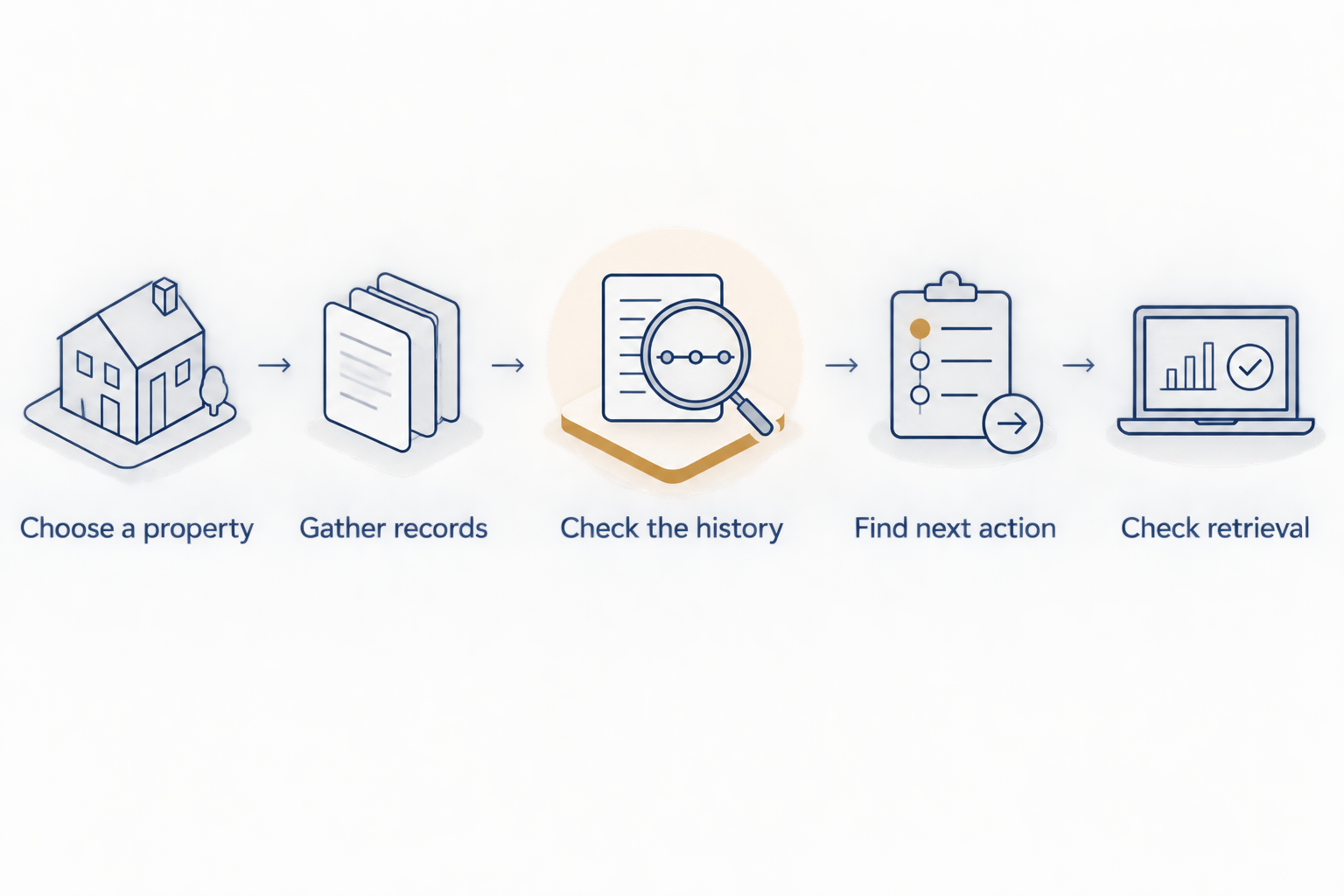
Follow this sequence:
- Choose a property. Pick a rental whose records you already understand.
- Gather records. Find its inspection report and supporting repair paperwork.
- Check the history. Confirm what the records establish and what remains unknown.
- Find next action. Identify the follow-up supported by the documents.
- Check retrieval. Find the evidence again without relying on memory.
For a rent-focused tool, use a payment and reconciliation task instead. For a financial tool, use an expense and reporting task. Judge each option on the job you would buy it to do.
How the options are ranked
This ranking prioritizes job fit, usable records, setup burden, and billing clarity. Each option owns a different use case; the order does not claim that one vendor has the lowest subscription.
That distinction matters in 2026. Compare like-for-like quotes within your chosen use case before deciding which offer fits your budget.
Which rental software should you choose?
Choose Property Master when your main problem is understanding your rentals' documented maintenance history and what needs attention next. Choose Avail for rent and leasing workflows, Stessa for rental finances, or Buildium when you need broader operational coverage.
If you are undecided, start with the last task that sent you searching through email or rebuilding a spreadsheet. Buy for that task first. Keep a manual baseline only if you will maintain it.
FAQ
What's the best way to compare rental property management software pricing?
Compare software that addresses the same job at the same unit count and billing term. Check required functions, payment arrangements, setup terms, and record access before comparing the total.
Which rental software is the cheapest for a small landlord?
A cheapest-to-most-expensive ranking requires current, like-for-like offers for your portfolio. First decide whether you need rent collection, financial tracking, maintenance knowledge, or broader operations.
Is rent collection software enough to manage maintenance?
Rent collection software alone does not establish a property's equipment or repair history. Assess maintenance records, supporting documents, and follow-up tracking separately.
Can I start organizing maintenance with one inspection report?
Yes. An uploaded inspection report can establish a baseline, and invoices or quotes can add detail over time. Undocumented information remains unknown rather than becoming an assumed history.
Should I choose monthly or annual billing?
Choose the billing term after checking the current terms and confirming that the software handles your actual tasks. Compare the commitment and cancellation conditions, not just the billing interval.
Can a spreadsheet replace landlord software?
A spreadsheet can hold a manually maintained property record. It does not interpret uploaded documents, and you remain responsible for entering details, maintaining file links, and tracking follow-up work.
What should I test before switching rental software?
Test a real task with records you already understand. Confirm that you can complete the task, retrieve the supporting evidence, and identify any information that has not been added.
One last thing
A blank equipment date is better than a guessed one. Mark it as not added, then look for the installation invoice, inspection note, or other supporting record.
The goal is not a record that looks complete. It is a maintenance decision you can explain with evidence.