Best free rental property management software in 2026
Compare free rental property management software for rent collection, leasing and records. Choose by the work you need done, not a longer feature list.

Best overall: Innago. Best for leasing: TurboTenant. Best for rental finances: Stessa. Best for a manual maintenance log: a spreadsheet. These free rental property management software options serve different jobs; this 2026 guide helps you choose the one that matches yours.
- Innago is the default free rental property management software pick for landlords who need rent collection and lease administration.
- TurboTenant fits leasing work; Stessa fits rental finances; a spreadsheet fits a maintenance log you update yourself.
- Propertymasterhq fits landlords managing 1–20 rental units who need document-based maintenance insights, not a permanent free plan.
- Choose by your recurring task, then check current account terms and any charges attached to optional services.
Why this matters
A rent collection tool does not automatically solve a maintenance problem. You can collect payments online and still have no idea where you put the furnace invoice or what the last plumber repaired.
Choose the job before you choose the software. If your main problem is scattered inspection reports and repair history, another payment dashboard will leave that problem untouched.
Propertymasterhq rental property maintenance software serves a different need: turning uploaded documents into centralized property knowledge, maintenance insights and preventive maintenance tracking. Its free trial is not a permanent free plan, so it does not belong at the top of a free-software ranking.
For your 2026 shortlist, separate the work into leasing, payments, financial records and maintenance. One account is convenient only if it handles the work you actually need.
What makes the best free rental property management software
Use these criteria before comparing feature lists:
- Useful ongoing access: Distinguish a continuing free account from a temporary trial. Read what remains usable after onboarding.
- Fit for your recurring task: Rent collection, applicant handling, financial tracking and repair history are different jobs. Start with the one taking your time.
- Clear service terms: Check who pays for screening, payment methods and optional services. A free account does not mean every connected transaction is free.
- Usable property records: You should be able to associate information with the correct rental rather than search a mixed pile of files.
- Manageable upkeep: Decide which records the software handles and which you must enter. An empty dashboard is not a maintenance history.
- An exit plan: Check how you can retrieve records before you depend on the account. Keep original documents somewhere you control.
These criteria favor a tool you will maintain over a longer feature list you will ignore. They also stop you from choosing accounting software when the real problem is a missing repair record.
Free options at a glance
| Option | Best for | Standout function | Key limitation |
|---|---|---|---|
| Innago | Everyday rental administration | Rent collection and lease administration | A broad rental workflow is not the same as document-based equipment history |
| TurboTenant | Leasing and applicant handling | Rental marketing, applications and screening workflows | Leasing tools do not replace a complete maintenance record |
| Stessa | Rental financial records | Income and expense tracking | Financial transactions alone do not explain equipment condition |
| A spreadsheet | A manual maintenance log | Custom fields and a file you control | You enter, check and update the information yourself |
The order reflects different starting points, not a claim that every landlord should use the same system. For 2026, check each provider's current free-account scope before moving records or inviting tenants.
1. Innago: best free rental software for everyday administration
Innago combines rental administration functions such as rent collection, tenant screening and lease management. It is the strongest starting point here when you want to handle routine landlord work in a rental-focused system rather than assemble separate tools.
Start with the task you repeat. If you spend time chasing payment information or finding lease paperwork, those workflows deserve attention before less urgent features.
Innago pros:
- Brings several recurring rental tasks into one system.
- Includes rent collection as part of its rental workflow.
- Supports leasing work alongside ongoing administration.
Innago cons:
- Setting up an account does not create a missing property history.
- Administrative records still need repair details and supporting documents to explain maintenance decisions.
- Screening and payment services require a separate check of current terms.
Best for: A self-managing landlord who wants a general rental administration starting point.
Before committing, walk through your actual process: add a rental, review the tenant workflow and find where you would retrieve a lease or payment record. Do not judge the fit from a dashboard screenshot alone.
Verdict: Choose Innago if everyday rental administration is your main problem. Skip it as a maintenance-only solution if you do not need those workflows.
2. TurboTenant: best free rental software for leasing work
TurboTenant focuses on landlord workflows that include rental marketing, applications and tenant screening. It belongs on your shortlist when filling a vacancy and handling applicants creates more work than tracking equipment or reviewing expenses.
A leasing workflow gives applicant information a defined place. That is a different benefit from knowing whether the water heater was repaired or replaced.
TurboTenant pros:
- Connects rental marketing with applicant handling.
- Supports tenant screening within the leasing process.
- Keeps the choice centered on landlord tasks rather than a generic filing system.
TurboTenant cons:
- Applicant records do not establish a property's maintenance history.
- A leasing-centered choice can leave your equipment records in a separate system.
- You must check which connected services have separate terms or charges.
Best for: A landlord whose immediate workload is advertising a rental and processing applications.
For your 2026 decision, write down what happens after you choose a tenant. Decide where the signed documents, move-in observations and later repair invoices will live. The leasing decision should not create another disconnected drawer of records.
Verdict: Choose TurboTenant for leasing work. Skip it as your only answer to maintenance planning.
3. Stessa: best free rental software for financial visibility
Stessa centers on rental property finances, including income and expense tracking. It fits landlords who need a clearer record of money coming in and going out rather than another place to manage applicants.
A financial record can show that you paid a contractor. It does not necessarily tell you which part failed, what the contractor recommended or whether the same problem returned.
Stessa pros:
- Organizes rental income and expenses.
- Gives financial records a property-focused home.
- Fits a landlord whose first question is about spending rather than leasing.
Stessa cons:
- Expense categories cannot substitute for repair descriptions.
- Equipment condition requires information beyond a transaction record.
- Your financial records still need review for accuracy and completeness.
Best for: A landlord who wants better rental financial records and already has a workable leasing process.
When recording a repair expense, retain the invoice too. The amount belongs in your financial records; the work performed belongs in the property's maintenance history. Keeping both makes the next repair conversation more useful.
Verdict: Choose Stessa for rental finances. Skip it as a substitute for detailed maintenance records.
4. A spreadsheet: best free option for a manual maintenance log
A spreadsheet is not a full rental management platform. It is a practical option when you only need a maintenance log and are willing to keep it current yourself.
Create columns for the property, unit, equipment, reported problem, work completed, contractor, document location and next action. Keep unknown details blank or mark them as not added rather than filling them with guesses.
Spreadsheet pros:
- Lets you choose fields that match your rentals.
- Keeps the maintenance log separate from unrelated leasing features.
- Makes missing information visible when you use consistent entries.
- Works as a starting point before choosing dedicated software.
Spreadsheet cons:
- Every update depends on you.
- A row does not interpret the inspection report or invoice behind it.
- File locations and entries become unreliable if you stop maintaining them.
Best for: A landlord who needs a basic maintenance record and accepts manual upkeep.
Set a 10-minute weekly review as a starting routine, then adjust it to your workload. Record completed work while the details are fresh, attach or reference the source document and leave a clear next action.
Verdict: Choose a spreadsheet for a narrow, manual maintenance log. Skip it if keeping records updated is already the task you avoid.
Where Propertymasterhq fits instead
Propertymasterhq rental property maintenance software is best for self-managing landlords with 1–20 rental units who need maintenance decisions grounded in uploaded records. It is a maintenance-focused alternative, not a permanent free option in this list.
Upload an inspection report to establish a baseline. Add invoices, quotes, leases and other documents over time; the software files uploaded information under the relevant property, unit and asset.
Propertymasterhq pros:
- Connects uploaded documents with property and equipment knowledge.
- Uses documented repairs, expenses and history to support maintenance decisions.
- Tracks preventive maintenance, equipment age and upcoming replacements.
Propertymasterhq cons:
- The free access is a trial, not an ongoing free plan.
- Finding scattered existing records remains part of getting started.
- Undocumented history stays unknown; missing information is marked not added.
Best for: A landlord whose main problem is understanding maintenance needs rather than collecting rent or processing applications.
Verdict: Choose the maintenance-focused route when your records need to support repair decisions. Skip it if you only need a free leasing or payment tool.
Turn your shortlist into a useful maintenance record
Choosing software is only the first decision. Use this sequence to make the records useful without trying to reconstruct everything at once.
Start with evidence
Begin with the inspection report or repair invoice you already have. Record its date and the property it describes. A recent upload does not make an older observation current.
Match the equipment
Associate each repair with the relevant system or appliance when the document identifies it. Do not assume an invoice for plumbing work applies to every bathroom or every unit.
Record the work
Separate a reported symptom from a completed repair. A quote describes proposed work; an invoice or service record describes what was documented afterward. Keep that distinction visible.
Set the next action
Choose an action supported by the record: request clarification, arrange service or check the manufacturer's maintenance instructions. Review the next 30 days of planned work as a planning habit, not a promise that nothing else will fail.
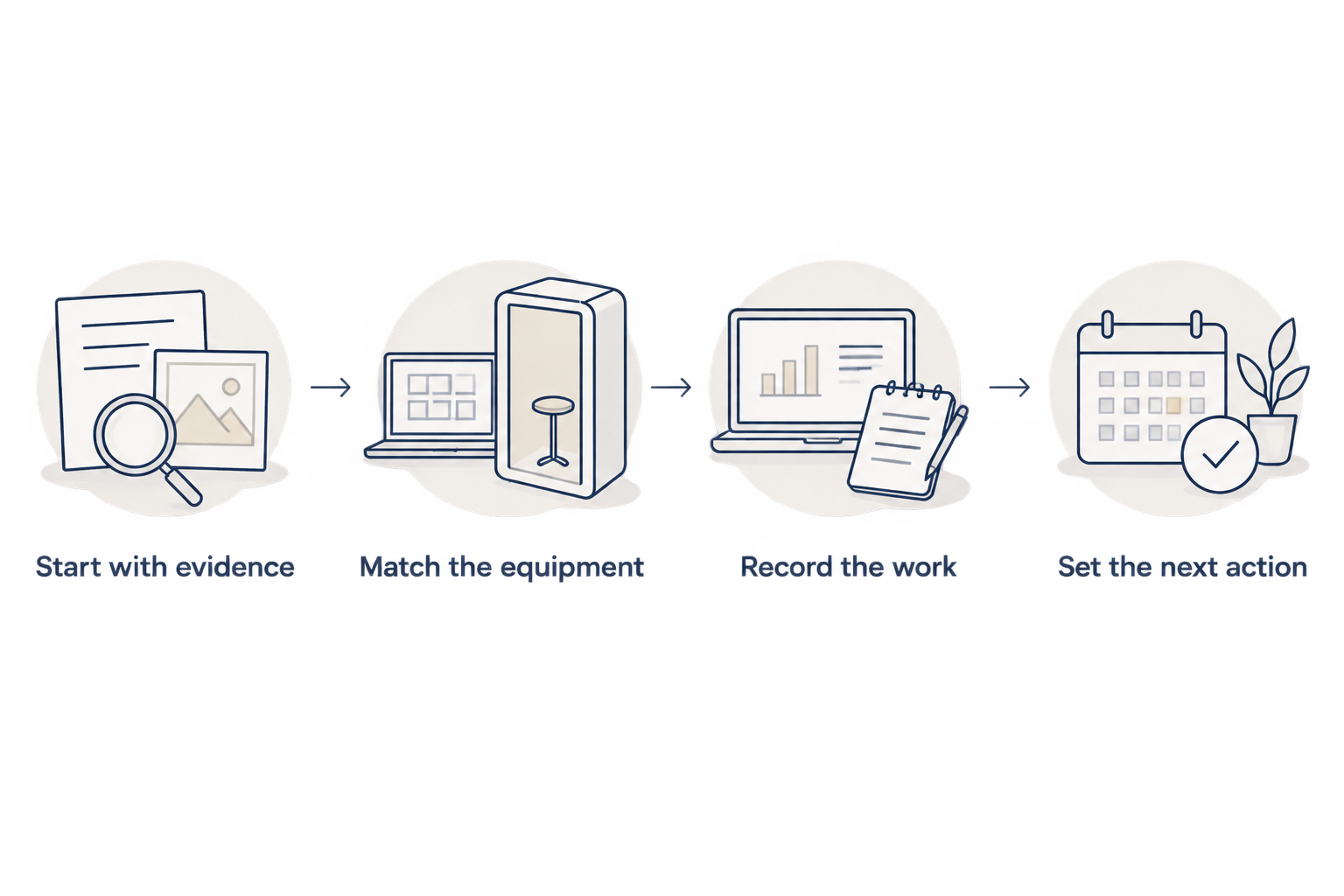
Keep the original source alongside your summary. That gives you something concrete to send the contractor instead of trying to remember what happened last time.
How the ranking works
This ranking prioritizes a useful free starting point, a distinct landlord task and clear limitations. Innago is the general administration pick; TurboTenant serves leasing; Stessa serves finances; a spreadsheet serves a manual log.
It does not treat more features as an automatic advantage. Nor does it count a temporary trial as permanent free software. The right choice depends on the work you need to stop carrying in your head.
Which free rental software should you choose?
Start with Innago if you need general rental administration and have no stronger priority. Choose TurboTenant when leasing is the bottleneck, Stessa when financial records need attention, or a spreadsheet when a manual maintenance log is enough.
Before moving your entire 2026 record set, try the intended workflow with 1 rental unit. Confirm that you can add information, find it again and retrieve the supporting documents. Expand only after that process makes sense.
Avoid entering the same repair history in several places without deciding which record is authoritative. Multiple accounts are manageable; conflicting histories are not.
FAQ
What's the best free rental property management software in 2026?
Innago is the default pick here for general rental administration. TurboTenant fits leasing, Stessa fits financial records, and a spreadsheet fits a manual maintenance log. Check current free-account terms before choosing.
Is free rental property management software completely free to use?
A free account does not mean every connected service is free. Check the terms for screening, payment methods and optional services, including who pays any applicable charges.
Is TurboTenant better than Stessa?
TurboTenant is the better fit for leasing work; Stessa is the better fit for rental financial records. Choose based on the task you need handled rather than treating them as identical tools.
Can I use a spreadsheet to manage rental maintenance?
Yes, a spreadsheet can hold a manual rental maintenance log. Record the property, equipment, problem, work completed, source document and next action, and update it consistently.
Does rent collection software track equipment condition?
Rent collection records alone do not establish equipment condition. Maintenance decisions need inspection findings, repair details and other evidence about the equipment itself.
Is Propertymasterhq permanently free?
Propertymasterhq offers a free trial rather than a permanent free plan. It focuses on uploaded property documents, maintenance insights, centralized property knowledge and preventive maintenance tracking.
What should I upload to maintenance software first?
Start with an inspection report to establish a documented baseline. Add invoices, quotes and other records over time, and leave undocumented information marked as not added rather than guessing.
One last thing
The date you upload a document is not the date the property was checked. An inspection report added in 2026 still describes conditions at the inspection date.
Keep both dates clear. When a repair decision matters, look for the latest relevant evidence rather than trusting whichever file appears first.