Best property management software for busy landlords 2026
Compare property management software for busy landlords. Choose by maintenance, leasing, or bookkeeping needs, with clear trade-offs and a setup plan.

Best for maintenance decisions: Propertymasterhq. Best for broader rental operations: Buildium. Best for leasing and rent collection: Avail. Best for rental finances: Stessa. This 2026 guide compares property management software for busy landlords by the work you need off your plate, rather than naming one winner for every rental business.
- Propertymasterhq is the maintenance-focused choice in property management software for busy landlords managing 1–20 rental units.
- Choose Buildium when accounting, leasing, and maintenance coordination need to sit within a broader operating system.
- Choose Avail when your main workload is finding tenants, handling leases, and collecting rent.
- Choose Stessa when rental income, expenses, and financial reporting need the most attention.
- Start with the task causing repeated work. A longer feature list does not settle the decision.
Why this matters
A rent payment and an aging furnace create different kinds of work. Software that handles one well does not automatically answer questions about the other.
Before choosing a platform, name the problem in everyday language. Are you chasing payments, searching for repair invoices, preparing a vacant unit, or trying to understand your expenses? That answer matters more than the number of features on a comparison page.
For a landlord managing 1 rental unit, the right starting point can be the same as for someone managing 20 rental units: fix the recurring task that keeps interrupting you. Add a wider system only when the wider workload calls for it.
What makes the best property management software for busy landlords
Use these criteria for your 2026 shortlist. They separate a useful fit from a platform that gives you another place to enter information.
- Fit with your main task: Maintenance records, leasing, rent collection, and bookkeeping are different jobs. Start with the one you need help with most.
- Useful property context: You should be able to connect a record to the correct property, unit, and piece of equipment where relevant.
- A workable starting point: Check what you must enter or upload before the software becomes useful. Include the work of finding existing records.
- Clear next actions: Look for the information you need to make a decision, not just another place to store a document.
- An understandable scope: Confirm which tasks the product handles before replacing your current process. Do not assume every landlord platform includes the same tools.
- An upkeep routine you will follow: A system needs current information. Decide how new invoices, payments, lease changes, and completed repairs will reach it.
The options at a glance
| Option | Best for | Standout function | Key limitation or trade-off |
|---|---|---|---|
| Propertymasterhq | Maintenance decisions from property records | Connects uploaded documents, property knowledge, and preventive maintenance tracking | Undocumented history remains unknown; missing information is marked not added |
| Buildium | Bringing broader rental operations together | Combines rental accounting, leasing, and maintenance workflows | A broader operating system requires decisions about setup and ongoing processes |
| Avail | Leasing and rent collection | Rental listings, lease tools, rent collection, and maintenance tracking | Leasing and payment tools do not replace the need to establish equipment history |
| Stessa | Understanding rental finances | Income and expense tracking with financial reporting | Financial records alone do not establish equipment condition or maintenance needs |
The order reflects the maintenance-focused needs covered here, followed by distinct alternatives. It is not a claim that every landlord should replace an existing system.
1. Propertymasterhq: best for maintenance decisions
Propertymasterhq is best for self-managing landlords with 1–20 rental units who need clearer maintenance decisions from their property records. It organizes uploaded documents and connects them with property knowledge, equipment information, maintenance history, and preventive maintenance tracking.
An inspection report provides a baseline. You can add invoices, quotes, leases, and other documents over time, with records filed under the relevant property, unit, and asset.
Where it helps
The useful outcome is not a tidy digital drawer. It is having documented information close at hand when you need to decide what deserves attention next.
Before discussing a repair, you need to know what was previously reported, what work was documented, and what remains uncertain. Keeping that context together supports a more informed conversation with a contractor.
Propertymasterhq pros:
- Connects uploaded records with maintenance insights rather than treating document storage as the end goal.
- Keeps property documents, equipment, vendors, and maintenance history together.
- Tracks equipment age, maintenance schedules, and upcoming replacements.
- Lets you begin with an inspection report and add other records over time.
Propertymasterhq cons:
- Finding scattered existing records is still part of getting started.
- It cannot establish a complete history from documents you have not uploaded. Missing information is marked not added.
Best for: A landlord whose recurring question is what needs attention at a rental, and what the existing records say about it.
Verdict: Buy if maintenance uncertainty is the problem you need to solve. Keep your other requirements separate, and confirm them before replacing tools you already use.
2. Buildium: best for bringing rental operations together
Buildium covers rental accounting, leasing, rent collection, and maintenance workflows. It belongs on your shortlist when the problem crosses several parts of running your rentals, rather than centering on property documents alone.
The deciding question is whether you want to move those operating processes into a shared system. That is a different project from simply organizing inspection reports and repair records.
Buildium pros:
- Brings accounting and property operations into the same product.
- Includes leasing and rent collection alongside maintenance workflows.
- Gives landlords with several connected administrative needs a broader option to evaluate.
Buildium cons:
- Moving several workflows requires you to decide which records and processes become the source of truth.
- Accounting, leasing, and maintenance still need accurate information and consistent upkeep; combining them does not remove that work.
Best for: A landlord who wants to consolidate rental operations instead of solving one narrow maintenance problem.
Before committing, walk through an actual task from beginning to end. Follow a rent payment into the accounting records, or follow a maintenance request through completion. Check whether the whole process fits how you work.
Verdict: Buy if consolidating rental operations is the goal. Hold if you only need a clearer way to understand property maintenance records.
3. Avail: best for leasing and rent collection
Avail provides landlord tools for rental listings, tenant screening, leases, rent collection, and maintenance tracking. It is a relevant choice when your busiest periods revolve around filling a vacancy and managing the tenant relationship.
Start your evaluation with the work around move-in and the monthly rent cycle. Those are different needs from understanding an older inspection finding or a piece of equipment's documented repair history.
Avail pros:
- Covers several connected steps from listing a rental through collecting rent.
- Includes lease tools within a landlord-focused workflow.
- Includes maintenance tracking alongside tenant-facing administrative tasks.
Avail cons:
- A leasing workflow does not establish the condition or history of equipment at a property.
- Tenant and payment records still need to connect with your separate repair documentation and financial process where applicable.
Best for: A landlord whose main source of repeated work is leasing a unit and managing rent collection.
Evaluate Avail using the next tenancy you expect to handle. Check your listing, screening, lease, and payment requirements against the product's current offering, including any local requirements that apply to your rental.
Verdict: Buy if leasing and rent administration are your main tasks. Hold if your bigger problem is making sense of maintenance history.
4. Stessa: best for rental income and expense tracking
Stessa focuses on rental property finances, including income and expense tracking and financial reporting. It belongs on the shortlist when your recurring problem is understanding what money came in, what went out, and how the records fit together.
That financial view is useful, but it answers a different question from a maintenance history. A repair expense records a transaction; it does not, by itself, explain every finding or recommendation behind the work.
Stessa pros:
- Centers the workflow on rental income and expenses.
- Provides financial reporting for rental property records.
- Gives landlords a finance-focused option rather than requiring every decision to start with leasing or maintenance.
Stessa cons:
- Spending records alone do not establish equipment condition, age, or service requirements.
- Financial reporting still depends on accurate records and appropriate categorization.
Best for: A landlord whose main question is how the rentals are performing financially.
Keep the supporting repair documents, even when you have recorded the expense. You need the transaction for your financial records and the work description for future maintenance decisions.
Verdict: Buy if financial organization is the priority. Hold if you mainly need help deciding what maintenance deserves attention next.
How these options are ranked
This 2026 ranking uses task fit, property context, starting effort, next actions, scope, and ongoing upkeep. Each recommendation owns a different job: maintenance decisions, broader operations, leasing, or finances.
The recommendations are based on those product functions, not a hands-on speed test or a measured savings study. No time savings, repair savings, or customer outcomes are assumed.
Choose the tool that fits the work you need to change. Do not give extra weight to a feature you have no plan to use.
Set up a useful starting point
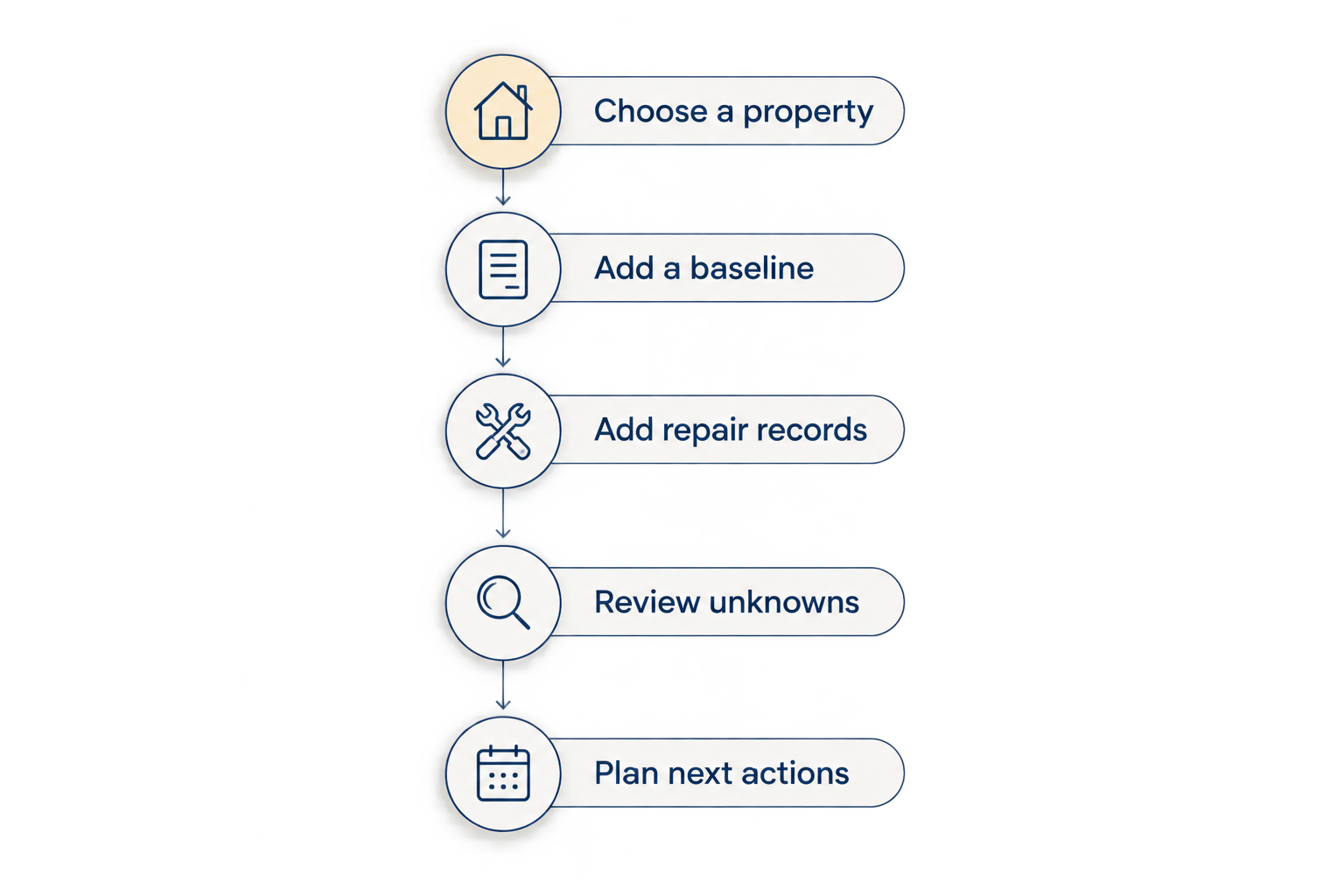
You do not need to reconstruct every year of ownership before improving your records. For your 2026 setup, start with a property you know well and work through a current maintenance question.
- Choose a property: Pick a rental with records you can locate. Use it to check whether the workflow fits.
- Add a baseline: Begin with an inspection report. Keep its findings separate from proof that work was completed.
- Add repair records: Attach available invoices and quotes. A quote describes proposed work; an invoice documents a billed transaction.
- Review unknowns: Leave undocumented information visibly unknown. Do not turn an estimate into an established installation date.
- Plan next actions: Use the available evidence to decide what needs follow-up, further inspection, or routine tracking.
After setup, make the next completed repair your upkeep test. Can you put the new invoice in the right place and understand what it adds to the property's history? If not, simplify the routine before adding more properties.
Which option should you choose?
For a maintenance-first decision, start with the maintenance-focused option. The point is to connect the records you already have with the questions you face about repairs, equipment, and upcoming work.
Choose Buildium when you want broader rental operations together. Choose Avail when leasing and rent collection dominate your workload. Choose Stessa when financial records need the most attention.
You do not have to replace a working rent collection or bookkeeping process just because maintenance records are scattered. Define the gap first, then choose the software that addresses it.
FAQ
What's the best property management software for busy landlords in 2026?
Propertymasterhq is the maintenance-focused choice for self-managing landlords with 1–20 rental units. Buildium fits broader operations, Avail fits leasing and rent collection, and Stessa fits rental finances.
Do I need property management software for just one rental?
One rental can justify software when a recurring task is difficult to manage with your current process. Choose around the actual problem, such as scattered maintenance records or repeated payment administration, rather than unit count alone.
Is maintenance tracking the same as tracking maintenance expenses?
No. Expense tracking records money spent, while maintenance tracking records the work, findings, equipment context, and follow-up relevant to caring for the property.
Can software tell me the full history of a rental property?
Software cannot establish an undocumented property history. Uploaded reports and repair records provide evidence; missing information should remain visibly unknown until you find supporting records.
What should I upload first when organizing maintenance records?
Start with an inspection report to establish a documented baseline. Add repair invoices, quotes, and other available records over time, keeping proposed work separate from documented completed work.
Should I replace my rent collection software to organize repairs?
Not automatically. If rent collection works for you, first identify the missing maintenance workflow and decide whether a separate maintenance-focused tool addresses it.
How should I compare landlord software before choosing?
Walk through a real task using records from your own rental. Check what you must enter, what the software helps you understand, and what you will need to update after the next transaction or repair.
One last thing
A quote is not proof that a repair happened. Keep proposed work, reported findings, and completed work distinct when you organize a property's records.
That small distinction matters when an old document resurfaces. You need to know whether it describes a problem, a recommendation, or work that was actually carried out—not just whether the file exists.